No one is immune to losing things. It's easy to misplace your phone, keys, or wallet, and if you're like most people, it can be a pain to track them all down. That's where Bluetooth tracking devices come in handy. They allow you to keep tabs on your belongings by connecting with your smartphone or other devices. We wanted to break down what Bluetooth trackers are, what they do, how they work, and how to choose the best Bluetooth tracker for your lifestyle.
What Are Bluetooth Trackers And What Do They Do
Bluetooth trackers are small devices that connect to your phone or other electronic devices using Bluetooth. They work by emitting a signal that helps you locate the item they're attached to. This could be your phone, keys, purse, or anything else you want to keep track of. They are one of the handiest tech gadgets that can really make your life easier. Bluetooth trackers come in a variety of shapes and sizes (and prices), and there are a variety of different trackers on the market to choose from. Amazon has a plethora of Bluetooth tracker options to choose from, but be careful…because not all of them are the same.
One of the best things about Bluetooth trackers is that they can help you find your phone even if it's on silent. This is because most trackers emit a loud alarm when they're near your phone. This alarm can help you find your phone even if it's buried deep in your bag or pocket. But it’s not just phones they can find. You can use a Bluetooth tracker to track wallets, purses, backpacks, books, keys, and yes…your pets! They are such a clever gadget. They not only will make your life easier, but if you’re the type who loses track (no pun intended) of things, they’ll save you a ton of time!
Bluetooth trackers work by using a Bluetooth signal to connect with your phone or other devices. This connection can be used to help you find your lost phone or keys, among other things. The connection also allows the tracker to send alerts and notifications to let you know when they're nearby.
There are many options available for Bluetooth trackers, making it tough to decide which one is best for you. We want to help you choose the perfect tracker by breaking down the different types of trackers, how they work, and how to choose the right one for you.
The Different Types Of Bluetooth Trackers
There are many different types of Bluetooth trackers on the market today. Some are small and can be attached to a key ring, while others are larger and designed to be attached to a pet's collar. Some trackers come with a built-in alarm, while others only provide location updates. Again…there are many varieties in this niche.
It's important to choose the right tracker for your needs. If you're looking for a tracker that will help you find your lost phone, then you'll need one that has an alarm feature. If you're looking for a tracker to keep an eye on your pet, then you'll need one that is water-resistant and has long battery life. No matter what your needs are, there is sure to be a Bluetooth tracker out there that is perfect for you.
How To Choose The Perfect Bluetooth Tracker For You
When it comes to choosing the perfect Bluetooth tracker for you, there are a few things you'll want to take into account. One of the most important factors is deciding which type of tracker you need. There are several different types available on the market, so be sure to do your research and find the one that best suits your needs. Are you wanting a Bluetooth tracker to track keys? Your phone? Your pet? Maybe the remote to your TV? Make sure to match the type of Bluetooth tracker with the purpose.
Another important factor to consider is price. Bluetooth trackers can vary in price, so be sure to find one that's within your budget. And the prices range. Apple Airtags are around $30 apiece…for one. Additionally, make sure to read reviews before purchasing any tracker to get an idea of what others thought of it. We’ve covered how to read and assess reviews on Amazon, but expand your research outside of the Amazon bubble (Consumer Reports, Reddit, etc).
Finally, decide which features are most important to you. Some trackers offer a variety of features, while others are more basic. Choose a tracker that will best fit your needs and lifestyle.
Some Of Our Favorite Bluetooth Trackers
We will have a more in-depth look at each of these Bluetooth trackers and dive into how they work and some of the incredible benefits each one offers. Until then, here are a few of our favorite Bluetooth trackers and why we would recommend them.
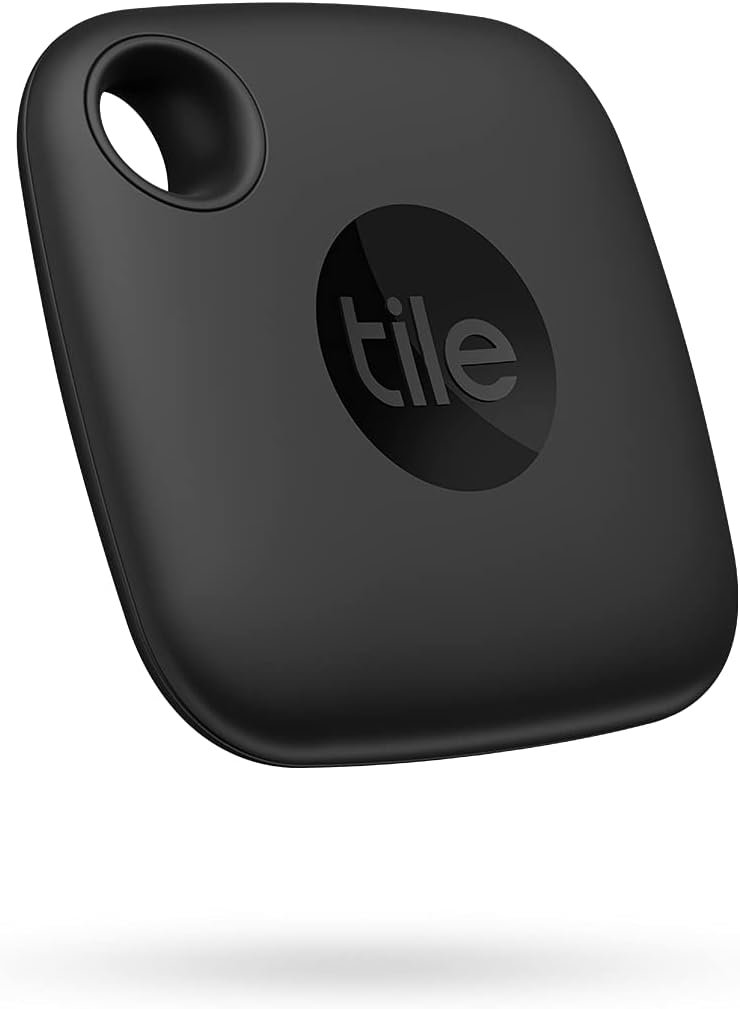
One of the best features of the Tile Mate Bluetooth Tracker is the “Find” functionality. You can “Find Nearby” where you use the Tile app to notify your Tile tracker when it’s within Bluetooth range. Or you can “Find Far Away” where you leverage Tile’s app to find devices when it’s outside of Bluetooth range. And yes…Tile works with Alexa and Google so you can sync your Tile account with these smart home platforms. The Tile Bluetooth tracker is very easy to use and just over-delivers on value, which is why we just love this little tracking device.
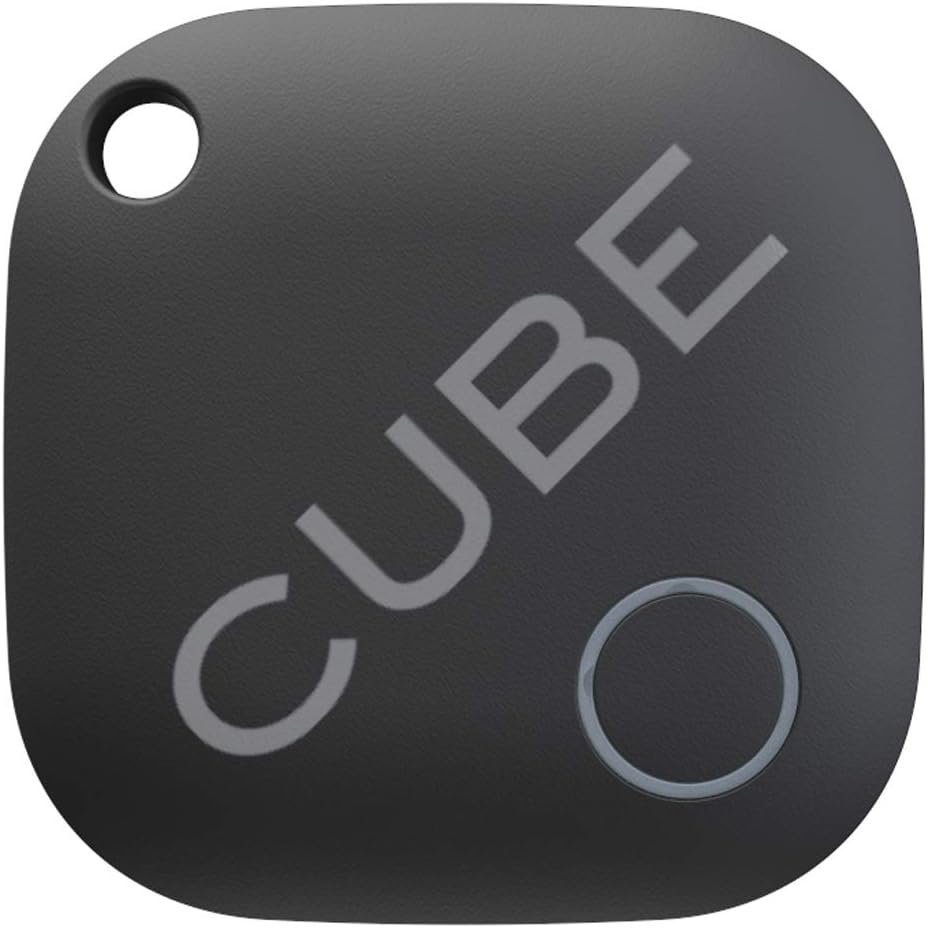
Losing stuff isn’t that hard. Finding it shouldn’t be hard either. This is where the Cube smart Bluetooth tracker comes into play. It’s literally as easy as tagging, pinging, and finding lost items. It works similarly to other Bluetooth trackers (has an app, integrates with smart home devices, etc), but we love the rechargeable battery feature, the GPS tracking capability, and its sleek design. Aside from being water-resistant (almost a must-have feature in the Bluetooth tracker market), the Cube smart Bluetooth track is super durable and can handle sub-zero temperatures.
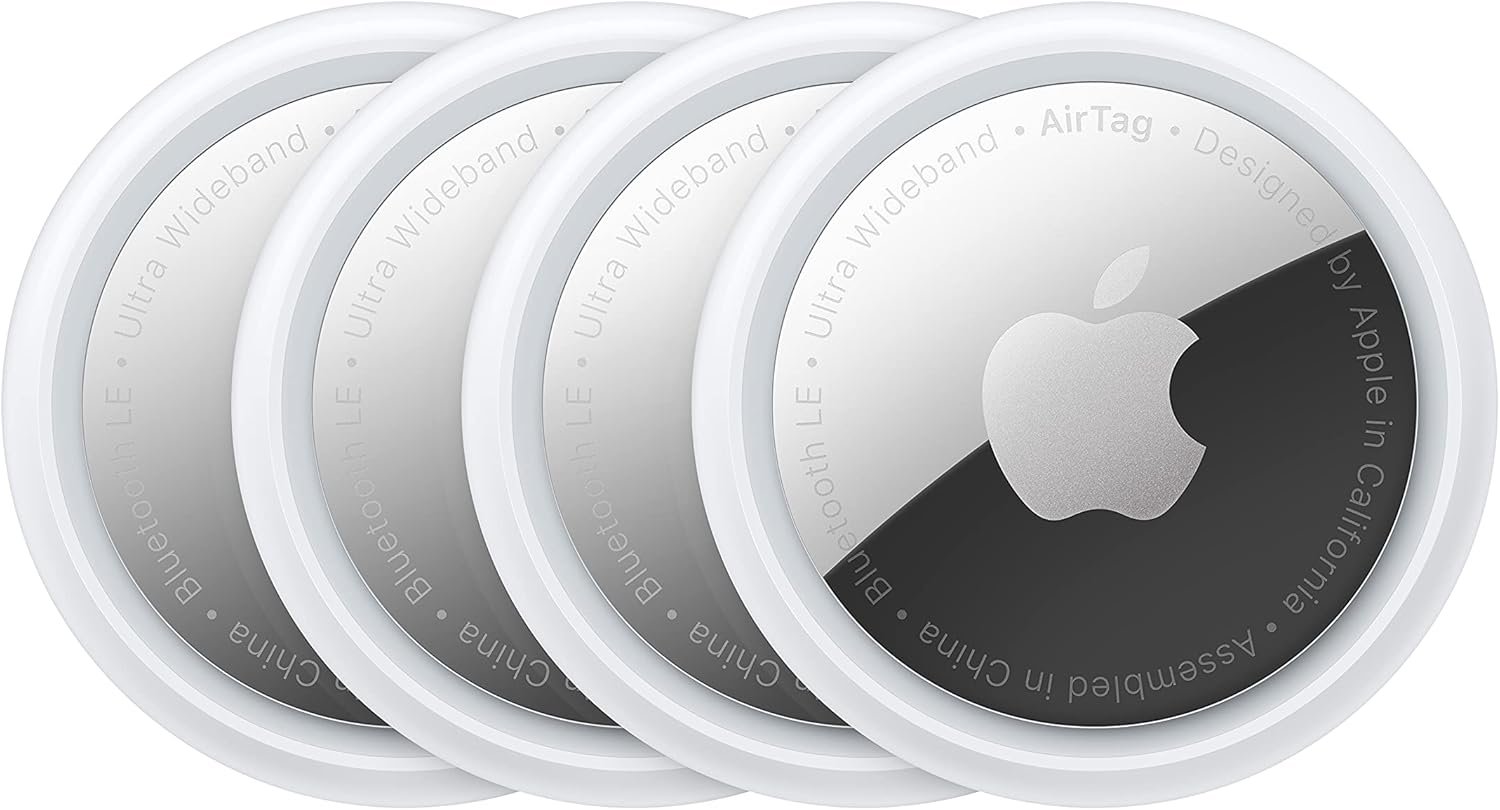
Aside from the price (around $30), the Apple Airtag is what we’d expect from an Apple product. You are getting premium technology and software integration when you buy a product. If you own an Apple iPhone, you’ll love the seamless integration in the Apple ecosystem (works flawlessly with the Find My app, connects instantly between iPhones and iPads, and has live precision finding). If you lose an item, put it in Lost Mode and you’ll be automatically notified when it’s found. Oh…and all data shared within the Find My network is encrypted and never stored on the AirTag. The battery isn’t rechargeable BUT…it is replaceable and lasts for over a year. If your devices live and exist in the Apple ecosystem, you may want to opt-in for the Apple AirTag from the get-go.
Bluetooth Trackers: Leveraging Tech To Make Life Easier
If you're looking for a way to make the process of finding your everyday things easier, consider purchasing a set of Bluetooth trackers. We consider them one of those tech gadgets every home must have; right along with smart plugs and smart lights. They truly are that handy. There are various types of Bluetooth speakers and features available, so be sure to do your research before deciding which is best suited for you. Don’t buy cheap because it has a ton of reviews and the price looks good. Again…like with a lot of tech devices sold on Amazon, there are many products sourced from China that are cheap and don't work. Once you know what type of tracker will work best, it's time to decide on the price range. You'll want something that fits into your budget but also has quality reviews from past customers who have purchased them in the past (one of the first filters I’ll perform is recency). Finally, be sure to think about which features will help mold this purchase into one that suits both your needs and lifestyle preferences!
When it comes to making decisions, most of us rely on our intuition. We all have a "gut feeling" that tells us when something feels right or wrong. Unfortunately, we often ignore this feeling in favor of more rational thoughts. This can be a big mistake, especially when it comes to making purchases. Insert Amazon Reviews. In one study, it was estimated that more than 60% of the reviews on Amazon were fake! I KNOW, RIGHT! There are also an estimated 3 million unverified reviews on Amazon, but verified doesn’t always mean legit. There are so many groups (primarily driven through Facebook) that have systems and processes in place that reward people for buying a product AND leaving a review. It’s shade. It’s been going on for a very long time. And we don’t blame people either. Amazon should shoulder the blame because their search ranking algorithm has placed an inordinate amount of weight on reviews.
So should you trust an Amazon review? Are all of them bad? How do you make an educated guess on choosing (and buying the right product)? Chances are high that you’ve bought a product (even tech products) that was pure garbage from Amazon. Even though a wide range of factors can influence your decision to buy, you should always pay close attention to what the reviews have to say and their ecosystem. Quite often, I’ll find myself using the filter and sort options for Amazon reviews to get a good pulse on their legitimacy. This is where your intuition needs to come into play because you'll often be able to tell whether or not something is worth buying based not only on the feedback but the type of feedback. It's especially important to take note of any warning signs that might indicate why something is getting bad reviews (or good). Always look for verified purchases (but these too can be manipulated). This can be very helpful but you should always check the product yourself before making any decisions. Essentially, don't let other people mislead you! A lot of Amazon reviews are untrustworthy because it's easy to pay someone to give a good review or many people feel compelled to do so with free items.
Trust Your Intuition When Making Tech Purchases On Amazon
We’ve all been there. We’ve found a product we like, so we go to Amazon. We click on the first result that pops up. It usually has the best price AND the best reviews. We buy it. And when we get it, it’s trash. I’ve done this with smart plugs, smart lights, wireless chargers, smart scales, smart blood-pressure monitors, smartwatches, smartphone chargers, Nintendo Switch docking stations, and on and on. You must develop your buying intuition. This is the ability to know something without any logical reasoning. It can be used to make decisions by considering all of the options and then choosing the one that feels right. Despite conventional wisdom, it is not a “gut feel”. Intuition can also be used to get in touch with your subconscious mind, which can provide guidance on making decisions.
Here Are A Couple Of Helpful Tips To Consider When Making Purchases On Amazon
Trust your intuition when making purchases
Avoid impulse buying. Ask yourself if you're being too quick to buy something, or are you feeling pressured by a salesperson (or effective marketing copy)
Consider what others have said about the product before buying it (not just reviews, but in real life people you know). Do they seem happy with their purchase or are they disappointed with it for any reason? You’d be surprised how great of a resource Facebook and Twitter can be when helping you make buying decisions.
Consider whether the price is worth the quality of the item: Does it cost much more than similar items in stores nearby? Is there anything else that makes you feel uneasy about this purchase? If so, you probably shouldn’t buy it!
Evaluate the price of the product in relation to the market. This is probably the most important tip we can give. If you’re looking for a smartwatch and found the one you like, but notice the price is about 20-30% lower than the market standard, this could be a red flag. Sadly enough, there is a lot of cheap-tech sourced from Asia and it’s not all bad. But it does have a presence on Amazon and sometimes it’s a game of roulette on whether the product will even work.
Red Flags To Look For When Buying Items Online
When you're shopping for items online, it's important to be aware of red flags that could indicate a scam. And trust us…there are scams out there (and not just on Amazon). Some red flags to look for include:
The seller has no information about who they are
Poor quality or inconsistency of reviews
The product is listed at an unusually low price (we mentioned this earlier). Just digging a little bit into the competition will help determine this.
So…Should You Trust Amazon Reviews?
Yes and no. It’s more vital to be able to spot fake and suspicious reviews more than anything. More importantly than trusting Amazon reviews, you should trust your intuition. But first, develop and learn to listen to your intuition when shopping on Amazon, especially with technology products. Always be aware of any red flags that could indicate a bad purchase decision. If you're ever unsure about a product, it's always better to be safe than sorry and go with another option. Don’t always go with the name brand (but it’s a safe bet) though either. I remember first buying an ASUS and Lenovo computer and thinking, ‘the brand is so new, should I really be doing this?’ I did the research on the reviews and the product (spent quite a bit of time) and it was worth it. In fact, I still have an ASUS laptop that is still going strong! Also, don’t be afraid to look for reviews outside of Amazon. I remember my father having a subscription to Consumer Reports. He never bought anything until he read their reviews.
Don’t be afraid to trust your gut! If something doesn't feel right about a purchase, it probably isn't. Spend some time considering what would happen if this turns into an expensive mistake before making a decision on whether or not to buy something. In addition, always take special care in looking at product ratings because there are ways sellers can manipulate these numbers using techniques such as fake accounts and incentivized reviews so they don't represent how many people actually bought from them.
You follow all the recommendations for your kids and technology – you monitor what games they are playing, you limit their time screen time, you block the online chats, but the one thing you forgot to keep an eye on is their ability to make in-app purchases.
Whether it be mobile games, console games, or PC games, there is typically an option to make purchases. As a kid, you simply see it as acquiring that weapon you needed or purchasing extra coins to get you to the next level. But as a parent, you see it as a few dollars, or even a few hundred dollars, leaving your bank account.
The problem lies not within the games themselves, but within the ease of making these purchases. If you don’t set up guards to protect yourself, you could end up with some major regrets.
Here we discuss FIVE WAYS to protect yourself and your kids from in-app overspending:
Set up a separate Microsoft account specifically for your child. By creating a separate account, there is no access to bank or credit card info so they are unable to complete in-app purchases.
Create passcodes or authentication factors that must be entered for any in-app purchases.
If using an iOS device – go to Settings > General > Restrictions and create a passcode that will be required for any purchase made in the iTunes store, Safari, and other Apple apps.
If using a Google device – go to the Play Store > Settings > Require Authentication for Purchases
If you feel comfortable allowing your child to make purchases, consider providing a limited amount of money through your Microsoft account. This ensures they don’t overspend and also teaches responsibility in managing their money for what they most want.
You can enable Airplane Mode while the child is on the device. When in airplane mode, all access to the online world is blocked. However, this can easily be disabled so It’s best for small children who do not know how to change it.
The most important tip – talk to your children.
It’s always a good idea to review apps prior to downloading. Research whether in-app purchases are available and then talk to your children about them. Explain how the in-app purchases work, that it is real money being used, and why they need to avoid overspending.
For continued advice and learnings on how to help your family stay safe and smart with the technology you use, follow Dale Dumbs IT Down on Instagram Dale Dumbs IT Down on Youtube Learn more about the why behind my journey of helping families stay safe and smart with the technology they use at https://www.daledumbsitdown.com/
So Roblox seems to have taken over my grandkids time and attention. This interest took me on a journey to learn more about this game.
Roblox is an online site where you can play games created by others or create games yourself, roleplay, and develop friendships. It has been described as a giant virtual playground.
The company claims that over half of all American kids ages 9-12 use this platform. Last year Roblox made it to the top 5 watched games on Youtube.
The interest my grand kiddos had in this site sent me on a quest to find out what parents need to know about this online game.
Just like with all other online activities, parents should stay engaged with how their child uses this site, but Roblox does have a lot to offer its young users.
Child experts have stated that Roblox is a great place to practice online, inter-connected gaming for both kids and parents. Kids can enhance their creativity and build strategies that can transition to academic and real-life interactions.
Roblox offers the “Learn & Explore” resource, which is a series of self-paced programs designed to help kids and teens create their first Roblox games. The site offers tutorials on coding, game development, and design.
As I spent time researching and learning more about this online game, I came to value all that it does have to offer our kids. I also realized that parental engagement and supervision would help guide our kids to get the best out of this platform. Concerns do exist as they do with all platforms. In this game, users can add their child to their friend's lists and communicate with our children, and it offers in-app purchasing. Both show a need for parental involvement, and as with most sites, too much can lead to opportunities for bad behaviors.
People often ask me, Do you use Facebook? Is it safe? I have only one answer to that, of course, I use Facebook as do 2.6 billion other people. As for the second question, the answer is No. Nothing is safe if you are online. Each time we log on to Facebook or any of our other numerous accounts we agree to potential risk. For each social media account, you choose to use, do the ‘Risk vs. Reward’ test. Is my reward (staying connected with family and friends) worth the risk (possibility of my account being breached)? If the reward outweighs the risk then choose to minimize that risk by being safe and smart when you are using the app.
We can minimize that risk by how we use our online accounts. For Facebook here are five to stay safe while online.
1. Change your password often.
I’ve met many people manifesting indolence to change the password, and then, they cry and dread when someone hacks their Facebook account. But changing a password is as simple as making a cheeseburger. Select a time length and change your password. As those who follow my blogs know I use a password manager for all my accounts including Facebook. If you don’t be consistent with changing your password. I recommend you change your password every three to four months.
2. Keep track of suspicious activities.
If you created an account and it’s inactive your chance the account will be hacked greatly increases. Why is that? Hackers are always in search of unutilized accounts. The solution is, stop by your Facebook every two to three days. If you find any suspicious activity, don’t panic. Swiftly change your password and click “log out of other devices” when Facebook asks you. Then, delete all the suspicious activities.
3. Choose your friends wisely.
Never accept friend requests from people you don’t know. If you use your account for reasons other than personal connections be wary of friend requests that contain blurry images, a name that seems fictional or you recognize a celebrity picture as the profile picture. For friend requests of people, you don’t know, review their ‘About’ section to see if anything seems off. If a Facebook friends account keeps sending you suspicious links, don’t open any of them, notify your friend it never hurts to just unfriend him/her. If you haven’t done so for a while, take time and review your friend list, then unfriend with people you don’t know at all.
4. Adjust your privacy setting.
Make sure to review the privacy checkup. Verify if you have the option selected not to have a friend request from everyone, and your login alerts are on. When you update your “About” or “Contact” information, confirm it multiple times if the information is only visible to you or your friends with whom you want to share. Do not provide any personal information on Facebook (e.g., bank information)
5. Use two-factor authentication.
Using Two-factor authentication is always a yes in my book. Here’s a quick overview of how it works. Let’s say you have a two-factor authentication option selected. Then what? If anyone tries to break into your account, you will instantly receive an alert notification on your cellphone, email, and text message. This notification will ask you, “if you’re trying to log in to your account from approximate XYZ location and XYZ device.” If you click NO, the hacker will fail to log in.
You can never be completely safe while online but you can certainly do your part to minimize risk.
For continued advice and learnings on how to help your family stay safe and smart with the technology you use, follow
Right now, many students in between their junior and senior years of high school are getting a head start on applying for college scholarships. The internet makes this process much more convenient for today’s students, and it provides them the ability to access opportunities they likely never would have discovered without it. Unfortunately, the anxiety of financial planning and researching the perfect colleges on top of trying to keep one’s grades up can lead to a desperation that puts a student’s guard down and makes them vulnerable to common scholarship scams found online.
How can you spot these hoaxes and differentiate between them and the real deal? Thankfully, there are some common formulas that they typically follow. A very common tactic college scholarship scams will use is asking you to pay in order to apply. This may be disguised as a processing fee or an insurance fee. Any company offering a legitimate scholarship will never charge an upfront application fee. In this same vein, you may have come across an offer for an educational loan that asks you to pay before receiving the loan itself. Oftentimes this particular con will offer you an astoundingly low-interest rate for a student loan only to ask you to pay before you actually receive it. Legitimate student loans will simply deduct the required fee from the reimbursement check.
Be suspicious of awards you don’t remember applying for. Scam artists will email you and try to dazzle you with promises of thousands of dollars in college scholarships that they claim you applied for, but then they’ll ask that you simply pay a redemption fee in order to claim them. Many of these college scholarship scams have duped students via emails that congratulated them on their winnings but also forbade them from collecting anything before they paid the “application fee”.
But not all college scholarship scams will explicitly ask for your child’s hard-earned money. Some will go after their personal information as well. Many websites will ask that you sign up for an account before they give you access to scholarship information, which can require your name, email address, and phone number. Whenever possible, use sites that don’t expect you to give them your contact information in order to actually view scholarship opportunities if you haven’t researched the company in advance. They may sell your information to third parties for marketing purposes. And never trust a so-called scholarship provider that asks for you or your child’s social security number, credit card number, or bank account number.
You’re likely wondering which websites have established themselves as reputable, trusted sources for scholarship opportunities. All of the following websites are free to use and tend to have positive reviews:
Scholarships.com has been in business helping students fund their education for 21 years and was given an A+ rating by the Better Business Bureau. It boasts 2.7 million awards in its database.
FastWeb.com was founded 15 years ago and was also given an A+ rating by the BBB. This site is considered one of the top 3 scholarship search websites.
BrokeScholar.com is a much newer service in this vein. However, it claims to have over 650,000 awards in its database and is generally highly reviewed.
Planning for college should be an exciting time for your kids, so it’s a good idea to make sure that this process won’t be tainted by experiencing scams along the way.