More and more homes are being set up to be smart homes with all the bells and whistles (smart cameras, smart doorbells, smart locks, smart assistants, smart this, smart that) with fast internet. If your family is like mine, it feels like everyone and everything is connected to the internet. For the most part, everything runs smoothly. But underneath all of those connections, devices, and the internet is a world of data and quite honestly…danger. How do you really know what each device is doing on your network?
One of the things I get asked quite often is, “What do you use for home network security?” or “What do you use for monitoring your home network?” First, let me state that there are many efficient and easy (and complex) ways to monitor your home’s network. It is a multi-billion dollar industry with a lot of options for a lot of different users. But one of my favorites and the one I use in my home is Firewalla.
At the highest level of why I love Firewalla? Well…firewalls are typically complex (at least for the general homeowner). Firewalla is extremely simple to use. And when you do come across a firewall that is simple, most of the time they are not powerful and lack protection. Most effective firewalls can be very expensive as well. One thing we love about Firewalla is not just the price but the VALUE it delivers for its users. We want to walk you through some of the things that will help you understand what is at work with the world of firewalls and how Firewalla can really help you monitor your home’s network.
Don’t panic. Those are big words. Let’s break it down for you as simply as possible. A firewall is a cybersecurity measure that is designed to protect a computer, device, or network from unauthorized access. It’s designed to give you control of what does and doesn’t have access. Firewalls can be software-based (such as the Windows Firewall that comes standard with Windows operating systems) or hardware-based (like Firewalla).
A firewall works by blocking incoming and outgoing traffic based on a predetermined set of rules. For example, you might have a rule that blocks all traffic except for traffic originating from your trusted IP addresses. You might have a rule that blocks a domain from being accessed on any device. You might have a rule that blocks access to any app on a smartphone. This would help to prevent unauthorized access to your computer or network from outsiders. Firewalls are so powerful that 100% of all major businesses use several of them throughout their networks. It’s one of the major networking devices for them. “Dale, if they're so good, why don’t we use them in our home?”. That’s where Firewalla comes into play.
What Type Of Firewall Is Firewalla?
Firewalla is a next-generation firewall that uses stateful inspection and deep packet inspection (DPI) to protect your devices from malicious attacks, while also providing you with visibility into all of your network traffic. What this incredible (yet simple to operate) piece of hardware can do is beneficial for your home network.
Firewalla uses application-level whitelisting and malware detection to protect your devices from unauthorized access, and it also includes a built-in VPN for secure browsing and streaming. We’ve talked about why you would want to use a VPN (they’re pretty cool). Plus, Firewalla's intuitive mobile app makes it super easy to monitor your home network from anywhere. There is a little confusion on whether or not Firewalla is a firewall. Yes, Firewalla is a firewall. It's designed to protect your devices and networks from unauthorized access and attacks. Firewalla can be used to protect your home network, office network, or any other type of network. It's an easy way to keep your data safe and secure. Heck…it’s an easy and effective way to keep your family safe as well!
Firewalla also acts as a VPN service that encrypts your traffic and routes it through servers before it goes out to the internet. This way, you can keep your data private and secure, even on public Wi-Fi networks. Plus, Firewalla gives you the ability to block ads, trackers, and malicious websites. It’s like the Swiss-Army Knife of devices.
To put it plainly, Firewalla is a great way to monitor your home network and see what devices are connected, what apps are being used on those devices, and how much bandwidth each device is consuming (yes…I can see how much bandwidth my son’s Xbox X or Oculus Quest 2 is using). You can also use Firewalla to set parental controls and block specific websites or apps.
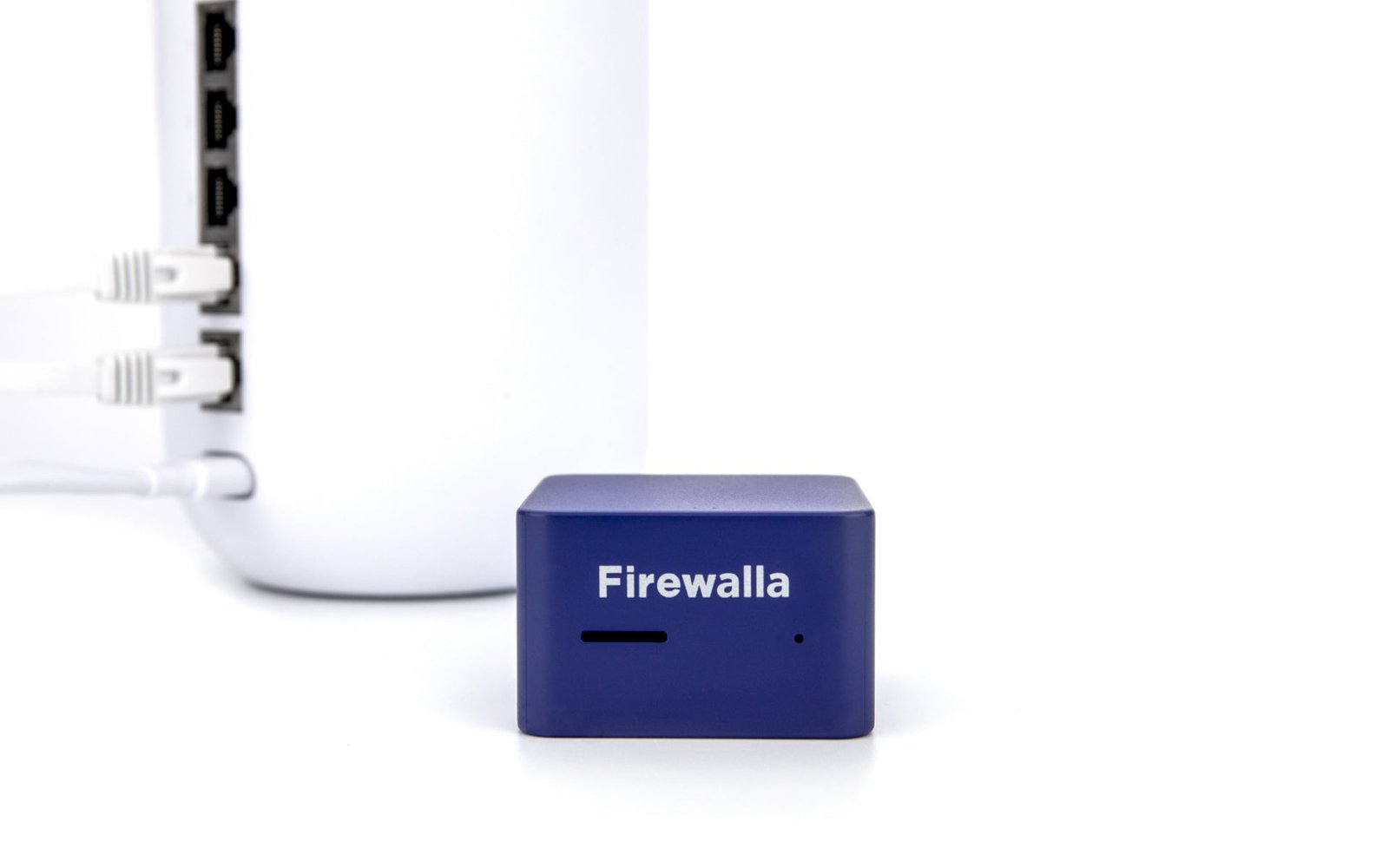
Firewalla is a hardware device (an actual thing you can hold) that plugs into your home router and tracks all the traffic going in and out of your network. It then sends all that data to the Firewalla app on your phone (to which you can be the only one who has access), where you can see everything in real-time. You can also go back in time up to 30 days and see what everyone (or device) was doing then.
Firewalla Products At A Glance Lineup
There are a handful of different Firewalla products and we wanted to briefly break down each one to make sure you get the one that will best match your needs. There’s almost a timeline of how Firewalla launched their products. And they’ve been an interesting story and brand to follow for the past several years.
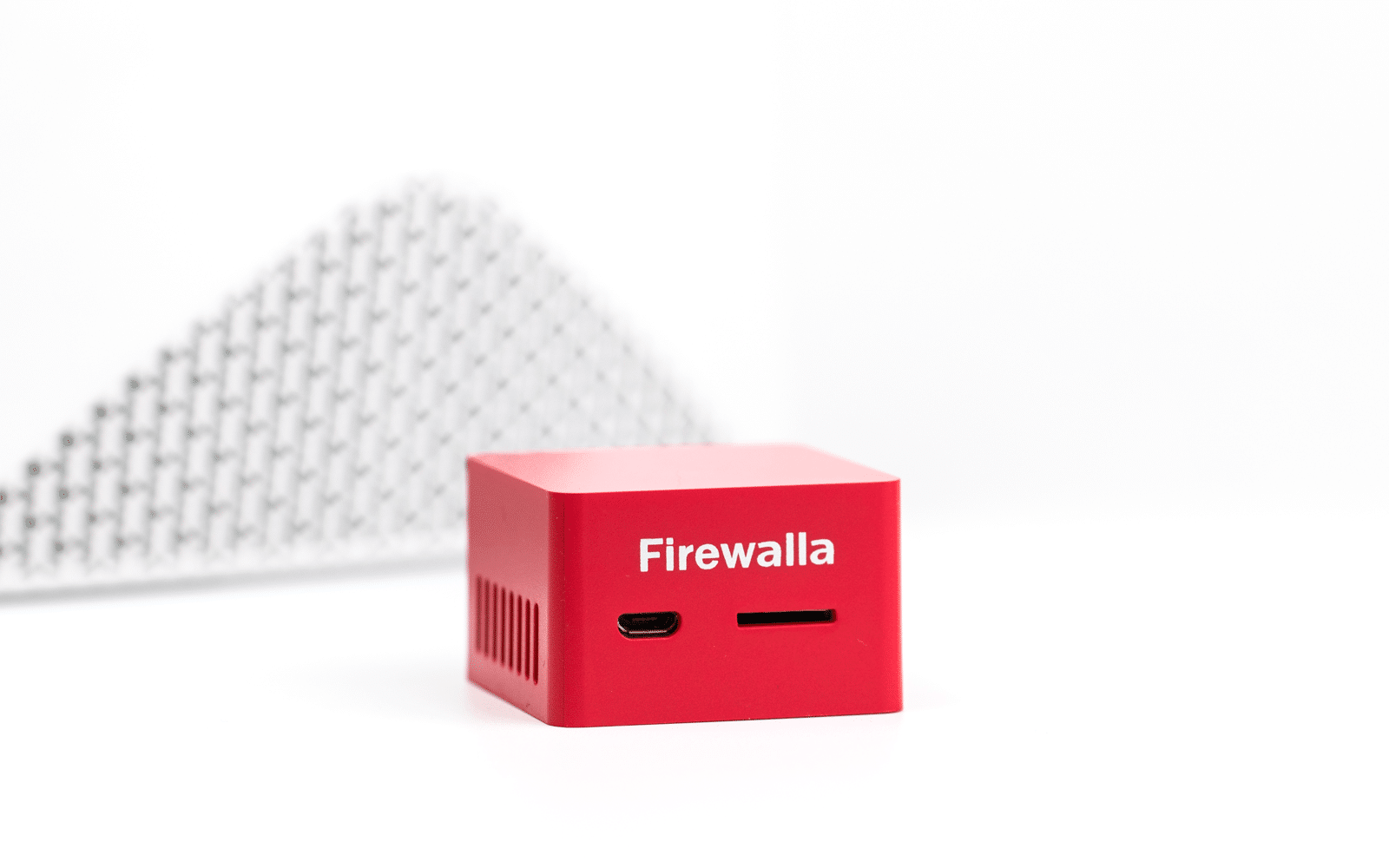
Firewalla Red has launched a handful of years ago with one thing in mind: make cybersecurity simple yet affordable. As a base-level product, Red was designed to give you a basic insight into your devices, manage your family’s internet access, and protect your network from dangerous media. It was Firewalla’s answer to fill in the need for an affordable option.
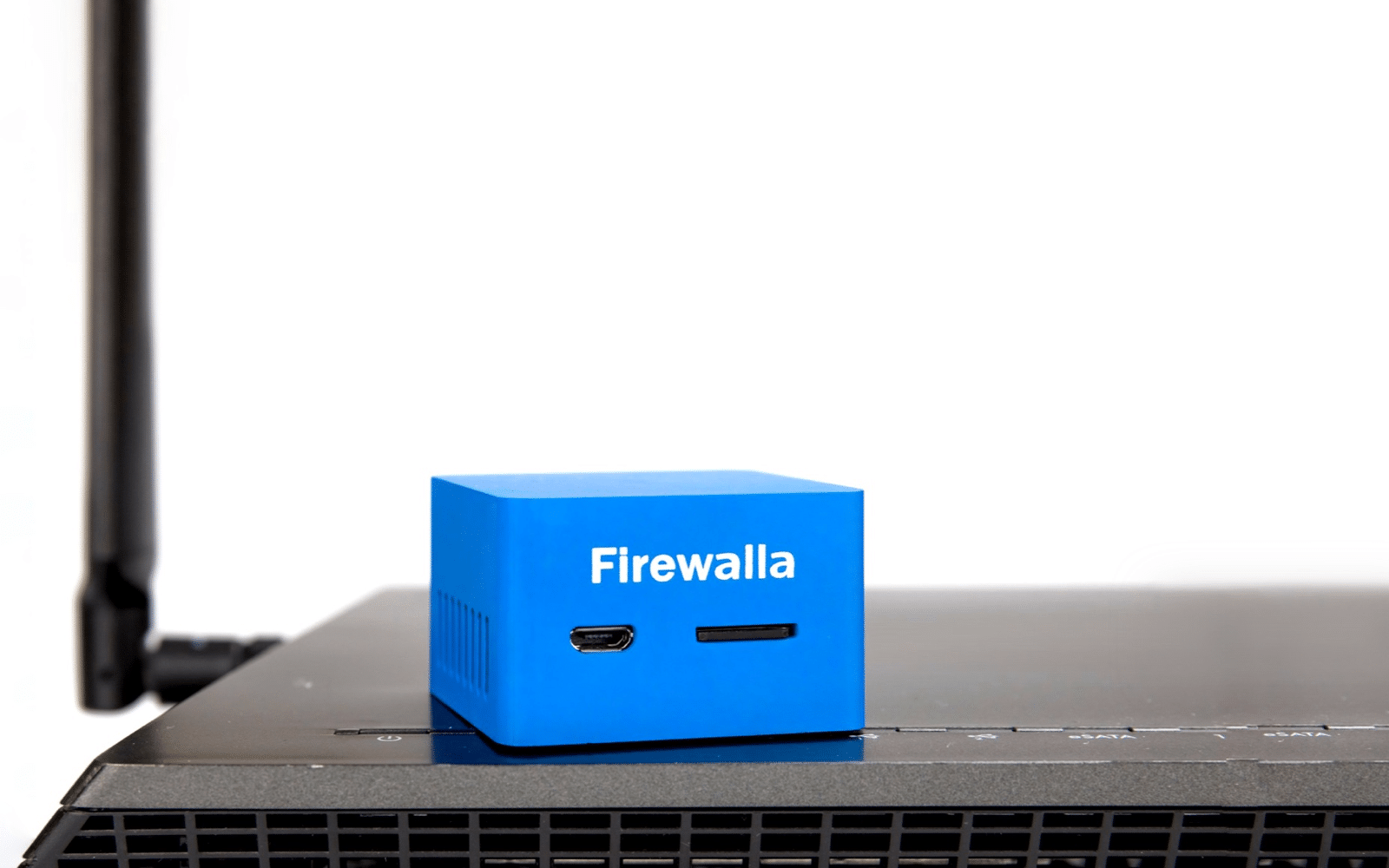
In 2018, Firewalla launched Blue. This version was designed and engineered to be more powerful than Red by operating at 500 megabits. They added Safe Browsing for kids, a VPN client, and geo-blocking to block basically any country from your network (no more Ukrainian hackers). The built-in VPN client is nice because it allows users to safely browse the internet without exposing their personal information.
Back in 2019 Firewall released a bigger, faster, better version of the Blue called the Blue Plus. All the features of the Blue, but more CPU and memory and a cool feature called Simple Smart Queue which reduces congestion on your network…meaning you can give Netflix a higher priority than your kids Xbox game and you’ll stop seeing buffering.
Firewalla Gold was launched in 2020 and it was the enterprise business “Gold” standard in home cybersecurity. They were aiming for next-gen smart firewall protection for home and business. It still utilized the same software as Blue and Red, but this product processes at 3 gigabits per second and was much more powerful than its predecessors. It was like 30 Red’s packed into one piece of hardware. Firewalla Gold allows you to create private networks (with customized rules for each one), device segmentation, create your own VPN networks so devices could teleport to a remote location, and a lot more other bells and whistles. It is built for businesses.
Gold is a professional grade and highly customizable hardware firewall and router with a lot of awesome features: parental controls, advanced insights into your home network, built-in VPN server, dynamic content filtering, device protection, the ability to block ads, and…no monthly fees. It truly is the “Gold” standard.
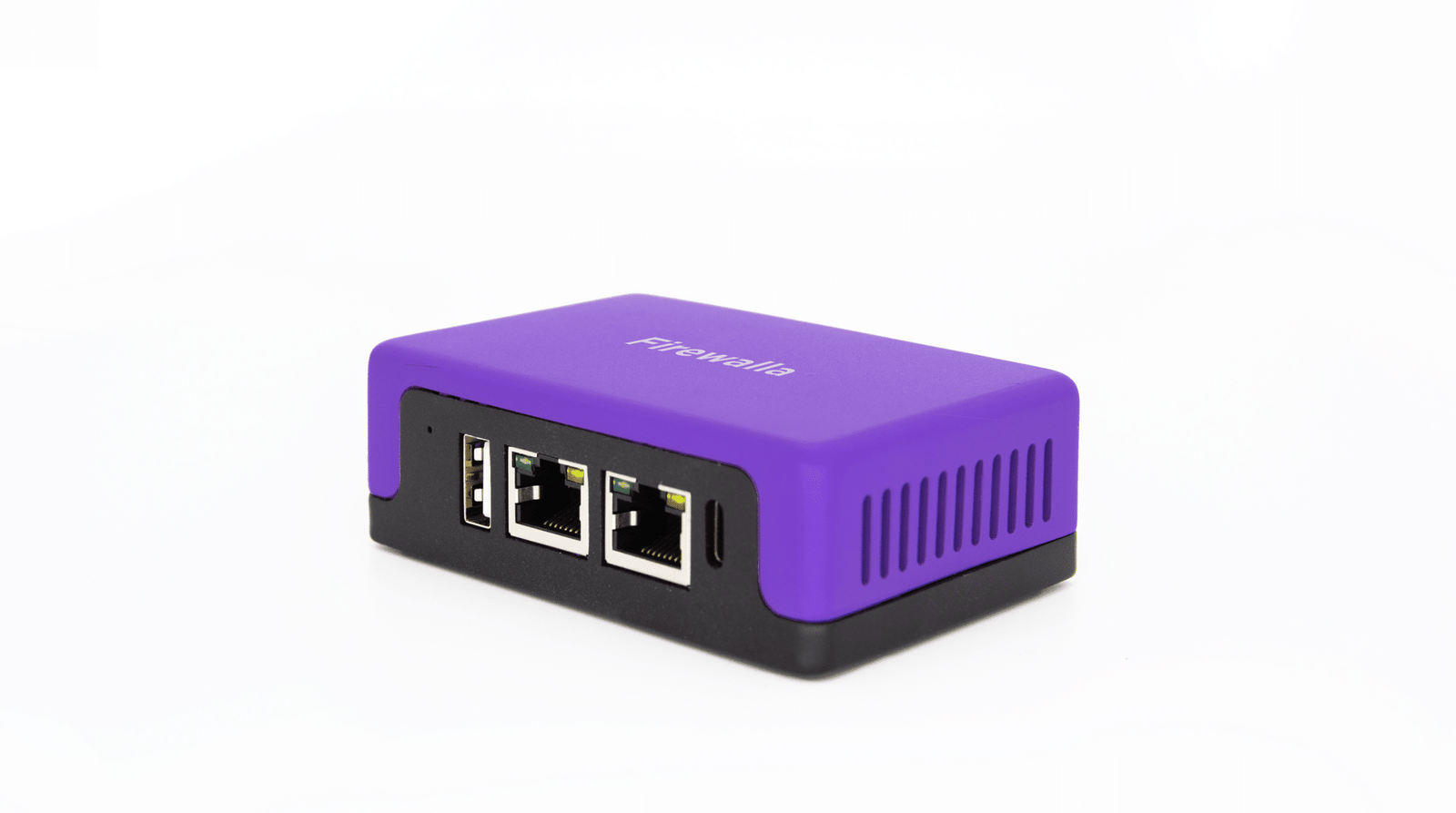
We’ll have a full review on the Purple in the very near future, but this latest product has very similar features as the Gold model but is packed into smaller hardware. There’s a small, yet clever wrinkle with Purple though: it has built-in Wi-Fi (short-range Wi-Fi radio) so it can operate as a remote router. Why is that cool? You can take Firewalla Purple on the go (vacation, work remote, etc) and can tether your smartphone to it and provide an internet connection to your devices (up to 8 devices). You don’t have to worry the next time your kids connect to the hotel’s Wi-Fi. It’s literally Firewall-on-the-go. It still runs at gigabit speed. Still protects devices. Still allows you to monitor and control internet usage. And yeah…still no monthly fees!
We’re going to show you how you can use a DNS content filter called Open DNS to make sure you can filter out the kind of content you deem inappropriate for your home and network. Again, not every home has the same benchmarks and standards for the type of media and content that comes through their network, which is another reason why we like content filters through a DNS.
What DNS Filtering?
First off, what is DNS? The Domain Name System (DNS) is like the phonebook for internet users. We navigate to websites through domain names, such as TMZ or Google. However, web browsers interact with IP Addresses instead. Essentially the DNS translates these numerical codes into human-readable formats so you don't need to memorize an address that can become outdated over time. Without it, we literally would be lost!
Furthermore, DNS filtering can keep your computer safe from malware and other threats by blocking access to websites that have been determined as harmful or hosting malicious content. This way, the user will basically never receive any file or code which could potentially infect one system with a virus! Depending on the service, setting up a DNS filter is relatively easy (more on that below). We highly recommend a DNS content filter because even though someone could circumvent access to bad content and media, they still won’t be able to do it through your network.
How Can Kids ByPass A DNS Filter?
One way someone can bypass a DNS filter is through the use of a VPN. We’ve talked about VPNs a couple of times. A VPN will take the computer or device and put it on a different virtual network. This new network most likely wouldn’t have the DNS filters set up for those certain websites you wanted to block, essentially rendering your DNS filter on your network useless.
Another clever trick (and maybe not so clever) kids can do to get around a DNS filter is by typing in the IP address directly. For example, if I know that ESPN.com is supposed to be at 45.63. 254.129. I could type those numbers in and that website is going to pop up. And this brings up another interesting topic in and of itself about access to VPNs in your home.
How To Setup Open DNS For Content Filtering
One of our favorite DNS content filters is called OpenDNS. This service is free for home users, which is just awesome. Below are the steps to get you going on this free DNS content filter services (exact instruction may change over time, but the idea is still the same:
From here, go to the “Learn More” button on the Consumer side.
Once you're in the consumer section, go to “Open DNS Home” and click “Sign Up”. A little side-note here on free vs paid versions. There is a paid version of OpenDNS which is around $20 a year. It gives you Usage stats and an “Optional Allow-list Mode”, which blocks everything except for the things that you have specifically wanted to allow.
Go ahead and sign up by entering all the signup information (it’s required…but hey…it’s free).
You will be directed to a page after signup that will help you set up Open DNS (Set Up OpenDNS On Your Device). When you get to this page you will see the name servers are two IP addresses. This is what you are going to add to your Wi-Fi route. These will be the external DNS servers that you would enter in your Wi-Fi router configuration.
After you set up your account, you will be directed to this page to help you set up your Wi-Fi router. These are the name servers for OpenDNS and will always be the name servers no matter what your account is. Because of that, you’ll want to write these down (or save them in Notepad and email them to you). You will need to enter them into the appropriate location on your Wi-Fi router or your modem.
You’ll want to click on “Home Routers” under “Choose Your Device” to get detailed instructions on different types of routers and modems. If your Wi-Fi router or modem is not listed here (and chances are that it might not be…there are thousands of routers), you’ll want to contact your wi-fi router or modem company on how to set a manual DNS on their device.
Further Customizations Through The OpenDNS Dashboard
Once you get your settings and router (or modem) configured properly, click “Test Your Settings”. You will see the OpenDNS dashboard and will be able to see all the stats and logs for your network. It’s kinda cool if you like to geek out on that stuff. You can also change the settings for your particular network as well, which is another nice added benefit of a free DNS content filter. When diving into the Settings (click on “Web Content Filtering”), you can do custom settings and block all of the categories that you want to be blocked. There are a lot of options to customize: gambling, pornography, alcohol, dating, nudity, sexuality, games, ads, weapons, and on and on. We love the custom setting. But if you’re not into dialing down to the specifics, you can choose between High, Moderate, or Low, which all have specific pre-built category filters set in place for you.
The DNS content filter is now set up and ready to operate. It’s not a perfect solution (a little disclaimer) and there are workarounds that someone can do to circumvent the filter, but you’re getting just another added level of protection on what kind of media and content is streaming through your family's screens. And we like that.
You’d be surprised how many parents out there have no clue what apps are downloaded on their teen’s phones and what they’re doing with those apps. TikTok is no different. This popular app has already set all kinds of download and usage records among young people and shows zero signs of slowing down. It has disrupted markets, has changed the way we view media, and has forced other social apps to rethink the way they present media. Where do you as a parent fit in all of this? Are you behind the curve with this new social phenomenon? Do you teens have TikTok? Are you making some of the most popular mistakes when it comes to parenting TikTok? We’ve put together a quick list of the common mistakes parents are making when it comes to TikTok.
Common Mistakes Most Parents Make With TikTok
First off: Don’t panic. Mistakes are just disguised opportunities to learn. And despite what others would have you believe, making a mistake here or there is not going to ruin your teen’s life. There’s a lot of research out there on the impact of technology and apps on our teens' lives. We’re certainly not dismissing that science or trying to undermine its purpose. But we’re definitely not buying into the doom-and-gloom nature some of these organizations seem to really peddle. We sometimes make rash decisions based on fear.
At DDID, we want to instill hope for the world, especially where technology is involved. However, there are mistakes being made out there by a lot of parents. We’ve experienced it. We’ve all seen the parent who just lets their kid stream and play with apps for hours and hours. It might be one of you reading this right now. This is a judgment-free zone. We’re all here to learn how to maneuver and exist in this crazy world of technology and families.
Here are some common mistakes many of us parents make with TikTok:
Ignoring Your Teens TikTok Media Habits
You’re not doing anyone any favors by just ignoring or being lazy about what your teen is doing on TikTok.The Laissez-Faire approach to parenting teens in a tech world is not an effective approach, but unfortunately, it is the most adopted style because it is easy. Do not ignore what your teen is doing on TikTok or online in general. Be involved. Find a way to have shared experiences with your teen and this popular app. Who knows? You might discover something on there you can use to help you with parenting 😉
Ruling With An Iron(Man) Fist
On the flip side of just completely ignoring what your teen is doing on TikTok, putting up an iron dome around your family where no technology, no phones, no tablets, no apps, no streaming services, etc. is quite possibly equally worse than being completely hands-off. Remember the goal: Teach them healthy media habits. Teach them how technology, and TikTok for that matter, can empower their lives. Completely cutting them off from the world of tech and innovation can actually have a negative effect on things like their careers, education, and yes…their social lives. We’ve seen instances where teens without phones are left out of social circles and activities. Furthermore, once they do leave the nest they will have this technology in their palms. Having tech habits established early on in their lives will benefit them so much! It is important for them to have that exposure so they can put technology in its place.
Never Talking About The Emotional Response They Feel
Emotions are important. How we respond to things we see, hear, and say on TikTok will shape the path which lies in front of us. Granted, being aware of our emotions is hard for adults, even harder for teens, but teaching them little mindfulness hacks can help lay the groundwork for healthy emotional intelligence down the road. This is a much-needed skill in this tech-crazy world. Sadly, many of the apps and devices we use can create really unhealthy emotional creatures (we call them trolls on social media). They create trolls in our physical lives too. Nobody wants a troll for a teen. Teaching our teens to be mindful while using TikTok can help prevent that. Here are a handful of questions to keep in your back pocket when having conversations with your teen: How did you feel inside while using TikTok or watching that video? Are you aware of how long you have used TikTok today? Did you see anything today that made you upset? Wanna talk about it? Are you being you when you engage with TikTok?
TikTok Can Be A Great Opportunity…
Again…parenting in a tech world is not easy. It’s not impossible though. Many of us simply don’t want to try because we don’t know how to do it. And simply expecting monitoring apps to do all the parenting work for us is not an effective approach. Are these apps useful? Definitely. Should we only rely on them to do all the parenting? Definitely not.
Technology and TikTok is an opportunity to teach kids and teens about discipline and self-governance. As much as some of us would hate to admit, one day our teens will be gone. They’ll be out of the house creating families and experiences of their own. They will no longer live in the confines of our homes. Are we equipping them with good skills and habits for when the training wheels of life come off? What wisdom are we leaving with them in this world? No pressure, but how we parent through this moment of our teen’s life will influence their lives down the road when we’re not there. Be involved. Have conversations. Teach them the value of technology, apps, and how it can really change the world for good.
Is Gaming Really That Big Hairy Scary Monster We Portray It As?
I’ve heard some crazy things said about gaming and kids. “My kid doesn’t have friends and it’s because he plays video games.” Or “my son has been rude to his siblings and it’s because he’s playing that Fortnite game.” Some of them have an inkling of possibly being true, but some of them are just bonkers. We get it, it’s easy to fall into the trap of blaming our kid’s poor behavior on anything but our parenting, which is why many of these myths continue to be believed. Even with the ones that sound kind of true, it’s just simply not the case. In fact, there are many myths floating around about the effects that gaming has on kids that could be the opposite of true. Some people believe that playing video games leads to obesity, social isolation, violent behavior, and more. But this isn’t always the case! We wanted to break down some of the most popular (and believable) myths about gaming and kids. Let's take a look at some of the myths about gaming and kids and see if they hold any water.
Myth #1: Gaming Leads To Obesity
Logic would tell you yes this one is true. And this is the problem with some of these myths out there floating around. There is a context of believability about them. When it comes to gaming leading (or causing) obesity, there is no evidence to support the claim. What leads to weight gain is high-calorie and low-nutrient snacks. According to Markus Appel from the University of Wurzburg, "Given our results, it is likely that the energy intake [food and drinks] and their energy expenditure [including non-sedentary activities] are not closely related to playing games." It is true that inactive behavior, like watching TV or playing outside, is what leads to obesity in kids, but it’s not the “gaming” itself. Now, we understand that playing video games doesn’t lead to healthy and fit kids either. But gaming isn’t causing your kids to be overweight and obese. And if you’re still thinking that this is true, fire up a VR headset and play Beat Sabor on “Hard”...you’ll work up a sweat!
Myth #2: Gaming Leads To Social Isolation
Some people believe that playing video games will lead to social isolation. Again…the logic is there, the believability is there. But how true is it? Let's take a look at some of the research on this topic.
One study found that there was no significant difference between the amount of time kids spent playing video games and the amount of time they spent talking to their friends. In fact, kids who played video games were more likely to have stronger friendships than those who didn't play video games. Another study found no significant difference between the amount of time spent playing video games and self-esteem.
Need more evidence? A study by the Norwegian University of Science and Technology found that "video game playing does not appear to lead to social isolation or problems with social interactions." In fact, the team found that video games are NOT the cause of some adolescent social issues. Imagine that? Now, this doesn’t mean that when children experience these feelings of isolation from their peers they’re not turning to video games to cope. We’re not saying this at all. We understand kids use video games to help manage their emotions and deal with teenage life. But does gaming itself lead to social isolation? Not really. And when we see those behaviors in our kids, we need to be proactive as parents and seize those moments as opportunities.
Myth #3: Gaming Leads To Violent Behavior
This one is actually one of my biggest pet peeves. There is a pervasive myth that gaming leads to violent behavior in kids. First of all, there is no scientific evidence to support the claim that gaming leads to violence. In fact according to Benajmin Burroughs from the University of Nevada, Las Vegas, he said, “There are no longitudinal studies that show a link between violence and video games.” It’s just not there. Think of the millions and millions of kids each day playing millions of hours of gaming. If gaming did lead to violent behavior, this would be one dangerous place.
So why do people believe that gaming leads to violence? Because it passed the “sniff-check.” It plays into our fears. Another reason may be that gamers are often portrayed in the media as angry, socially-isolated males who spend all their time playing video games. But this is not representative of the majority of gamers. The truth is that most gamers are normal, well-adjusted kids who simply enjoy playing video games. My kid games a handful of hours each week, yet is socially engaged, is active in sports, is involved in schooling events, and is the nicest individual.
While it is true that some gamers have played violent video games (and there are a LOT of violent games out there), there are also some people who are affected by violence in the media. Although many scientists believe this evidence is not strong enough to prove a connection between media and behavior, it's important to be cautious when kids watch any type of media. We’re not saying gaming doesn’t lead to violence so let your kids play whatever games they want. Not saying this at all. Parents still should monitor what their kids are watching and should educate themselves on the movies, TV shows, video games, etc. that their children are playing or watching to ensure they are age-appropriate. It’s interesting that I’ve seen some parents that would NEVER allow their child to watch a rated R movie or a rated M show on a streaming service, but for some reason don’t look at the rating of games they allow their kids to play (Come on parents, let's be consistent). Now obviously I’m not going to let my 4-year-old grandson play Call of Duty. It’s all about what’s age-appropriate for your child. Listen, just because your kid plays a game where they’re a fictitious character using fictitious and fantastical weapons to take out other fictitious characters doesn’t mean they want to carry out similar actions in real life. Otherwise, why don’t you just block games like Minecraft as your child just might want to get a sword and start combatting zombies, dragons, and killer rabbits! There’s just no connection there. But the bottom line? There is no scientific evidence that supports the claim that gaming leads to violent behavior.
Gaming Isn’t The Enemy Here
It's clear there are many myths floating around about gaming and its effects on kids. But do any of these myths hold water? Not really. Some do. We’ll say that there are little breadcrumbs of evidence sprinkled here and there linking gaming to psychological and social issues in some individuals, but there still lacks the concrete, causality proof about gaming and some of these myths we hear about. But that isn’t a license for you as a parent to just not manage what your kids are doing and playing when it comes to gaming. There is still something to be said about gaming in moderation. It isn’t necessarily the aspect of gaming that is of concern. The total amount of time spent consecutively playing is something parents definitely need to be aware of. Gaming isn’t the enemy, but we realize too much of one thing isn't always good. We’ve noticed a behavior shift with our son when he plays too much Fortnite; his attitude changes a bit. We’ve heard this from other parents as well. The key is finding that healthy balance.
PLEASE get involved in their world. Understand what’s going on and what motivates them to want to play these games. Talk to them. Engage with them. Just the little things will go a long way in creating healthy screen time and gaming behaviors for your family.
Sources
Markus Appel, Ph.D., professor, communication psychology and new media, University of Wurzburg, Germany; Jason Bruck, R.N., Mount Sinai West, New York City; June 9, 2019, Social Science and Medicine
In the last year or so, Apple has been getting very serious about child safety in relation to their devices. This latest feature in Screen Time for their iOS is an attempt to move the needle in creating the safest environment while at the same time balancing the privacy of their users. Apple doesn’t want to come off as “Big Brother” watching every little thing you do on their devices, BUT…they still want to maintain that image of taking an initiative when it comes to communication safety. This most recent update now includes tools that will warn users (kids) and attempt to supply them resources if they either receive or even attempt to send images that potentially contain nudity.
Enabling Communication Safety In Apple Messages
Enabling this new feature is very easy. Keep in mind, you must have the latest iOS updated on your device (and your child’s device as well) and you have to have Family Sharing setup. If you haven’t set up Screen Time yet, you’ll want to do that first. Once you have everything in place, follow these really easy steps on how to set up communication safety in Apple Messages.
Step 1:
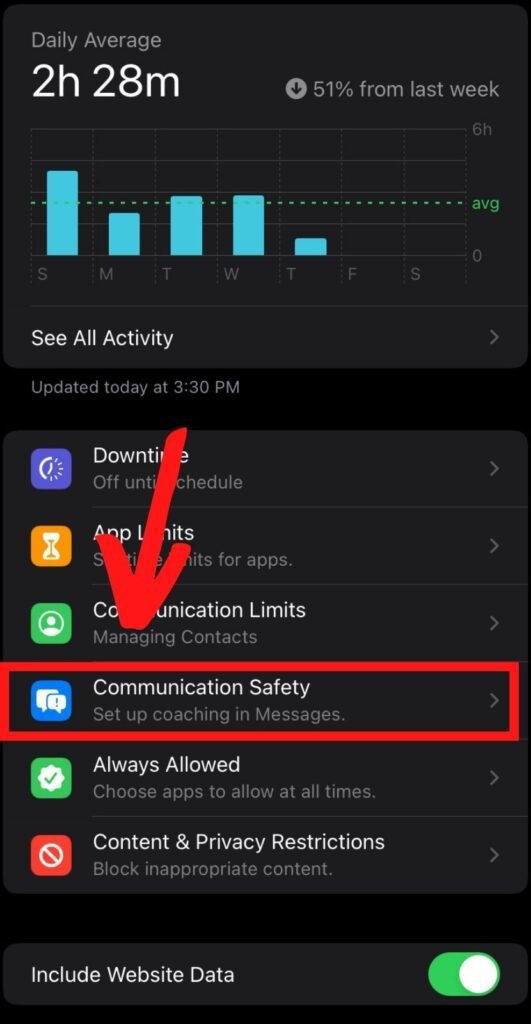
On your Apple device (most likely an iPhone or iPad), select the Settings app and scroll down to Screen Time. Once you are in the Screen Time frame, you’ll want to select the name of your child under the “Family” section. I have multiple kids so they’re both there. You’ll have to do this for each family member.
Step 2:
Once you’ve tapped on your child’s name, you’ll be directed to their Screen Time main page. Select “Communication Safety”.
Step 3:
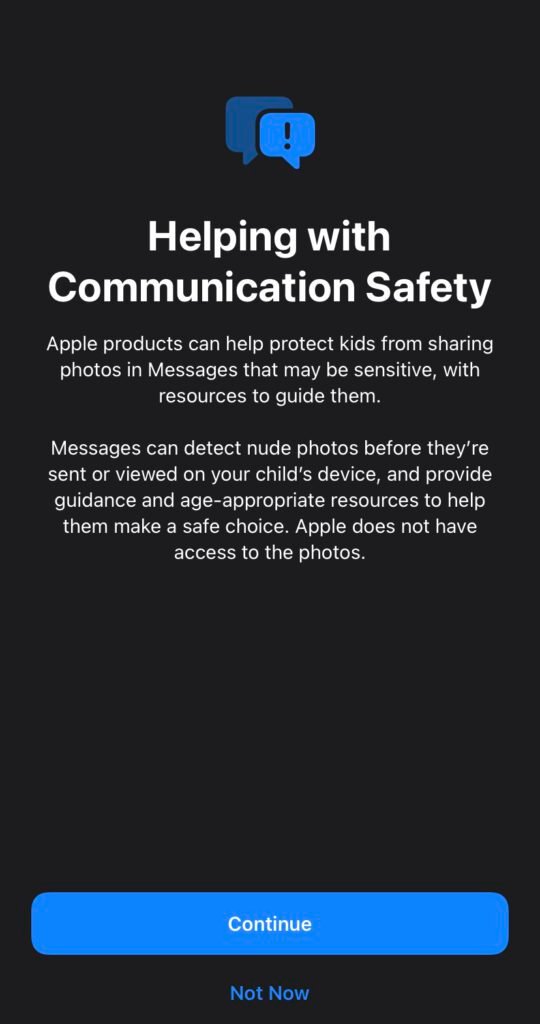
A window (like the one below) will pop up and give you some detailed information about helping with Communication Safety. You’ll want to read this before selecting “Continue”.
Step 4:
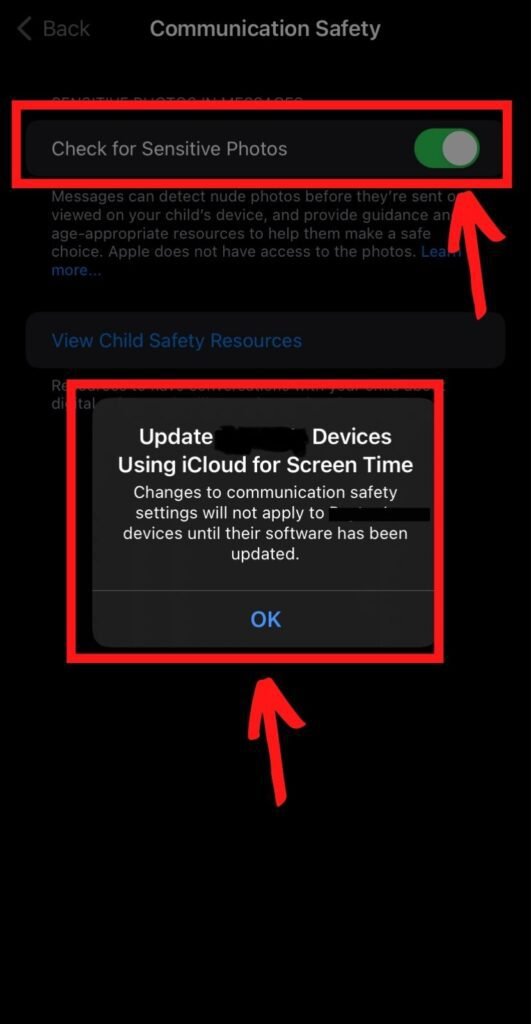
Once you hit continue, you’ll be brought to the next page where “Check For Sensitive Photos” will be darkened (turned off). You have to enable it and a message will pop up notifying you that these changes will not apply to your child’s device until their iOS software has been updated (you’ll want to do this or you lose these communication features). Once you hit okay, you’re all set.
What Communication Safety In Apples Messages Will Do
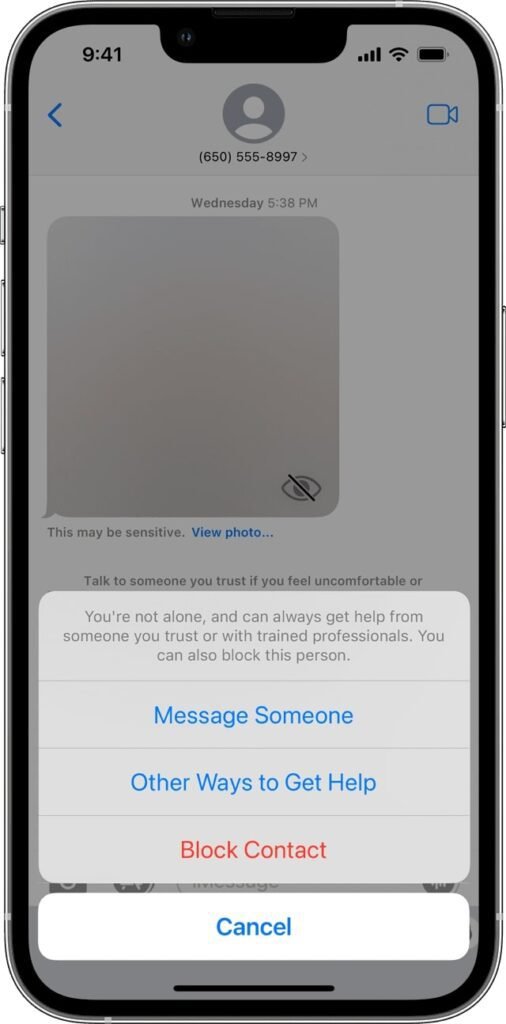
It’s going to notify your kids if they get an inappropriate message. In fact, it will blur out the image before they see it! And…believe me, if your kid gets this message, they’re going to think you’re getting notified as well. The idea of this communication safety feature is to protect your kids from viewing nudity.
What Communication Safety In Apples Messages Won’t Do
It doesn’t stop them from sending inappropriate images. They’ll receive a message about the dangers of doing so before it sends. And who knows? That might be enough for some kids to think twice. It has the potential to give you a false sense of security, so you’ll still want to monitor what your kids are doing and who they’re communicating with. It’s still better than nothing. If you have Screen Time Parental Controls set up properly, you can still decide who your child’s contacts are. You can also determine a “downtime” designation of particular contacts they can call and message. For example, our kids can only call or message Mom, Dad, and grandparents during downtime (ours is set up from 9 PM until 8 AM every day).
What Happens When Apple Detects An Image With Nudity?
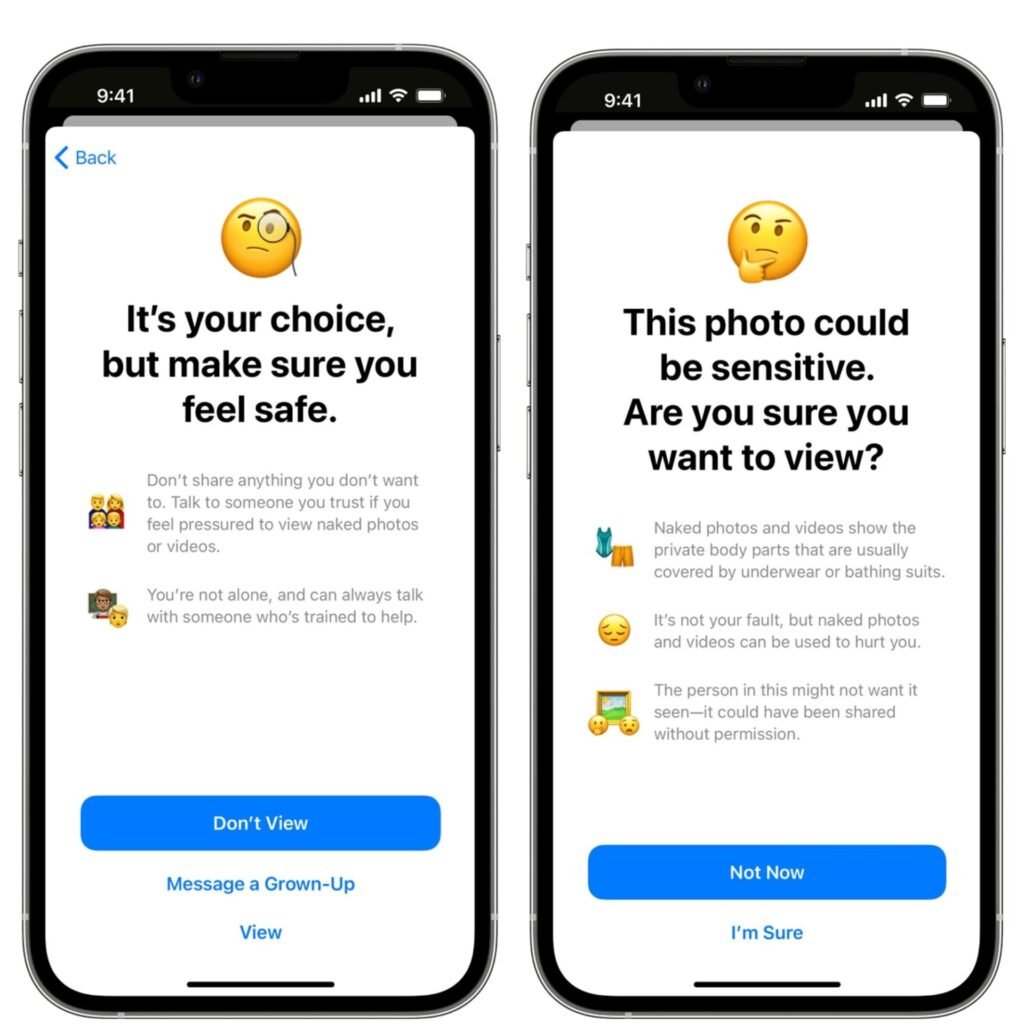
Through some really cool algorithms and data analysis, Message can detect if your kid has received or is about to shoot off some questionable images. It will then blur the image, display a warning of the image’s sensitivity, and offer some pointers on how to get out of this mess of your life. They can message someone they trust (for those under 13).
If your child decides to engage in viewing and/or sending a photo that contains inappropriate nudity, they will get a notification to make sure they want to confirm the action and it also suggests alternative actions the child can take besides sending or receiving this kind of content. Oftentimes, that’s all we need. A little nudge can go a long way and we appreciate what Apple is trying to do here.
Should I Enable Screen Time On My Family’s Apple Devices?
Even if you don’t have kids, enabling Screen Time on your Apple devices is such a cool feature in the Apple iOS. It’s free software that helps you manage your screen time. Screen Time will allow you to place restrictions on apps and schedule downtime (if you have kids, or for yourself). It also gives reports about how your devices are being used, as well as functions that help manage screen time for kids in the house! What it won't do though? Screen time won’t monitor who they call and message or what content they’re sending out. You’ll need another service such as Bark, MMGuardian or OurPact. If you’re still unsure, you can read more about how to set up screen time.
How Often Should I Update My Apple Devices?
Generally speaking, you should update your iOS whenever you can get the version that isn’t beta. A beta release is basically a pre-release of software usually through an invitation to a large group of super-users with the intention of using it in real-life situations. These beta versions usually don’t last long until Apple releases them at large to the public. But to answer this question: YES! Definitely update your iOS on your Apple devices when you get the notification to. One of the biggest reasons why is because of security. There are some bad dudes out there constantly trying to find a hack into Apple’s OS. To help keep those intruders at bay, Apple does its best to keep its iOS at peak performance. Androids are the same way. So you’ll want to for security reasons. But you’ll also want to because of new, innovative features like the one we just detailed above.
Home automation? What is that? Do I need to know what it is? Home automation is awesome! Dale Dumbs It Down is going to share some of our favorite principles with Home automation. What we’re going to cover in this article are just the basics you need to know when it comes to home automation and some of the guiding principles we use when it comes to getting started. These core ideas apply to just about everything home automation. If you’re just getting started, then these principles will be good to go over and be mindful of as you select home automation devices. If you’re already building out your smart home, this may still spark some new ideas and how to make your home automation gameplan even better!
Home Automation: Where Do I Begin?
While smart home tech has definitely improved and is much more accessible in recent years, it’s still a bit of a conundrum for some people and there’s a lot of noise out there on what to do. Unfortunately, a lot of that information is wrong, by the way. More likely than not, you’ve most likely been inundated with ads, commercials, and advice on the hundreds of choices for smart outlets, smart lightbulbs, smart vacuums, smartphones, smart locks, smart thermostats…everything! How are you supposed to know? In another post, we’ll dive into some of our favorite smart home devices, but until then we want to dish on some of the principles to follow before you even think about home automation.
Basic Principles With Home Automation
One of the most valuable pieces of information we can give you is to have a game plan based on principles before you start diving into smart devices. It is not uncommon for some people to be into a smart home setup 10-15 devices where only a handful of them communicate with each other. The last thing you want is to have your Amazon echo control some devices, while your Google Assistant controls another set of devices. You might be chuckling at this, but it does happen.
Principle #1 - Make A Plan
This isn’t always as easy as you think, but don’t just start buying the first smart device for your home without having some kind of an idea or plan. Are you a Google Home fan? What about Amazon? Do you already have a basic setup now? Think about what you want. And don’t just fall for the price as a reason to buy something. One of the biggest mistakes people make with smart home devices is buying cheap. Just don’t. You want the best. Think about the functionality and features in your home that you’d like to automate to save energy, save time, avoid effort, or make your life easier. Smart plugs are a must. We think every room in your house needs at least one. Smart televisions…yeah…they’re awesome. Another must-have: Smart thermostats. They control your heating and cooling costs in your house and do some incredible monitoring to optimize heating and cooling. Smart lights that know how to turn themselves on and off when the house is empty are fun little devices. Smart locks are just awesome because you never know when you are going to accidentally leave the door unlocked on your way out. The point is: Have a plan. If you already have Google Home devices, you’ll want to make sure the smart devices are compatible with Google Assistant. Like Amazon Echos..stick with that. A great way to start is to list what devices you want and then map out what that will look like.
Principle #2: KISS (Keep It Simple Stupid)
It’s cliche, but we don’t care. Keep it simple stupid. No matter what you do, smart home tech should be adding to your user experience and making your life easier. It should never make something more difficult or cumbersome to do than the non-smart home method. If using smart home devices is making your life a living hell, you’re doing it wrong. And you won’t be the only person frustrated. Your family will be frustrated as well if you tell them that they have to stop using the wall switch and instead have to use their smartphone to turn something on or off. If you have to use 10 apps to use 10 devices…yeah…you’re doing it wrong. A good smart home adds functionality and application on top of what you already do every day. Smart devices should augment your day-to-day life, not add more drama to it. And another tip: don’t be afraid to start over. Yes, you probably will already have invested some decent amount of cash, but you’d be surprised how many people will buy used smart devices on eBay. Don’t be afraid to reboot.
Principle #3: Don’t Be Married To One Brand
Versatility in the brands you choose isn’t a bad idea. Keep your options open. The first thing to understand is that you don’t have to stick with just one brand. Just because you have a Nest Security Camera doesn’t mean you need to use all Nest products. You can mix and match these devices, but you need to make sure they all support at least one common platform. What does that mean? This means you have to do your research, make a plan (principle #1), and decide what platforms are important to you to support. Do you want voice support? Do you like to utilize the app interfaces? Are you interested in Alexa, Google, or Siri? Knowing these answers will help you narrow down your options. Do you already have an existing network of smart devices? Then make sure each smart device works natively or can tie into something like IFTTT (If This Then That). This is why we highly recommend buying products that support as many platforms as possible. There are devices that support Alexa, IFTTT, Google, and HomeKit right out of the box. Versatility is key.
Principle #4: Your Security Matters
This cannot be understated enough. Security should be the highest priority with smart home automation. When you’re using some of these major platforms you’re going to be giving away a lot of data about your family. Plain and simple. That’s the trade-off. Make sure you’re buying into a company you trust. Do your research. Do a simple search “Wzye security issues” or something similar. Read through their privacy policy and make sure your data is getting handled in a way you’re comfortable with. Make sure the brands have an action plan when or if there is a security breach. It is on them to notify you when your data is compromised. And it happens. Some of the largest corporations have had major data break-ins. Not that that’s an excuse BUT those companies have an action plan. As a result of T-Mobile’s latest security attack, they offered all of their customers a free subscription to an identity theft service. There are some platforms like Home Assistant which are self-hosted and completely in your control. Your data remains your own. This is awesome. With other services that’s definitely not the case. And very much related to that, not all devices are created equal when it comes to cyber security. Some may have old software that has security holes that hackers can take advantage of (another tip…perform regular hardware and software updates…it’s worth it!). We also talked about locking down your Google Assistant here.
Dale Dumbs It Down Can Help With Home Automation
There are so many other principles to operate from when doing home automation. And home automation is not basic by any means. It is a concept that can be as simple as you want it OR it can be very complex with literally a hundred devices connected to your personal life. One thing for sure is when first getting into home automation pay attention to having a plan, keeping it simple, being versatile in the brands you choose, and most importantly… making security a major priority. If you have any questions about home automation or how to set up your devices to make it the best smart home, follow us at Dale Dumbs IT Down for more smart home tips.