You may not realize it, but your credit card is one of the most important pieces of financial information you have. That's why it's so important to make sure you're notified of all your credit card transactions. By doing so, you can keep track of your spending and make sure your account is in good standing. And it’s more than just about account spending too. You can save yourself a LOT of heartache and potentially money by enabling something as simple as a notification. Let me break down some important reasons why you need notifications for all your credit card transactions.
1. Keep Track Of Your Spending
It's easy to lose track of your spending when you're not keeping an eye on your account. With notifications, you can see exactly where your money is going and how much you're spending. This can help you stay on budget and keep track of your finances. If you have a significant other that tends to spend, this can help you stay aware of their spending as well.
One of the benefits of notifications is that they can help you avoid fraud. If you see a charge on your account that you don't recognize, you can immediately report it to your issuing bank. When this happens, time is of the essence. I’ve literally seen thousands go up in smoke in a matter of an hour. Adding a notification can help you avoid costly fees and potential damage to your credit score.
3. Stay On Top Of Your Account
In order to maintain a good credit score, it's important to stay on top of your account. By getting notified of all your transactions, you can ensure that there are no late payments or other red flags that could lead to a negative mark on your credit report.
Perhaps the biggest benefit of notifications is the peace of mind they provide. When you know what's happening with your account at all times, you can relax and rest assured that your finances are in good hands.
Notifications Aren’t Just For Credit Cards
Notifications are great for more than just your credit cards as well. You should definitely have notifications set up with your financial institutions as well (bank, credit union, etc). A very popular method of fraud is performing illegitimate ACH wire transfers. And it’s not just for fraud detection either. I love having them set up for account balance changes, transfer deadlines, and other important details like overdraft fees and penalties.
Popular Financial Scams You Don’t Want To Fall For
As a great general rule of thumb, you likely want to make sure that your finances are as stable as possible. Unfortunately, there are many people out there who would love to take advantage of that stability. The best arrow in their quiver: financial scams. If you aren’t extremely careful, you could easily find yourself the victim of one of these schemes. Financial scams are growing in popularity and becoming really common. Right now, almost every banking institution I belong to has a permanent banner in their app that warns of these scams. It’s important to be aware of the most popular scams out there and know how to avoid them. Here are a few to be aware of:
Debt Collection Scams
If you receive a call from an unknown number and they are demanding payment on something that doesn’t seem legitimate, don't provide any personal information. Instead, do some research into the debt collector by looking up their license numbers or asking for written proof of what you owe them. If there is no evidence available online then it might be time to hang up immediately as this could lead to identity theft! Plus, don’t answer calls from “Unknown” numbers. That should be your first indication that something might be amiss.
Phishing
Phishing is a common crime where con artists use emails or texts that look just like they're from banks, popular merchants, and others you may know. Phishing is one of the most clever and effective kinds of scams out there. They are easy to fall for as well. They try to get users into sharing bank account numbers among other things, which can immediately grant them access!
Imposters may try to convince you that they represent trustworthy, well-known, and authoritative entities like the county sheriff, reputable charities, or even the IRS. These imposters might ask for money by claiming their organization is running low on funds or you’re behind on your taxes and are being audited. Sometimes this call is just a scammer trying to find out personal information so they can later use it against you!
Be Proactive When It Comes To Your Online Action
Notifications are a simple and effective way to stay on top of your credit card usage. I’ll be the first person to admit that I can’t stand notifications. This is why you must be judicial in how many notifications you set up on your phone. By signing up for notifications with your credit card and your financial institution, you can keep track of your spending, avoid fraud, and maintain a good credit score. Most importantly, notifications give you a little peace of mind that comes with knowing exactly what's happening with your account at all times. If you're not already signed up for credit card and banking notifications, make it a high priority on your to-do list.
Every day millions of people open their computers, tablets, phones, and other devices–click on their browsers, and begin searching. How many of those people have updated their browser systems for security purposes? This number would probably scare you, but if it doesn’t– it probably should. We’re passionate about tech security, so updating your browser is one of our top passions!
Browser Security Risks
What is a browser? Simply put: a browser is an interface for the World Wide Web. From a hacker's perspective: it’s an interface that allows them to steal your information right under your nose. Much like we lock our cars to avoid theft, and have deadbolts and security systems to protect our homes, we also need the best security for all things digital. Sometimes we need to think like a criminal, to think of the best security solutions. As we said before, new technology can mean new risks, but we’re here to provide all the information to our readers to avoid browser security risks.
One browser security risk is not having the proper antivirus software installed on your computer. Antivirus software protects you, your computer, and your information. You can install many products, but you’ll need to keep them updated, as well. We recommend Norton, Total AV, McAfee, and Trend Micro.
Browser security risks can include pop-up ads, site redirects, extensions, and plug-ins, filled forms, and stored passwords. Pop-ups and site redirects can include malicious bots, malware, and other security threats. Extensions and plug-ins can be useful like Grammarly, Honey, Invisible Hand, StayFocusd, and more. We discuss how browser extensions affect speed and performance; however, there are extensions and plug-ins hackers design to deliberately attack your browser and steal valuable information. Users should be aware that just because an extension is available, doesn’t mean it’s been vetted for security. It’s common to keep passwords saved on your computer and the “fill form” feature. However, any saved information is more easily found through scamming attempts. It’s vital to make sure you’re constantly using up-to-date software, and browsers, and researching the plug-ins you use and the sites you visit.
Whoa. Wait. Do you have to update your browser? Yes, yes you do. Whatever browser you might be using (We recommend Chrome), Safari, Microsoft Internet Explorer, Mozilla Firefox, DuckduckGo, Brave, and others. Recently, Google Chrome became aware of a high-severity vulnerability and released the Chrome 104 version. These updates are presently available to desktop users, and hopefully, the Android and iOS versions will come out shortly. If you’re using Microsoft Edge and Brave browsers those will update soon.
How to Update Your Browser
Updating your browser is relatively easy. Most browsers today are Chromium-based browsers which are based on Google Chrome. These include Microsoft Edge (this has officially replaced the old Internet Explorer), Brave, and Opera. These all have the same update setting, which you can find and click on the menu or the three dots (also called the hamburger menu) in the upper right side of the browser’s window. You can select the “about” browser section and check for updates. If your browser needs updates, most will start automatically, but depending on your settings, you may need to request a manual update. It is pretty common for this update action to require a complete browser and computer restart. Any browser tabs or windows will reopen upon restart, so you won’t have to worry about losing your work.
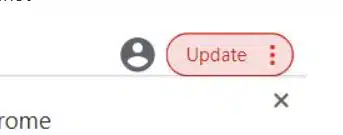
Curious if Google Chrome is up-to-date? Google recently added a feature that tells you that there is an update available with a notification in the upper right-hand corner.
Windows browser recently updated their systems with Windows 11. This helped users with their speed and performance. For Windows browser updates, click the Windows button and go to the Settings options. The left panel should have an update or Check for Updates option. Windows will automatically install the updates, then request a restart for your computer.
Many computer updates can seem obnoxious and tedious, especially if you’re in the middle of work or Zoom meetings. We all have felt the urge to postpone updates on our computers and our phones. Most of the updates are for users to provide better systems, better security, and more efficient interfaces. So the next time you hear about an update, especially a security update: do it. Go update your browser–NOW!
We all have a love/hate relationship with our cell phones. Not only do they provide entertainment besides communication abilities, but they also open users up to various scammers and hackers. Interestingly enough, we all have strong opinions about Androids or iPhones and which is best. Regardless of which operating system you prefer, it’s important to block any spam content on your devices. Previously, we discussed How To Block Scams, Spams, and Phishing Easily On Your iPhone. Like iOS systems, you can also block spam content on your Android.
Spamming 101
To put it simply, spam is anything users didn’t subscribe to or didn’t authorize on their phones, emails, texts, calls, etc. Spam can come in various forms from phone calls, text messages, emails and internal linking, and more. The most frustrating thing for users is redundancy. If you end up on a political spam list, you bet you’ll be on every political spam list in your area.
Let’s Talk About Spam Calls
If you own a phone, you’re probably getting spam calls at all hours of every day. We’re often unsure how we end up on these call lists, and just about everyone hates answering the call just to tell whomever to put them on the Do Not Call List. Whatever happened to that list anyways? The good news, you can still register your phone numbers and most spammers should cease calls within 31 days of registering.
Nowadays, it seems like you might recognize a number because it has the same or similar area code as your phone or a friend’s phone. That being said, how are these robocalls and spammers able to do that? These companies are taking a service that runs their numbers through multiple agencies, to lower their cost, and increase answers. Each time you answer a call, it proves that your number is legit, therefore increasing the stats on your number and gaining more spam calls. Instead of answering, just register on the Do Not Call List.
We all know the drill. You buy something in a store, they ask you if you want to join their rewards program. Not only will it save you money off initially, but forever X-amount you spend, you gain more money off later. For many people, that sounds like an excellent idea, but that one little rewards program has the potential to set your number up for unlimited spam messages. If the actual messages aren’t annoying enough, many spam texters add clickable links ready to infect your phone with malware and viruses. Though scamming and spamming seem never-ending, there are ways to block spam content for good.
Luckily, app creators are focusing on creating software to help smartphone users to stop spam content. For Android users, we highly recommend Bitdefender, as it’s the most reliable antivirus for Android systems. It provides users optimal protection against malware and data-theft activities. It offers the Scam Alert, which allows users to see warnings on suspicious messages and notifications. It has many features that can help block spam and scammers from stealing your information and sensitive data.
RoboKiller is another spam blocking app to make sure you can remove the annoyance of all the spam calls, messages, and content. Google Play shows an average rating of 4.1 stars for Android users, but an impressive number of over 5 million downloads. Despite many decent ratings, users are complaining about voicemail playback features and other bugs that RoboKiller needs to address.
Cellphone companies are also taking a step toward happier phone users through their spam-blocking apps. Verizon provides an optional upgrade for its users called Verizon Call Filter or Call Filter Plus. It provides spam detection and filtering with a visual rating per incoming call. You can see on a meter where the phone number ranks from low spam to high spam risk. Depending on your plan, you can get added features for an additional $2.99 per month for one line or $7.99 per month for three or more lines. T-Moble/Sprint also offers Scam Protection with similar screening options that let its user see a caller ranking of potential fraud.
No matter what, you need to take all technology seriously when you’re deciding to share your sensitive information. Whether it’s your Android, iOS system, or computer, you need to be aware and conscious of the content you’re sending and receiving. Common sense tells us not to open messages and links from people, numbers, and emails we don’t recognize. There are other ways to ensure you’re safe from spam content and hackers when in doubt. Take a look at some of our previous suggestions on keeping you and your family safe.
In my opinion, one of the most important things you own and use is your credit card. Many people are clueless as to how easy it is for hackers to get your information and make fraudulent charges. It's no surprise that fraudsters target credit cards more than any other type of payment. And most of these criminals are very clever. Don't worry though, there are plenty of little hacks and tools you can use to prevent credit card fraud from ever happening to you. Nothing is full-proof. There is no bulletproof method because the nefarious game of credit card hacking seems like it will never end. And it feels like it’s always evolving and innovating. With that said, check out our list of the best tools and hacks to help keep your cards safe.
Credit card companies often include many free features and tools to help deal with rampant card and identity theft. It is a high priority for them because if the public loses trust in credit card safety, these companies will have a massive problem on their hands. But these tools range from the ability to lock your card from purchases, thorough monitoring of the dark web, and a slew of other cool things. Aside from what they offer, there are some other hacks you can do that will give you an added level of security when making purchases with your card. Your challenge is to just try one of these this week. Make it a priority to take control of security in this digital world.
Use Your Credit Card Company’s App
This is a no-brainer. And I’m still shocked when I find people who don’t use an app to help manage their credit cards. Yes, you can still go online. Yes, you can still wait for that paper statement to arrive in the mail where you can send a check in each month to pay off your credit card statement. But for real…use your credit card company’s app! Credit card apps can help you track your spending. You can see exactly where you are spending your money and how much you are spending each month. This information can be really helpful in budgeting and making sure you are not overspending. Furthermore, you can get immediate notifications sent to your phone on every transaction.
Credit card apps can also help you stay on top of your payments. You can set up reminders for when your bill is due and track your payment history. This can help you avoid late fees and keep your credit score high. Credit card apps can help you get rewards for using your credit card. Many credit cards offer rewards points for every purchase you make. These points can be redeemed for cash back, gift cards, or merchandise. A lot of times, you must have the app to unlock those rewards (or at least redeem them).
Biometrics, Digital Wallets, And Contactless Card
Use biometrics whenever you can. This will most likely require you to use payments through Apple Pay, Google Pay, or Samsung Pay through your smartphone. I almost always use biometrics to pay versus a normal credit card. Biometrics are simply measurements of physical or behavioral characteristics. They can be used to identify individuals and verify their identity. The most common biometrics include fingerprints, iris scans, and facial recognition. Biometrics are becoming increasingly popular as a way to authenticate users (and not just with buying things either), especially in the realm of digital security. That’s because biometrics are unique to each individual and they’re very difficult to fake. Because of this, biometrics offer one of the highest levels of security when buying goods.
Contactless cards are another great feature to help reduce credit card fraud. They can be identified by a logo that looks like the Wi-Fi symbol of radiating waves. It leverages technology where you don’t have to put the card in a POS system.
Card Lock
If your credit card company has this service, enable it right now. Card lock or card freeze lets you essentially "turn off" your credit card to foil would-be thieves, which is particularly helpful if you lose it. Most of the time, you can use the mobile app to activate an On/Off switch for this feature.
We’ve already written a post on why you need to enable notifications on all your credit card transactions. This little tips can prevent a lot of loss IF your credit card does get hacked. Time is of the essence with hackers. If you can identify fraud quickly, you can seriously save your bacon when involved with fraud. Alerts allow you to also stay in the know on what’s happening with your account or any other security news and updates.
Never Store Credit Card Info On Your Phone
Let me explain. Sometimes I’ve seen people take pictures of their credit cards or write down their number with a CVC code in a Notes app on their phone. Big no-no. Just don’t do it. Now…if you wanted to use an app or service like LastPass Password Manager and leverage their secure notes feature…that’s not a bad idea. It’s much safer than just valuable personal information on your phone where it’s not password protected or encrypted.
This is another no-brainer, but I’ll take this a step further. Don’t ever put your personal information on any form on one of these sites. In fact, I’ll take this even one step further. Don’t even visit sites that aren’t secure. How do you know if a site is secure or not? If you look in the top left of the address bar right before the web URL on almost all browsers, you’ll see a little lock symbol. If you don’t, the site isn’t secure.
If you’re a parent, you will do whatever it takes to keep your kid or kids safe. As parents, we understand the importance of the safety and security of our kids, grandkids, or littles around us. Once you become a parent, you quickly parent others around you by watching them for safety, etc. You take your kid to the park and watch the kids around you. It is second nature. With all the communication devices available, it’s vital to find the appropriate ones for our youth. GPS watches are a fantastic idea to keep our children and young ones safe while gifting kids with something trendy, so they’ll want to wear them.
The market is saturated with the newest tech items and watches for kids of all ages featuring all different apps and widgets. You should factor in age when deciding what tech device is best for your children. You don’t want your three-year-old child playing with a watch that can call or text just anyone. As we’ve discussed in our Toddlers and Tablets, finding the right features per electronic device is necessary for the well-being of your child. Let’s be honest, it’s also important for the parents in cost and ease of use.
The GizmoWatch 2 is a kids GPS watch through Verizon that works well for kids as young as 4 or 5. It’s kid-friendly and easy to use with fun, basic features kids can enjoy including a step counter, to-do lists with rewards, a clock, a weather app, and a GPS locator. Parents can store up to ten trusted contacts for kids to call, text, or send notes with. It provides accurate GPS if the device is on the Verizon network. We know Verizon claims they have service everywhere, but nowhere on their website and product description does it say that the GizmoWatch has X for a mile radius location accuracy. For parents, you can download the GizmoHub app for Android and iOS systems. You can set ringtones and sounds and add a PIN for additional security. The average cost depends on your phone plan, but Verizon states it’s $2.77 per month for 36 months or $99.99 to buy with a one-time activation fee of $35 per device. It gets 3.9 stars on Amazon.
Spacetalk Adventurer
The Spacetalk Adventurer is a 4G kids smartwatch, phone, and GPS tracker available with most retailers like Amazon, Best Buy, etc. This watch is marketed as a wearable cell phone for kids than a smartwatch, with a target audience of ages 5-12. This kids' GPS watch has safety features like SOS alerts, safe zones, and quick call contacts for parents or siblings. Since it’s more suitable for school-age children, it also comes with a School Zone feature for school hours, so kids aren’t distracted. Spacetalk does not have the internet, so parents can have peace of mind there. It does require an activated SIM card which should work with most US and Canadian cell phone service providers except Sprint. Parents can download the Spacetalk Adventurer app to set ringtones, and sounds, and locate their children. For a more costly price, the unit is $199.99 plus whatever costs from the phone provider you may use. It gets 3.6 stars on Amazon.
TickTalk
Ticktalk smartwatch is another option targeted at younger school-aged kids. Parents can get them on the device’s site, Amazon, and Walmart. TickTalk focuses on the smartwatch with calling capabilities, video chats, and no games or internet. They are part of an FTC-approved Children's Online Privacy Protection Act (COPPA) Safe Harbor program. Out of all the kids' GPS watches, this is the first watch to list this COPPA program on its site. This kids' watch has emergency SOS, 911 response, and over 20 parental controls including number blocking, limited contacts, and more. It retails for $189.99 and comes with a SIM card at $9.99 a month. It gets 4.2 stars on Amazon with an impressive 1,100 reviews.
There are more kids' smartwatches with GPS on the market. These are the most common ones we found on our search. Whatever watch you pick, we always encourage you to read the reviews and the cost associated. GPS watches work with current cell phone service and coverage, so if you live in a rural area, these may not be your best investment. Of course, many parents have tried Bluetooth tracking devices like Apple AirTags and Samsung’s SmartTag, but those don’t appeal to children like a nifty watch. Those can have some dangerous issues. Like we’ve said before, you’ll need to do the research for yourself and your family and make the best decision.
If you're like most people, you probably have a few electronics, devices, and gadgets that you use every day. Maybe you have an iPhone or iPad to keep in touch with family and friends. Or maybe you use a fitness tracker to stay in shape. Perhaps an Echo Show to help with home automation. Whatever your favorite electronics are, it's important to find the best places to buy them. That's why we've put together this list of the best places to buy electronics, devices, and gadgets.
For anyone looking to purchase affordable electronics, we've searched the Internet to find the most reliable and trustworthy online stores, which all offer some of the greatest gadgets you can get your hands on.
In addition to a wide range of products, Amazon is a terrific place to get a bargain on electronics. It's easy to find a wide variety of gadgets and devices for sale in this popular online marketplace. The site is easy to use and you may get the best price by finding a seller that offers similar products at a lower price. Amazon’s filtering options are also a nice added feature when trying to drill down on exactly what you are looking for in a device.
Amazon is a trustworthy site that provides exceptional customer service in addition to its low costs. You may expect prompt and thorough responses from Amazon's sellers in response to your inquiries. In addition, you may rest easy knowing that you can return your gadget for a refund if you want. Because Amazon merchants depend on favorable feedback from their customers, they will go to great lengths to avoid disappointing their customers.
Tips For Buying Electronics On Amazon
Here are a few tips to help you snag the best prices on everything from TVs to laptops. First, be sure to check out Amazon's "Deals of the Day" page. This is where you'll find can't-miss savings on a wide range of products. Second, keep an eye out for special promotions and coupons. Amazon frequently offers discounts on specific items or categories, so it pays to do your research. Third, take advantage of Amazon Prime. Prime members get free two-day shipping on eligible items, which can save you a lot of money if you're planning on buying multiple items. Next, always check Amazon reviews. Granted, a lot of Amazon reviews are fake. But I’ve found the most reliable method is to sort reviews by recency. I’ve uncovered some janky products with this little research hack. Finally, don't forget to compare prices. Checking other retailers' websites is a great way to make sure you're getting the best deal possible.
I love buying from Amazon. It’s one of my go-to places for electronics. It really is. There are a couple of reasons why you might want to think twice before buying your next tech device from Amazon. For one, the company has been criticized for its labor practices, with workers in its warehouses often facing grueling conditions. According to recent reports, it is getting better. But it's still important to buy from companies that share your values. Additionally, there have been reports of counterfeit products being sold on the site, which could create a lot of additional problems. Not only could it pose a serious risk to your health and safety, but if you buy a brand you expect to get that brand's product. Chinese counterfeits aren't as common as they used to be on Amazon, but they're still a problem with some devices. I always check the most recent reviews on any product I buy from there to make sure there isn't a counterfeit trend happening.
Since its launch in September 1995, eBay has become one of the most widely used websites in the United States. To this day, eBay is active in over 100 countries throughout the world. Users love their online auction capabilities, and if you're patient, you may get some great prices by using them. Electronics from your favorite brands are frequently available for purchase here. If you're looking for a wide variety of brands and products to choose from, this is the place to go. On occasion or during holiday seasons, they provide substantial discounts to their consumers in order to attract new customers and retain current ones.
Tips For Buying Electronics On eBay
When it comes to buying electronics and gadgets, eBay is a fantastic option. Not only can you find great deals on new and used products, but you can also purchase items from sellers all over the world. However, there are a few things to keep in mind when shopping on eBay. First, be sure to check the seller's feedback score before making a purchase. This will give you an idea of their customer service and whether or not they are reputable. Secondly, pay attention to the shipping costs. Sometimes sellers will inflate these costs in order to make more money. I’ve seen Amazon Echos with a price point of $19 with a shipping price of $29.99. Don’t fall for this little trick by sellers. Finally, be sure to read the product description carefully before making a purchase. This will help you avoid any surprises down the road. By following these simple tips, you can have a great experience shopping on eBay for all your electronic needs.
There is no better place to shop for photography-related products than B&H Photo and Video. In 1973, B&H was founded by a husband-and-wife team as a "Mom and Pop" business. Because of their approach to honest selling and high-quality goods, they quickly gained the trust of the picture, video, and sound professionals. When they first opened their doors, it was 1973. They've grown into one of the largest non-chain specialized electronics retailers in the United States today. There is a wide selection of new and used equipment available at their online electronics shop. It’s not rare to find incredible bargains in the area devoted to special offers.
Tips For Buying Electronics From B&H
There’s no denying that B&H is one of the leading electronics retailers in the world. Whether you're looking for a new television, camera, or laptop, B&H is a great place to start your search. However, with so many products on offer, it can be tricky to know where to start. To help you make the most of your next purchase, here are a few tips for buying electronics at B&H.
Firstly, take the time to research the product you're interested in. B&H offers a wide range of products, so it's important to find one that meets your needs and budget. Reading reviews from other customers can be a great way to get an idea of what a product is like. I trust B&H reviews more than I do Amazon and Walmart reviews. Once you've found the perfect product, be sure to take advantage of B&H's competitive prices. In many cases, you'll be able to find the same product for less at B&H than at other retailers. Finally, B&H offers a great returns policy, so you can buy with confidence knowing that you can return or exchange your purchase if you're not happy with it.
Outside of Amazon, it's possible that Walmart is Best Buy's only real competitor. These two retail titans have been in business for a long time. Wal-Mart is also a multibillion-dollar store chain owned by the Walton family, a well-known American aristocrat. Moreover, Walmart provides one of the most extensive selections of consumer electronics available, including some of the most modern models.
Since Walmart has over 10,000 store locations worldwide and an ever-growing presence online, you won't have any trouble locating one where you can buy your electronics. That’s one advantage stores like Best Buy and Walmart have over Amazon. You can research your product online, then go buy in-store. Or…you can go check it out in the store and go buy it online. In addition to televisions and laptops, they also sell tablets and mobile phones, as well as printers and video games. This is a good site to get gadgets and devices if you're involved in the internet of things movement as well. It honestly feels like Walmart provides everything you need, from wearable technology to cameras and streaming services. Many fantastic deals are available throughout the year as well in their physical stores and online.
Walmart is one of the biggest retailers in the United States and it's no surprise that they sell a lot of electronics. This could be because of foot traffic or just the massive branding advantage Walmart has over competitors. Nonetheless, there are a few reasons why you might want to be a little skeptical before buying your next gadget from Walmart. Again…it depends on the device or gadget you’re buying. For one thing, Walmart is known for selling products that are low in quality. This is why...if you do buy from Walmart, stick with the name-brand products. These generic, low-quality tech gadgets and electronics often cut corners to save money and this can result in products that break easily or don't work as well as they should. In fact, some might not even work out of the box.
Finally, Walmart has a reputation for terrible customer service. It’s not always bad, but I’ve had to wait in line for a long time just to return something. If you have any problems with your purchase, good luck getting anyone to help you out.
Hear me out on this. Costco is actually a great place to buy electronics. Not because of the variety (because the variety is slim here or at least slim compared to Walmart, Amazon, and Best Buy). But…it’s very difficult to beat Costco’s return policy (and sometimes pricing). And if you sign up for their Costco Citi card, you can score extra years (not days, not months, but years) of warranty without paying extra. Another reason why Costco is a great place to buy electronics is the savings on just one device (like an iPad, for example), which can often pay for a membership for a year.
Tips For Buying Electronics At Costco
Whether you're in the market for a new TV or a new laptop, Costco is a great place to start your search. Here are a few tips to help you get the best deal on electronics at Costco:
Know what you want before you go. It can be tempting to browse the shelves and try out all the latest gadgets, but it's important to know what you're looking for before you head to the store. This will help you avoid making an impulse purchase that you may later regret. If I had a penny for every time I walked out of Costco without spending over $200 I’d have no pennies. They get me on impulse buys all the time.
Compare prices online. While Costco does offer some great deals, it's always worth checking prices online before you buy. This way, you can be sure that you're getting the best possible price.
Ask about return policies on specific items. Most electronics retailers have different return policies for open-box and used items, so it's important to ask about Costco's policy on the product before you make your purchase. Their general return policy is great, but make sure to check on the specifics for the product as well.
Check for special promotions. Costco often has special promotions or coupons available for electronics purchases. Be sure to check the website or ask a sales associate.
In order to get the greatest deal, it's critical that you're looking in the right place. Every site on this list is great for affordable electronics, and they all have something special to offer. Electronics are a big part of our lives. We use them for work, for entertainment, and for staying connected. With so many electronics available, it can be tempting to buy them exclusively online. After all, online shopping is convenient and often cheaper than shopping in person. BUT…there are some risks to consider before buying electronics online. For one thing, it can be difficult to know if you're getting a good deal. Online retailers may inflate prices or sell counterfeit products. Furthermore, electronics can be delicate and easily damaged in shipping (this is rare, but it still happens). As a result, it's important to do your research before buying electronics online. By taking the time to compare prices and read customer reviews, you can help ensure that you're getting a good deal on a quality product.
With all that said, if you're looking for the best deals on electronics, then shopping online is the way to go. You can find great discounts on everything from TVs and laptops to cameras and smartphones. And with so many online retailers to choose from, you're sure to find the perfect electronics for your needs. Plus, shopping online is convenient and easy. AND…if you stay connected to some of these brands’ social media handles, you can score some really good deals IF you’re patient. You can also shop for electronics from the comfort of your own home. I do not miss the days of finding the best deals among crowded shopping malls and crazy traffic.