by Staff | Oct 24, 2022 | Reviews, Smart Home
It's no secret that home security is a big deal. And if you're like most people, you're probably on the lookout for a good, affordable system that will keep your family safe. Having the ability to monitor your property even if you are not there with security cameras is important. And there are two brands that are solid entry-level home security systems: Ring and Blink. But which one should you choose? We break down all the ins and outs as we compare and contrast what you need to look for in an entry-level home security system.
Ring Vs Blink: Comparison
I love entry-level DIY home security systems. Why? One reason is these security cameras and video doorbells cost significantly less than your high-end CCTV systems. Alternatively, they can store video locally, accessible anytime via WiFi. Blink and Ring might be on your radar if you're looking for easy-to-use DIY home security. Amazon owns both brands, but how do they compare? Ring and Blink differ in their focus.
RELATED: Here’s A Crash Course In Home Automation Basics
At the root of their products is security, but the value prop differs slightly. A Ring Security System combines cameras, doorbells, sensors, and smart lights, while Blink offers affordable cameras. They do have a video floodlight now added to the lineup, but Blink is all about cameras.
Ring Vs Blink: What's Similar
Both Ring and Blink offer a variety of products and include well-designed features of their product offering. Both are founded on simplicity. Both allow you to easily integrate their devices into existing smart home automation. Here are a handful of other similarities:
- You don't have to sign long-term contracts. If you want to cancel, you can. If you don’t want a long-term contract or you don’t want to sign up for a plan, you can still use the devices!
- Ring and Blink setup was easy. For ease of use, each brand provided videos and top-notch How-To content.
- A variety of Blink cameras are available. Ring offers multiple indoor and outdoor cameras: the Indoor Cam, Spotlight Cam, and Floodlight Cam.
- Each system lets us monitor our homes using a mobile app. Each app is intuitive and is one you will find yourself using often.
- Both work with Alexa.
TRENDING NOW: The DIY Home Security Smart Light Bulb
Ring Vs Blink: What's Different
For all the ways these are the same, there are some differences between Ring and Blink. Most of your differences will reside in the tech and each tech’s purpose. With Ring, you get cameras, lights, sensors, and a hub. You also get additional community features and emergency support. With Blink, it’s just about visual monitoring through cameras. Here are some of the key differences of note:
- Blink offers 30-day refunds. The Ring can't. However, if you buy from Amazon you will get to take advantage of their 30 days refund policy (make sure you buy from Amazon).
- Cloud storage is available from both companies, but only Blink offers local storage of up to 265 GB, but you have to have the Sync Module 2.
- All Blink cameras are wireless except the Mini. Ring cameras accept batteries, cords, and solar power, and Power modes are even available.
- Blink is about self-monitoring through video. Ring is geared towards whole-home security.
Ring Vs Blink: Streaming Video And Audio
Video and audio quality between Blink and Ring cameras are generally similar. Testing both brands' products has always shown clear video and audio. Blink and Ring motion-activated cameras capture HD color video during the day. Some Ring and Blink home security cameras include integrated lights to record color video at night.
Blink's cameras are slightly inferior to Ring's. First with the view field. Outdoor Ring cameras cover about 140 degrees, while indoor Blink cameras cover 110 degrees. Covering a wider area prevents blind spots. This can be remedied with more cameras, but fewer cameras mean less money in the long run. The two-way audio features for both systems are really good. Having used both of these, I’d say the Ring is slightly better and doesn’t have as much of a feed lag as Blink, but both have great sound quality.
DISCOVER: Home Automation? What Is That? We Answer That And More!
People Only is also available on Ring's cameras that only alert you if someone moves. Blink doesn't offer this feature. Blink does have motion activity and you can set up zones (via a still image), so you can kind of achieve the same effect. But the People only feature on the Ring is solid.
Winner: Ring
Ring Vs Blink: Setup
Blink and Ring work well. Each system took less than an hour to install. For novice users, neither of these DIY home security systems should take more than an hour. If it is, seek their support or opt-in for a professional installation. Professional installation is only available from Ring. I haven’t tried it out, but I do know people who have had Ring professionally installed and it’s done by contracted professionals based on your region. It’s an extra fee, but if you are REALLY green in this setup area…Ring has the edge here.
What To Expect With A Blink Setup
Overall, it’s an easy setup for Blink cameras. You’ll want to sign up for Blink’s subscription plan to unlock all the features of its services. You can get a free trial. We needed a module system too. It's Sync Module 2 and it supports Blink Minis as well. We plugged in Sync Module 2. After that, we had to set it up our WiFi. This process up to this point took like 15-20 minutes.
LEARN MORE: Ring Video Doorbell Tips And Tricks
We then set up the cameras. We installed the batteries using the included tool. QR codes connect Sync Modules to the devices. Following the installation process, we renamed the cameras in the app. Went off without a hitch. You can mount all Blink cameras on the wall, table, ceiling, or shelf. We mounted our Blink Indoor at the back of our house and our Blink Outdoor at the front to deter burglars.
Winner: Ring
Ring Vs Blink: Connectivity And Apps
Ring Protect subscribers can also view previous footage captured with the Ring app. You get a similar feature with Blink’s subscription. I’ve tried using both systems without the plans and quite honestly, I really like to be able to look at the footage in the cloud from a month ago. There are ways to store that footage in a NAS device, but that’s for more advanced users and would require you to purchase one like the Synology NAS unit. Additionally, both platforms notify your smartphone with detailed alerts.
Alexa integration is no surprise since Amazon owns both. Alexa-enabled smart speakers let you speak to anyone in the camera's field of view or make noise when motion is detected. And you can view both feeds on Amazon's smart displays.
READ MORE: Best IFTTT Home Security Systems
I love the ability that both systems have with IFTTT. Blink has some quality IFTTT integrations and recipes to take your smart home automation to the next level. You can do things like automatically arm your Blink system when you leave your home or get a text message when motion is detected at night. Don’t fret, Ring has these IFTTT integrations as well. In fact, Ring has a more robust offering when it comes to these automation recipes.
Winner: Ring
Ring's Professional Monitoring
Professional-grade monitoring is only available on Ring. Ring Protect Plus provides 24/7 monitoring and motion sensors send alerts to the monitoring center in case of a break-in. The Ring has account reps who review alerts and surveillance footage to determine if a home is in danger.
A Side Note About Self-Monitoring
Although you won’t get professional monitoring from service with reps that help you keep your home safe, self-monitoring your home is easy with Blink. Mobile notifications alert you when movement is detected. In response, you can check your recorded clips or log in to see our live stream.
In A Nutshell
Blink and Ring are both simple and effective entry-level home security. With a Blink security camera, you'll save money and space. On the flip side, Ring has more features geared towards whole-home security. Determining which one is better, really comes down to which one is more aligned with your needs for home security. It’s an important thing to consider. If you want just a casual system where you do most of the monitoring and you don’t want something too robust, Blink is a great option. Personally, I love Ring. All of their products sync together nicely so you can start out simple with a video doorbell and then build a home security system tailored to your needs. I love that Ring works well with Google Assistant, Apple HomeKit, and Samsung SmartThings. I love that Ring has the Neighbor app where I can real-time and up-to-date community reporting on crime and nefarious activity. The list of things I love about Ring is long, which is why
by Staff | Oct 19, 2022 | Reviews, Smart Home
I love technology. Love devices. I’m a big believer that they can make your life a lot more chaotic, but if you get the right ones…can make your life a lot better. There are different gadgets that solve different problems for us to make our lives easier. You’ll want to check this list of some of my favorite gadgets and devices that truly help not hinder your life. From smart home automation to home security, you’re going to want to check out this list.
Best Devices And Gadgets To Make Life Easier
Whether you're a busy mom or dad trying to keep up with the kids, or an older adult struggling with daily tasks, some great devices and gadgets can make life easier. Now…you don’t have to get every one of these. I’m not about to tell you to drop a lot $$$ and get every device listed here. BUT…I truly believe each of these, in its own unique way, can help dial down the chaos in life and really help you organize and increase the efficiency in which we operate. Heck…some of these devices even do some chores for you!
A Portable Battery
Imagine a world where you're always tethered to a wall. Your phone dies every few hours, your laptop only lasts for a couple of hours on a charge, and you can never stray too far from an outlet. Portable batteries make life much easier by freeing us from the tyranny of the plug (I’m waving my Les Mis flag). Whether on a long flight, stuck in traffic, at the park with the kiddos, or taking a hike in the middle of nowhere, portable batteries allow us to stay connected and keep our devices charged.
Portable Power Station
You have emergency food storage, right? That’s kind of how I view these portable power stations. Our devices are essential to our everyday lives. We rely on them for work, school, and staying connected. But what happens when our devices run out of battery or worse…the power goes out? A portable power bank can be a lifesaver in this situation. Portable power banks are small, portable chargers that can give your devices the boost they need to get through the day (and sometimes a week). And with so many different sizes and capacities available, there's sure to be a portable power bank that's perfect for your needs. The best thing about portable power banks is that they’re relatively lightweight, small and have enough power to charge our phones and other devices a dozen times or so.
A Roku Media Streamer
Or if you prefer…an Amazon FireStick. If you’re looking for the most efficient method to stream media from the most diverse sources, the Roku streaming device is your most efficient solution.
It’s compact enough to carry with you on your travels. These streaming devices provide access to more content than you’ll ever be in a position to access. And there are a lot of streaming apps that have access to free content.
Ring Camera System
Imagine never having to worry about whether or not your home is secure. That’s a hard feeling to achieve, but with Ring, you can rest easy knowing that your property is well-protected. Ring's camera system offers a wide range of features that make it an essential part of any home security setup. If there’s one device I’d recommend EVERY home have, it would be this one. Perhaps most importantly, Ring's cameras provide live streaming of what is happening on your property at all times. This means that you can check in on your home whenever you want, and be immediately alerted if there is any suspicious activity.
TRENDING: Ring Video Tips And Tricks
Additionally, Ring's cameras come equipped with night vision and two-way audio, so you can keep an eye on things even in low-light conditions or when you're away from home. Best of all, Ring's camera system is easy to set up and use, so you can start protecting your home with just a few simple clicks (and about four screws).
Google Nest Wifi
Google Nest Wifi is not your ordinary wifi system. This powerful little device not only provides a fast and reliable connection for all of your devices, but it also comes with a host of features that make life easier. For example, the built-in Google Assistant makes it easy to stay connected and control your smart home devices. And if you ever need a hand, the Nest Wifi app can help you troubleshoot any problems. Best of all, Google Nest Wifi is easy to set up and use, so you'll be online in no time. Whether you're streaming movies, playing games, want to control a device connected to the network, or just staying connected, Google Nest Wifi has you covered.
One of my favorite features is just having the ability to have insight and control into which devices are connected to my network. It’s not just making life easier in this regard, but making your digital life easier as well.
READ MORE: Can Google Nest Wifi Really Speed Up Your Internet?
Home Assistant Device
Amazon Echo Dot and Google Nest Mini, both are awesome. Google Nest Mini is a small, affordable, and easy-to-use smart speaker with Google Assistant built-in. It has all the features of Google Home, but it's even more compact and it comes in multiple different colors. You can use Google Nest Mini to control your smart home devices, play music, get weather and traffic updates, set alarms and timers, and much more. Plus, you can ask Google questions and get answers just like you would on your phone or laptop. Simply put, Google Nest Mini makes life easier by giving you access to the power of Google Assistant in a compact and affordable package.
The same goes for the Amazon Echo Dot. The only reason why you’d prefer one over the other is based on how your smart home ecosystem is set up. Some people like to utilize Google Home for their smart home automation. And some prefer Alexa. Regardless, any of these home assistants are going to make your life easier.
DISCOVER: Cool Things To Do With Google Assistant
Smart Vacuum Robot Cleaner
With this type of vacuum, you won't have to worry about lugging around a heavy machine or dealing with cords. Instead, you can simply set it up in one room and let it do its thing. Smart vacuums are also great for people who have allergies or asthma because they can really help to reduce dust and other allergens in the air. And if you have pets, a smart vacuum can be a lifesaver. It will pick up all the pet hair and dander that normal vacuums leave behind.
Hands down, the best smart vacuum robot cleaner is the iRobot Roomba. Not only can it be controlled with Alexa, but it does an amazing job cleaning both hardwood floors and carpets. My only complaint is a manufacturer needs to figure out the whole stairs issue. I hate having to physically move my vacuum to another level and reprogram with the floor plan it’s now on. We put a man on the moon, can’t we figure out how to get these things to climb stairs?!
Firewalla Purple
Once you get this device set up and running properly, it will give you peace of mind when it comes to monitoring your home network. It makes life easier because I don’t have to worry about cyber attacks, internet ads, monthly fees, what bad content my kids might be exposed to, and a slew of other nice features. Quite honestly, I don’t want to think about what my digital life was like before Firewalla.
DISCOVER: Our Firewalla Purple Review
Smart Plugs
Smart plugs are devices that allow you to control your home’s electronics via an app on your smartphone. You can use them to turn on and off lights, TVs, and other appliances with the touch of a button. Smart plugs can also be used to create a schedule, so you can automatically turn on the coffee maker in the morning or have the lights turn on when you get home from work. I absolutely love smart plugs. I bet I have close to 15 in my home. One of the best things about smart plugs is that they can make life much easier. For example, let’s say you forget to turn off the straightener before you leave for work. You can simply open the app and turn it off (or have Google Assistant or Alexa help). No more coming home to a burned-out straightener! Smart plugs are also great for people who have a hard time reaching certain switches or outlets. With a smart plug, you can control any electronic from anywhere in your home.
BOOKMARK THIS: Basic Smart Home Automation Tips
My favorite smart plug? I really like the WeMo Smart Plug. The WeMo Smart Plug is a smart plug that allows you to control any appliance that is plugged into it. The WeMo Insight Switch can be controlled via a smartphone app and can be used to schedule timers, set up rules, and monitor energy usage. The WeMo Insight Switch can also be integrated with other smart home devices, such as the Amazon Echo, Google Nest Mini, and Philips Hue Smart Bulbs.
Smart Lights
I love smart lights. One of my favorites for smart lighting is the Philips Hue Smart Bulb. This advanced smart light is a line of smart bulbs that can be controlled via a smartphone app or home assistant. The bulbs can be used to create custom lighting scenes, schedule timers, and turn on/off automatically based on your location. There are some clever IFTTT recipes you can program with smart lights as well to take your smart home automation use to the next level. The Philips Hue system can also be integrated with a variety of other smart home devices, such as the Amazon Echo, Google Nest Mini, and Nest Thermostat.
LEARN MORE: Best IFTTT Home Security Systems
Smart Thermostat
The Nest Learning Thermostat is a programmable thermostat that can be controlled via a smartphone app. The thermostat can learn your heating and cooling preferences over time and can automatically adjust the temperature to save energy when you’re away from home. The Nest Thermostat can also be integrated with other smart home devices, such as the Philips Hue Smart Bulbs and the Google Nest Mini. My favorite smart thermostat? The Google Nest Thermostat is next-level smart technology. I’ve had Honeywell devices before, but this is the smart thermostat that is keyed-in to making life easier and more efficient.
RELATED: My Favorite Alexa Enabled Devices
Smart Lock
Have you ever lost your keys? Or been locked out of your house? Or needed a neighbor to get into your home while you’re on vacation and have no spare? If so, you know how frustrating it can be. With smart locks, you can use your smartphone to unlock your door (or even 4 digit code). No more fumbling around for keys. No more hiding the spare in the all-too-obvious spots. Smart locks are also convenient if you have guests coming over. Instead of having to keep track of a key, you can just give them a code that expires as soon as they leave. And if you're worried about security, don't be. Smart locks are actually more secure than traditional locks because they're much harder to pick. And these smart locks aren’t just for the outside doors either. Yes, I put a smart lock on my pantry door to keep the kids (mostly my teenage boy’s friends) out.
And mixing home automation is extremely helpful. Have you ever gone to bed and thought “Did I lock the doors”? Well, I can just say “Hey Google, Secure the Batcave” and all my doors lock. To unlock I simply say….wait a second, you thought I’d tell you that one?! I’ll let your imagination fill in the blanks, but I do have a Google command that when I say it…all the lights in my house turn on, my outdoor lights start flashing, and all cameras go into record mode. Some notifications are sent to the Just-Us-League (friends and family) who will come to our aid. Did I mention how much I love technology?
by Staff | Oct 14, 2022 | Reviews, Tech Living
While the benefits of cloud computing are undeniable, there are also some drawbacks. It’s no hidden secret that Facebook and Google utilize user data for marketing and other purposes, and new data breaches occur each year.
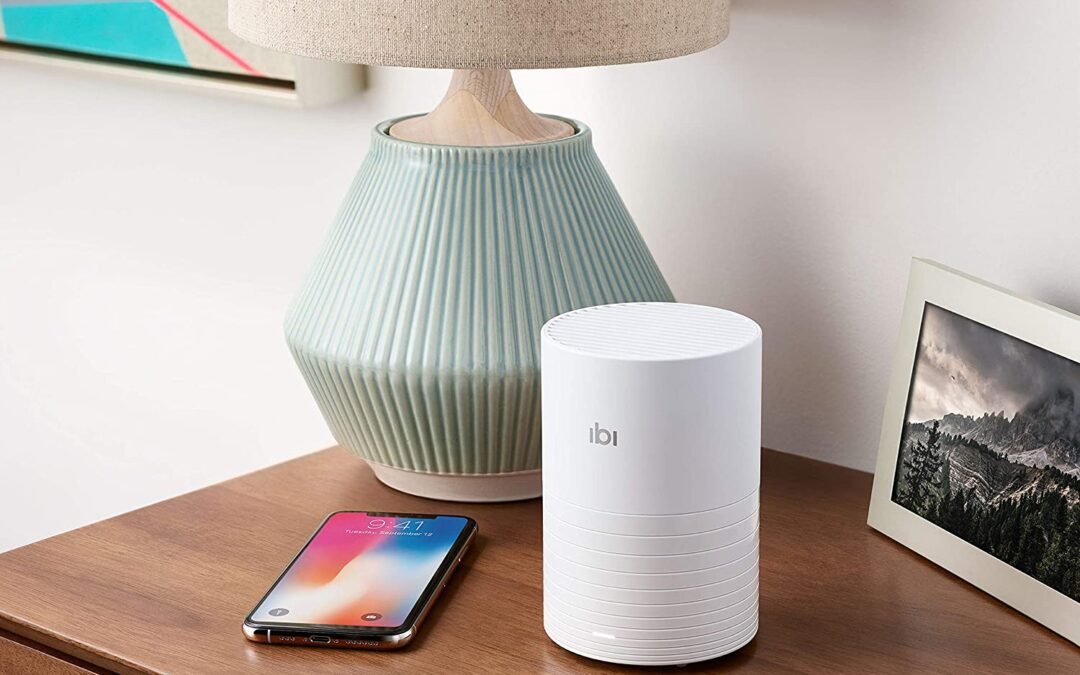
Developers at SanDisk designed iBi for people who aren't comfortable with the concept of storing their photographs and movies on the cloud. When you add a wireless device the size of a beer can to your home network, the files are stored. The iBi, on the other hand, is more than just a backup device. You may share files with your "inner circle" and others, along with the option to like and comment, using iOS, Android, and Mac applications. Casting films to Apple TV, Fire TV, and Chromecast and syncing material from social media are just a few of the other features of this device.
iBi Set-Up
Before you start the setup process, make sure you’re near your Wifi router and have a good internet speed. The set-up is quite simple. Let the app do the work for you by downloading the application and creating an account. You can use cloud storage by importing your images from your phone, and we recommend using auto-import. Since I usually have a portable hard drive with me, we connected it to the app and imported all our images. It worked flawlessly.
Features
According to SanDisk, you may store more than 250,000 photographs or over 100 hours of HD video on the 1TB of storage in the current iBi version. Additionally, there is a 64-bit quad-core ARM Cortex CPU and 1GB DDR3L RAM. Wi-Fi 802.11ac and Bluetooth Low Energy are both supported by the gadget. I love the fact that you can stream from iBi to your TV with Roku, Google Chromecast, Fire TV, and many more. Here are a handful of other features worth mentioning:
- You only need one device. If you want to invite family members, friends, or whomever to share images/videos, you will only need one device.
- You can invite as many people to your iBi inner circle (as of right now, there are no limits). As far as sharing those videos and images, you can also share as many photos and videos to as many people
- Here’s the secret: it’s not really “cloud storage” per se. Your photos and videos are all stored on the smart photo manager hardware device.
- The app is free. No premium service. No monthly subscription. No monthly fees. Easy to download and extremely easy to use.
BUY: Buy Your iBi Smart Photo Manager Now!
Share With Your Inner Circle
We alluded to it above about sharing with your inner circle. There are several ways to share files with the iBi. Everything you post on iBi is accessible only to you and secured by login and password; therefore, it's crucial to keep this in mind when using the service. The next step is to decide which files or photos you want to share with your family members.
"Inner circle" has been made for your closest family and friends. Ideally, this group should only include those who live in your house and have access to your Wi-Fi. You can place restrictions on what users can do (because you don’t want others you invite to invite others ~ that would be almost impossible to manage). You can, however, add anyone you choose to this list. These individuals receive an iBi login and access your device's storage for films and images. As the owner of the iBi, you cannot view these files directly. However, the iBi owner can remove members of their inner circle (and their data) at any moment.
Pros Of The iBi Smart Photo Manager
It's easy to see that iBi is both a backup and a sharing device for images and movies. Specifically, the "automatic backup" option has been a breeze to set up, use, and enjoy. Because it automatically backs up everything in the Photo app. I love that I can rest easy knowing that our files are safe with iBi. I’ve NEVER had an issue being able to access my photos or video. Even though there are several ways to share photographs and videos, you still need to address some issues if you don’t have an internet connection. That’s the key. I’ve read some reviews where people are mad because they can’t access their media. That’s mostly on them because they might be somewhere where they have no connection either through the internet or cellular data.
SanDisk deserves credit for keeping the iBi app design simple. They have a lot of years behind data storage and that’s probably a major impetus behind their simplicity. In addition, the app's search tool allows you to look for material by date, location, and keyword, which is helpful, even though the built-in AI doesn't know the difference between dogs and cats yet. It’s really simple, but I expect the search AI to get better.
DISCOVER: 5 Easy Tips How To Protect Your Home Wifi Network
Cons of the iBi Smart Photo Manager
There is nothing wrong or problematic with iBi. The setup is one of the simplest things I've encountered. In terms of social integration, iBi might use some work. The synchronization difficulties might be a concern for some. But paying attention to the instructions and even diving online and checking out a few tutorials will help any hurdles in that department.
With that said, it’s still a bit clunky. For example, you can use the iBi app and online interface on your mobile device to connect to Facebook. Yes, it's functional. The back and forth, on the other hand, the back and forth is disorienting and may confuse certain people. A future software upgrade may be required to make the procedure more efficient. The workaround for this is to download the photo to your device and share it through your phone’s default photo app.
As one of the most important reasons not to utilize third-party picture and video solutions on Apple or Android devices, synchronization and backup can be confusing terms. iBi is a backup device, not a sync tool. When you erase data from the primary source, your backup will retain it. Having a secondary backup system like the iBi demands some rethinking for someone who prefers order over chaos regarding photo and video preservation. Prepare yourself for going all-in with an iBi gadget or not if you buy one.
LEARN MORE: Amazon’s Using Your Internet For Their Own Network?
So who should take iBi into account? iBi is a wonderful alternative for truly safeguarding your most priceless memories to escape the cloud. However, you'll also need to select how to back up your other data. And if you don’t back it up, create your own personal framework for organizing photos in the app interface.
iBi User Reviews
This product has a 4-star rating out of 5 on Amazon. Nearly 1.4K reviews are generating this rating and after our recent analysis of these reviews, almost all of them are from verified purchases And even though Verified purchases aren’t the end-all-be-all of reviews, they do matter. Based on customer ratings by feature, easy to install (5.0), value for money (4.2), easy to use (4.0), and storage capacity (3.8) are the most important features customers love about the iBi photo manager. I’ve now personally recommended this product to half a dozen family and friends. One time the product came back defective out of the box. With the help of contacting iBi and then Amazon, we got the product completely replaced at no charge. In talking with Tech Support for iBi, I was pretty impressed with their genuine level of professionalism and care.
A Smart Alternative To Google Photos
For the record, I love Google Photos. It is a great way to store and share your photos, but it has its drawbacks. For one thing, it can be difficult to find the photos you're looking for, especially if you didn’t create folders and think ahead with your asset organization. IBI photo manager can help you organize your photos so you can find them easily. IBI photo manager can also help you edit and share your photos. I love the user access functionality with IBI and think their app OS interface is easy to use. You can even use IBI photo manager to create slideshows and collages. The nice thing about the IBI photo manager is you pay once and that’s it. If you run into storage issues with Google Photos and need more space, you’re going to be paying an extra monthly fee. You might be surprised at how much IBI photo manager can improve your photo-sharing and photo-storing experience.
Do You Really Need A Smart Photo Manager?
If you're like most people, your photo and video collection is a hot mess. Your smartphone is full of random images and videos that you've taken over the years, and your computer's hard drive is probably cluttered with even more memories. I feel your pain. So do you really need a smart photo manager to help you organize all of those memories?
The truth is a smart photo manager can be a huge help when it comes to sorting, storing, and sharing your photos and videos. With a smart photo manager like the iBi, you can quickly and easily tag your images so that you can find them later. The organization of your personal media is super slick. It will save you a ton of time! You can also create albums and slideshows, store your photos and videos in the cloud, and share them with family and friends.
BUY: Buy Your iBi Smart Photo Manager Now!
Related Articles:
How To Protect Your Home WIFI Network
Amazon Sidewalk: How to Opt-Out
by Staff | Oct 10, 2022 | Family Safety, Reviews, Tech Living
If you're like most people, you probably have a few electronics, devices, and gadgets that you use every day. Maybe you have an iPhone or iPad to keep in touch with family and friends. Or maybe you use a fitness tracker to stay in shape. Perhaps an Echo Show to help with home automation. Whatever your favorite electronics are, it's important to find the best places to buy them. That's why we've put together this list of the best places to buy electronics, devices, and gadgets.
For anyone looking to purchase affordable electronics, we've searched the Internet to find the most reliable and trustworthy online stores, which all offer some of the greatest gadgets you can get your hands on.
In addition to a wide range of products, Amazon is a terrific place to get a bargain on electronics. It's easy to find a wide variety of gadgets and devices for sale in this popular online marketplace. The site is easy to use and you may get the best price by finding a seller that offers similar products at a lower price. Amazon’s filtering options are also a nice added feature when trying to drill down on exactly what you are looking for in a device.
Amazon is a trustworthy site that provides exceptional customer service in addition to its low costs. You may expect prompt and thorough responses from Amazon's sellers in response to your inquiries. In addition, you may rest easy knowing that you can return your gadget for a refund if you want. Because Amazon merchants depend on favorable feedback from their customers, they will go to great lengths to avoid disappointing their customers.
Tips For Buying Electronics On Amazon
Here are a few tips to help you snag the best prices on everything from TVs to laptops. First, be sure to check out Amazon's "Deals of the Day" page. This is where you'll find can't-miss savings on a wide range of products. Second, keep an eye out for special promotions and coupons. Amazon frequently offers discounts on specific items or categories, so it pays to do your research. Third, take advantage of Amazon Prime. Prime members get free two-day shipping on eligible items, which can save you a lot of money if you're planning on buying multiple items. Next, always check Amazon reviews. Granted, a lot of Amazon reviews are fake. But I’ve found the most reliable method is to sort reviews by recency. I’ve uncovered some janky products with this little research hack. Finally, don't forget to compare prices. Checking other retailers' websites is a great way to make sure you're getting the best deal possible.
DISCOVER: How Much Trust Should You Put In Amazon Reviews?
What To Watch Out For Buying From Amazon
I love buying from Amazon. It’s one of my go-to places for electronics. It really is. There are a couple of reasons why you might want to think twice before buying your next tech device from Amazon. For one, the company has been criticized for its labor practices, with workers in its warehouses often facing grueling conditions. According to recent reports, it is getting better. But it's still important to buy from companies that share your values. Additionally, there have been reports of counterfeit products being sold on the site, which could create a lot of additional problems. Not only could it pose a serious risk to your health and safety, but if you buy a brand you expect to get that brand's product. Chinese counterfeits aren't as common as they used to be on Amazon, but they're still a problem with some devices. I always check the most recent reviews on any product I buy from there to make sure there isn't a counterfeit trend happening.
Since its launch in September 1995, eBay has become one of the most widely used websites in the United States. To this day, eBay is active in over 100 countries throughout the world. Users love their online auction capabilities, and if you're patient, you may get some great prices by using them. Electronics from your favorite brands are frequently available for purchase here. If you're looking for a wide variety of brands and products to choose from, this is the place to go. On occasion or during holiday seasons, they provide substantial discounts to their consumers in order to attract new customers and retain current ones.
Tips For Buying Electronics On eBay
When it comes to buying electronics and gadgets, eBay is a fantastic option. Not only can you find great deals on new and used products, but you can also purchase items from sellers all over the world. However, there are a few things to keep in mind when shopping on eBay. First, be sure to check the seller's feedback score before making a purchase. This will give you an idea of their customer service and whether or not they are reputable. Secondly, pay attention to the shipping costs. Sometimes sellers will inflate these costs in order to make more money. I’ve seen Amazon Echos with a price point of $19 with a shipping price of $29.99. Don’t fall for this little trick by sellers. Finally, be sure to read the product description carefully before making a purchase. This will help you avoid any surprises down the road. By following these simple tips, you can have a great experience shopping on eBay for all your electronic needs.
There is no better place to shop for photography-related products than B&H Photo and Video. In 1973, B&H was founded by a husband-and-wife team as a "Mom and Pop" business. Because of their approach to honest selling and high-quality goods, they quickly gained the trust of the picture, video, and sound professionals. When they first opened their doors, it was 1973. They've grown into one of the largest non-chain specialized electronics retailers in the United States today. There is a wide selection of new and used equipment available at their online electronics shop. It’s not rare to find incredible bargains in the area devoted to special offers.
Tips For Buying Electronics From B&H
There’s no denying that B&H is one of the leading electronics retailers in the world. Whether you're looking for a new television, camera, or laptop, B&H is a great place to start your search. However, with so many products on offer, it can be tricky to know where to start. To help you make the most of your next purchase, here are a few tips for buying electronics at B&H.
Firstly, take the time to research the product you're interested in. B&H offers a wide range of products, so it's important to find one that meets your needs and budget. Reading reviews from other customers can be a great way to get an idea of what a product is like. I trust B&H reviews more than I do Amazon and Walmart reviews. Once you've found the perfect product, be sure to take advantage of B&H's competitive prices. In many cases, you'll be able to find the same product for less at B&H than at other retailers. Finally, B&H offers a great returns policy, so you can buy with confidence knowing that you can return or exchange your purchase if you're not happy with it.
Outside of Amazon, it's possible that Walmart is Best Buy's only real competitor. These two retail titans have been in business for a long time. Wal-Mart is also a multibillion-dollar store chain owned by the Walton family, a well-known American aristocrat. Moreover, Walmart provides one of the most extensive selections of consumer electronics available, including some of the most modern models.
Since Walmart has over 10,000 store locations worldwide and an ever-growing presence online, you won't have any trouble locating one where you can buy your electronics. That’s one advantage stores like Best Buy and Walmart have over Amazon. You can research your product online, then go buy in-store. Or…you can go check it out in the store and go buy it online. In addition to televisions and laptops, they also sell tablets and mobile phones, as well as printers and video games. This is a good site to get gadgets and devices if you're involved in the internet of things movement as well. It honestly feels like Walmart provides everything you need, from wearable technology to cameras and streaming services. Many fantastic deals are available throughout the year as well in their physical stores and online.
LEARN: Set Up a Smart Home Intercom System For Under $100?
What To Watch Out For Buying From Walmart
Walmart is one of the biggest retailers in the United States and it's no surprise that they sell a lot of electronics. This could be because of foot traffic or just the massive branding advantage Walmart has over competitors. Nonetheless, there are a few reasons why you might want to be a little skeptical before buying your next gadget from Walmart. Again…it depends on the device or gadget you’re buying. For one thing, Walmart is known for selling products that are low in quality. This is why...if you do buy from Walmart, stick with the name-brand products. These generic, low-quality tech gadgets and electronics often cut corners to save money and this can result in products that break easily or don't work as well as they should. In fact, some might not even work out of the box.
Finally, Walmart has a reputation for terrible customer service. It’s not always bad, but I’ve had to wait in line for a long time just to return something. If you have any problems with your purchase, good luck getting anyone to help you out.
Hear me out on this. Costco is actually a great place to buy electronics. Not because of the variety (because the variety is slim here or at least slim compared to Walmart, Amazon, and Best Buy). But…it’s very difficult to beat Costco’s return policy (and sometimes pricing). And if you sign up for their Costco Citi card, you can score extra years (not days, not months, but years) of warranty without paying extra. Another reason why Costco is a great place to buy electronics is the savings on just one device (like an iPad, for example), which can often pay for a membership for a year.
Tips For Buying Electronics At Costco
Whether you're in the market for a new TV or a new laptop, Costco is a great place to start your search. Here are a few tips to help you get the best deal on electronics at Costco:
- Know what you want before you go. It can be tempting to browse the shelves and try out all the latest gadgets, but it's important to know what you're looking for before you head to the store. This will help you avoid making an impulse purchase that you may later regret. If I had a penny for every time I walked out of Costco without spending over $200 I’d have no pennies. They get me on impulse buys all the time.
- Compare prices online. While Costco does offer some great deals, it's always worth checking prices online before you buy. This way, you can be sure that you're getting the best possible price.
- Ask about return policies on specific items. Most electronics retailers have different return policies for open-box and used items, so it's important to ask about Costco's policy on the product before you make your purchase. Their general return policy is great, but make sure to check on the specifics for the product as well.
- Check for special promotions. Costco often has special promotions or coupons available for electronics purchases. Be sure to check the website or ask a sales associate.
TRENDING: Everything You Need To Know About Smart Home Automation
A Few More Tips For Buying Electronics
In order to get the greatest deal, it's critical that you're looking in the right place. Every site on this list is great for affordable electronics, and they all have something special to offer. Electronics are a big part of our lives. We use them for work, for entertainment, and for staying connected. With so many electronics available, it can be tempting to buy them exclusively online. After all, online shopping is convenient and often cheaper than shopping in person. BUT…there are some risks to consider before buying electronics online. For one thing, it can be difficult to know if you're getting a good deal. Online retailers may inflate prices or sell counterfeit products. Furthermore, electronics can be delicate and easily damaged in shipping (this is rare, but it still happens). As a result, it's important to do your research before buying electronics online. By taking the time to compare prices and read customer reviews, you can help ensure that you're getting a good deal on a quality product.
With all that said, if you're looking for the best deals on electronics, then shopping online is the way to go. You can find great discounts on everything from TVs and laptops to cameras and smartphones. And with so many online retailers to choose from, you're sure to find the perfect electronics for your needs. Plus, shopping online is convenient and easy. AND…if you stay connected to some of these brands’ social media handles, you can score some really good deals IF you’re patient. You can also shop for electronics from the comfort of your own home. I do not miss the days of finding the best deals among crowded shopping malls and crazy traffic.
by Dale Meredith | Oct 3, 2022 | Geek Speak, Reviews
Developers designed VPNs for personal use, but with technological advancements, VPNs now act as a shield to protect users from malicious content over the Internet. Businesses also opt for VPNs to provide additional security features like user management and blacklisting websites.
With the right business VPN, you can access foreign markets, secure your employees' use of public Wi-Fi networks, and securely link remote workers to your most valuable business assets. A business VPN encrypts all of your internet traffic and data. Even if a hacker intercepts your data, they won’t be able to read it.
Plus, dedicated business VPNs deliver static IPs, restricting your data access to just one IP address. Check out our favorite picks below!
Choosing A VPN For Your Business
If you're looking for the best VPN for your business, you've come to the right place. Before we get to the best VPNs for business, I want to briefly walk you through everything you need to know about choosing a VPN, from the basics of how they work to the features you should look for. By the end, you'll have all the information you need to make an informed decision about which VPN is right for your business.
Choosing a VPN can be a daunting task, but it doesn't have to be. With a little knowledge and guidance, you can easily find the best VPN for your business.
How Do VPNs Work
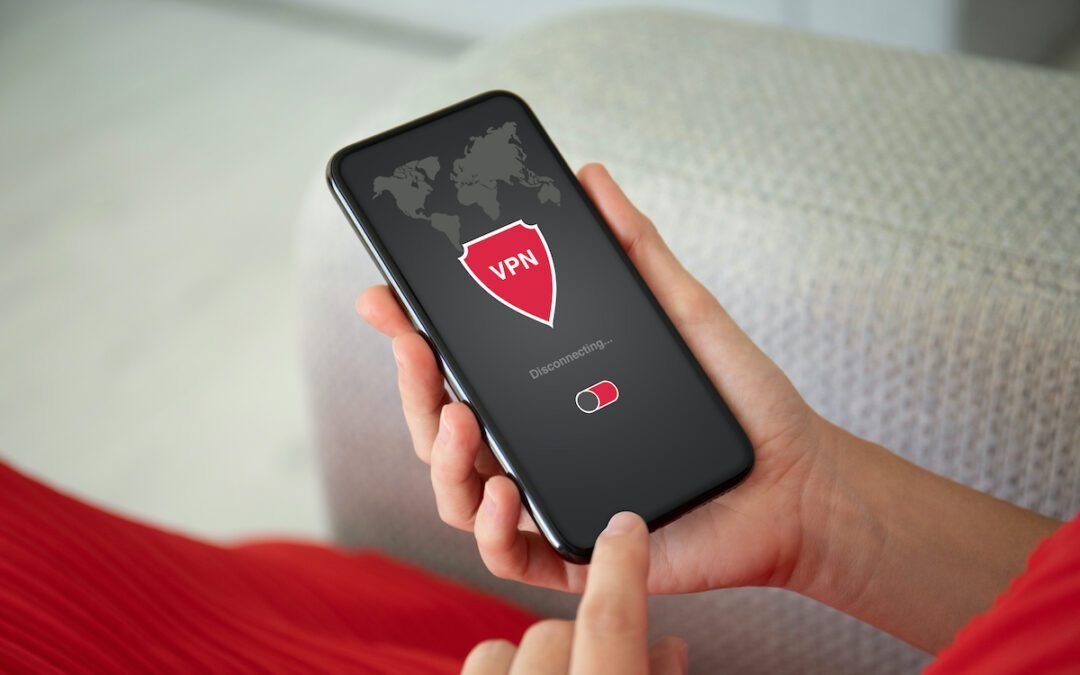
A VPN, or Virtual Private Network, is a way of extending a private network across the internet. When you connect to a VPN, your device will appear as if it's on the same local network as the VPN server. This means you'll be able to access all of your usual network resources, even if you're in a different location. By encrypting your traffic and hiding your IP address, a VPN can also help to improve your online privacy and security.
There are many different ways how VPNs work, but most operate using a similar set of principles. First, you'll need to sign up for a VPN service (we've got our picks below). Once you've done this, you'll be able to download and install their VPN software on your device. Once the software is installed, simply launch it and connect to one of the VPN servers. Your traffic will now be encrypted and routed through the VPN, providing you with a secure and private connection. And yes…it really is that simple.
RELATED: Your VPN Questions, Answered
VPN Features To Key On For Business Users
If you're looking for a VPN for business, there are a few key features to look for. First, you'll want a VPN that's fast and reliable. After all, nothing is more frustrating than trying to work remotely only to find that your VPN is slow and keeps disconnecting. Second, you'll want a VPN that offers robust security features. Security should be one of the highest features you prioritize when choosing a business VPN. You'll be trusting your business data to the VPN, so you'll want to make sure it's well-protected. Finally, you'll want a VPN that's easy to use and set up. As a successful business owner or manager, time is valuable. You don't want to spend hours messing around with settings just to get the VPN up and running. Luckily, there are plenty of great business VPNs out there that offer all of these features and more. So…what are my picks for some of the best VPNs for business?
Perimeter 81: A Premium Business VPN
The Perimeter 81 business VPN offers specialist services for businesses. It enables businesses to deploy private VPN servers that their staff can securely access from anywhere. What does that mean for your employees? Employees will be able to securely access files, apps, and other resources from remote locations.
Perimeter 81 uses AES 256-bit encryption for all communication through their VPN. Those who don't want to deploy their VPN service can choose from 700 public servers located in 36 locations worldwide. The VPN can be monitored by businesses by logging and inspecting all the traffic that passes through it. What are some of the business reasons to consider Perimeter 81:
- Business-oriented
- You can set up your own server or use public ones
- Supports site-to-site VPNs
- You can host apps and files on the VPN server
- Secure encryption
- Enables network segmentation (which you will need if you have some team members who need more from your network)
Perimeter 81 offers a premium service at a premium price, making it the most expensive service provider. Therefore, You should consider the number of devices while getting a subscription. With that said, Perimeter 81 is a solid business VPN and probably one of the best on the market.
>>Get Perimeter 81 VPN Here<<
Nord Teams: Business VPN For Small And Medium Businesses
NordVPN's business-focused service Nord Teams is designed for small to medium businesses. You can access the office network and the internet securely via remote access. A centralized admin panel allows users to manage all accounts from one location and tunnel their work devices through 33 countries. IT managers can add users easily without complicating billing. That’s a feature we love. Less hassle doing things and making life easier for us IT geeks.
LEARN: Skip The VPN For Business? Say Hi To Firewalla Gold
The third-party authentication option works with Microsoft Azure, OneLogin, and GSuite. Our iPhone and Android apps are available for Windows, macOS, iOS, and Android. A kill switch and strong encryption protect your organization's data. Additionally, support requests can be delivered within three hours by Nord Teams. Reasons to consider Nord Teams:
- Connectivity that is fast and reliable
- Secure encryption with 256-bit military-grade
- Strict no-logs policy ideal for privacy-conscious users
- Unlimited bandwidth with no data caps
- Compatible with Windows, Mac OS, iOS, Linux, and Android
If you consider Nord Teams, you should note that the desktop app is a bit technical for general users and requires some time to use correctly. Therefore, your IT manager might have to debrief staff on how to use it.
>>Get Nord Teams VPN Here<<
TorGuard: Simple VPN For Businesses
If you're a business that wants encrypted email, a VPN connection, and a dedicated IP address in a single package, TorGuard is what you need. It's one of the few VPNs for businesses that provides everything your business will need. The cheapest package includes five user accounts, five encrypted email addresses, and a dedicated IP address so that you can get started right away. Your company can be up and running with this business VPN in no time.
AES-256 encryption secures your connection with this security-focused VPN. TorGuard also offers a stealth VPN option that further obfuscates your VPN connection, making it appear as regular internet traffic.
TRENDING: The Pros And Cons Of Using A VPN
Additionally, TorGuard provides custom server setups and a dedicated account manager who monitors your account 24 hours a day, seven days a week. It’s like having an employee without having to pay for that employee. Every plan includes TorGuard's extensive network of servers and apps running on Windows, Mac, Android, and iOS. Here are some business-related reasons to opt-in for TorGuard:
- Obfuscation of a VPN for stealth
- Email addresses are encrypted
- It bundles IP addresses
While finalizing TorGuard, you need to keep in mind that it does not support split tunneling and the business VPN option is only available when you subscribe to a bundle.
>>Get TorGuard VPN Here<<
Twingate: A High Quality + Versatile Business VPN
Twingate is a new VPN company with some exciting features that make it stand out from the rest. Twingate is a cloud-based VPN service that offers zero-trust access control and makes gateways invisible to the Internet, unlike traditional VPN solutions. The service can be deployed and scaled with no changes to network infrastructure.
Twingate supports single sign-on (SSO) so that staff can only access resources designated by IT admins. That includes on-premises, cloud, and remote apps and networks. With the help of split tunneling, you can tunnel traffic when necessary, while bandwidth-intensive tasks like video calls are routed directly through the network. You should consider Twingate if you are looking for:
- Access control based on zero-trust
- Supports most major single sign-on (SSO) providers
- Easily deployable
- Split tunneling
>>Get Twingate VPN Here<<
ExpressVPN: My Personal Choice
ExpressVPN may be the fastest VPN on the market, according to industry tests that consistently show it only slows down connections by an unnoticeable amount. However, there are a few more variables to consider. Let's start with ExpressVPN's 3,000+ servers in 160 locations across 94 countries. This is critical to performance since the closer your company is to the VPN server, the faster your internet connection will be. ExpressVPN also includes Smart Location technology, which selects the finest VPN server location for you depending on download speed, latency, and distance. But there's more to a business VPN than just speed. One of the most important factors is security, and ExpressVPN has that covered, too. It uses 256-bit AES encryption with 2048-bit keys, which is as good as it gets. Additionally, ExpressVPN keeps no logs of user activity or IP addresses, so your anonymity is guaranteed. This claim is verified but yearly audits from 3rd party companies.
If you're looking for a business VPN that's both fast and secure, ExpressVPN is a great option.
>>Get ExpressVPN Here<<
Do You Really Need a VPN For Business? (H2)
If you're running a business, then the answer is yes, you need a VPN. A business VPN can give your employees remote access to your company network, making it easier for them to work from home or on the road. It can also help secure your data and keep your confidential information safe from prying eyes. With more and more employees and professionals moving to remote work, business VPNs are almost a must-have at this point. There are a few different types of business VPNs available, so it's important to choose one that's right for your company. If you have a small business, then a shared VPN may be sufficient. For larger businesses, however, you'll need a dedicated server which can be more expensive. No matter what size business you have, though, a business VPN is an essential tool. If you are still unsure about getting a VPN for your business, at the very least get a firewall for your business.
So…which one would we recommend as being the best VPN for business? It's best to use a corporate VPN for consolidated data. You'll need a static IP address to keep tabs on your employees' internet activities. With Perimeter 81, you're getting more than just a VPN, you're also getting comprehensive security for your organization. And that's why it is at the top of our list for one of the most impressive VPNs for business. But…the other VPNs we reviewed are still equally impressive.
Related Articles
Pros and Cons for Using a VPN
Benefits of VPN
Firewalla Gold: Review for Home Networking
by Staff | Sep 16, 2022 | Reviews, Tech Living
Getting outside and enjoying some much-needed sun (or just nature for that matter) is a joy no matter where you are. Similarly, power outages during winter storms, wildfires, or summer heat waves are unpredictable. Our lives revolve around electrical equipment, such as smartphones, smartwatches, tablets, laptops, and GPS devices. And when the power goes out, having a backup (or multiple backups) just feels right. This is where portable power stations can play a major role. Granted, you still have your traditional gas generator that can provide energy when those outages occur. Still, this evolving market of portable power stations is definitely something you should investigate and keep your eye on. If you are someone who enjoys the outdoors and likes to camp, getting one of these power stations is the perfect addition to your outdoor equipment.
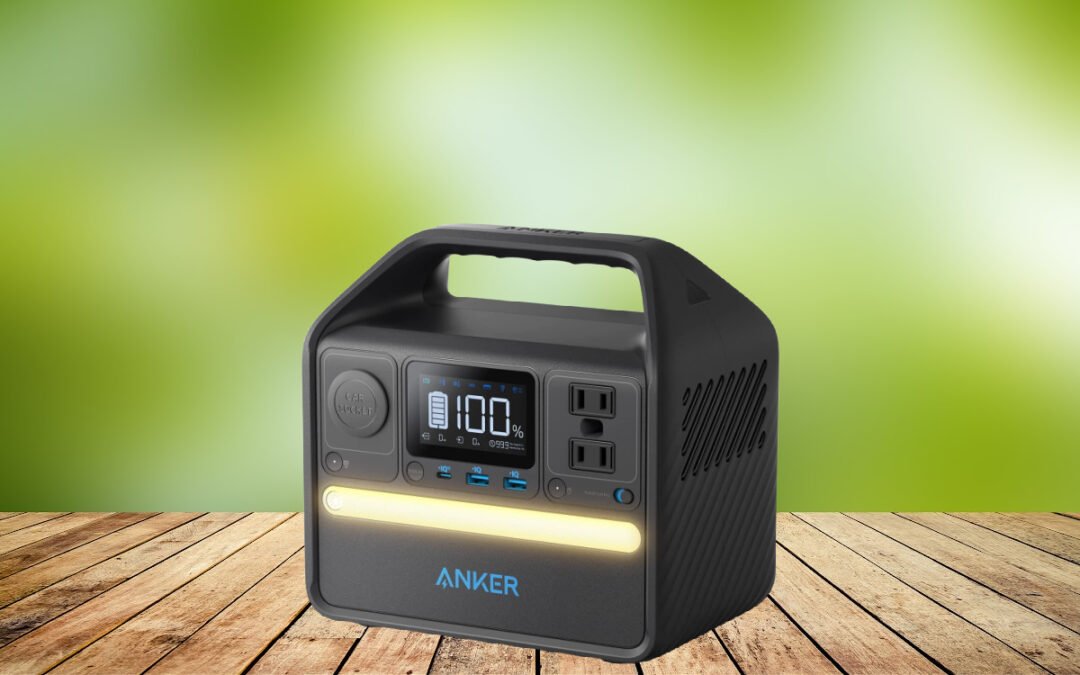
One of those small pocket power packs is ideal for camping and when you’re away from power for long periods of time BUT impractical with a family with multiple items. This is where Anker's 521 PowerHouse Power Station comes into play. The Anker 521 power station features six outlets: two USB-C ports, a car socket, three-pin US plugs, and two USB-A ports. In addition to its lamp bar on the front (which I thought was superfluous at first but turns out it isn’t), the 521 also has a power-saving mode that automatically cuts off power to a device when fully charged.
Anker The Brand
I'll admit it, I'm a bit of an Anker fan. I've been using their products for years, and I've never been disappointed. Yeah, you have the occasional slip-up or quality issue with a product (and this has increasingly been an issue with the onslaught of supply chain issues created by covid), but they’ve always been quick to make things right. In my opinion, their chargers are some of the best on the market. Their batteries always seem to last just a little bit longer than the competition (there are some exceptions ~ Jackery). Most of the Anker brand’s products are very affordable and durable. But what really sets Anker apart for me is their customer service. Whenever I've had an issue with an Anker product, their customer service has always been super responsive and able to help me out. It's really refreshing to see a company that cares about its customers. That's why I'm such a big fan of Anker.
DISCOVER: How Often Should You Reset Your Phone?
Portable Power That Matters
Based on Anker's claims, we tested the 521's ability to power our devices. Anker claims this power station unit can charge a camera 15 times, a laptop four times, and a smartphone 20 times. That’s a huge task if you ask me. We didn’t try each of those for each charging cycle, but we did use the Anker 521 quite a bit on the last trip and it met our expectations with charging capacity and speed. With Anker, you'll get great LiFePO4 batteries. I’m very hopeful that this portable power station will live up to the company’s 10-year lifespan claim. I see these kinds of claims often when it comes to batteries. For the most part, I believe them. But ultimately how you treat and use your batteries has more impact on their lifespan than anything.
I also used this Anker power station to power an air pump to blow up the paddle boards AND to power a small air compressor to pump up the tire of my ATV. This device powered my laptop to a full charge and even powered my tablet to a full charge. I used the Anker 521 in just about every portable charging situation I could find. After four days in the mountains using the Anker 521 to power a ton of our devices, it still had juice leftover. This portable power station is one I’d highly recommend. Aside from just a portable power unit to take with you for on-the-go travel, I have to imagine this would be a perfect tool in case of a power outage as well.
LEARN MORE: Stop Your Smartphone Apps From Tracking You
Additional Power Station Features Worth Mentioning
A power station must be portable. And not just portable but easily portable. One of the main strengths of the Anker 521 lies here. Around 8.2 pounds (inches too), it resembles a larger-sized ATV battery. It’s not bulky and cumbersome either.
We tested the 521's portability in a car. A four-hour drive went by with Anker comfortably fitting in the passenger footwell. I used my laptop plugged into the Anker power station while in the passenger seat without any issues. Due to its lightweight, it was easy to move from the front to the back of a vehicle with just one hand when the kids wanted a turn to charge their devices. The Anker 521 also rested comfortably in the middle console between the driver’s and passenger’s seats, so that was a pleasant surprise.
The Power Saving Mode feature made the Anker 521 undeniably efficient. Plugging in an item displays the remaining power hours. The power consumption will drop significantly after attaching an empty device, so ideally it’s a good idea to charge your devices fully before embarking on any journey. As for power and portability, the Anker 521 is impressive.
Pros:
- Power-saving mode is a nice feature
- Ultra-portable design
- Made from very durable materials to handle drops and general wear and tear
- I was surprised at how fast this Anker power station charges devices. Definitely noticeable.
- The solar bundle option is very affordable for portable solar energy. The Anker 521 Solar Generator bundle will run around $550. In direct sunlight, you’ll get a full charge in a little over 4 hours.
Cons:
- One USB-C port only. I haven’t torn apart the unit, but with USB-C being used more and more, I can’t see why Anker couldn’t have put one more port here.
- Wish they had surplus car sockets (but that’s just me being picky.
Specifications
- Brand: Anker
- Wattage: 200 watts
- Item Weight: 8.2 Pounds
- Color: Black
- Frequency: 60 Hz
- Output Wattage: 200 Watts
Anker 521 Limitations
I didn’t run into many issues and limitations with the Anker 521. It performed really well with just my wife and I on our last mountain trip. I didn’t really like having the two AC receptacles share a hole for the ground prongs on the plug. They’re almost two close together, but I didn’t have a need to use both at the same time, so again… I'm being picky. If you wanted to plug in two laptops or a lamp and a laptop, you won’t be able to. The USB-A ports only kick out 14W total, which may not seem like a big deal UNLESS you are using both of the ports at the same time.
TRENDING: Find Out The Best Places To Buy Electronics
According to some customer reviews from verified buyers, there have been some technical issues with some units: USB-C stops charging, LCD screen stops working after a month, rapid drop in charging capacity, etc. These are typical one-off issues, so I don’t think they are commonplace. After I have this power station unit for a while, I’ll come back and update this review with more findings.
Anker 521 Portable Power Station User Reviews
This product has an amazing 4.6 rating out of 5 on Amazon. That’s with 500+ customer reviews driving that rating as well. And based on customer ratings by feature, portability (4.6), lightweight (4.5), charging power (4.5), and battery life (4.3) are the most important features customers love about the Anker 521 portable power station.
Final Thoughts On The Anker 521 Power Station
Anker's 521 Portable Power Station has really caught my attention. I like that it delivers a great deal of recharging power and is compact. Anker's 521 operates without a hitch in practice, despite a few shortcomings and limitations. The device provides great flexibility when camping or in emergency situations.