Want to secure your online presence from malicious activities but don’t know what tool you should use to achieve your security on your Android device? Then you have come to the right place 😉 We’re going to break down all the essential information about the best VPNs that can be used to secure your Android device.
Virtual Private Network is an effective security tool that safeguards your online activities on your devices like your Android phone or tablet. VPN helps you get peace of mind and free web browsing securely and privately. You can also hide your identity and location from advertisers and online trackers through a VPN. I’m a big fan of having a VPN for your desktop and laptop, but equally as big of a fan when it comes to mobile devices as well.
Many VPNs are available on the market today. When I started diving in to do more research, I was amazed at how far VPNs for smartphones have really evolved just in the last year alone. Because of that, it is crucial to make a proper and informed decision based on this list that contains the best VPNs for Android in 2022. Luckily, I was able to come to a conclusion on some of the best VPNs for your Android.
What Is A Virtual Private Network (VPN)?
A virtual private network or VPN is a network encryption tool that provides security and privacy to your web browsing. Without VPN, any observer can easily monitor and check your web traffic. VPN helps to hide your identity and location from all online observers.
VPN encrypts all web traffic by sending it to a secure server operated by the company. The crucial thing is that VPN hides the IP address of your Android phone, which keeps away the active snoopers. All these encryption functions are to protect your online activities.
Additionally, some VPNs also provide antivirus support to your android. This feature is not available in all types of VPNs, but those who offer it, ensure you enjoy robust protection from malware attacks.
Why does Your Android Need a VPN?
A VPN has a vital role in Android smartphones because they access and use the internet and cellular internet which can be compromised if not used properly. VPNs help secure your phone’s identity and location to prevent harmful threats.
Best Android VPNs in 2022
The list of the best android VPNs updates every day based on features, services, and ranking. As previously notes, VPNs for smartphones is a growing market, so we wanted to key in on those VPNs that have stood out most recently. The following are the top five Android VPNs today:
NordVPN
NordVPN is one of the best and most reliable brands in the VPN market. The main thing that makes it a unique and trusted brand is its design. The App has a user-friendliness interface and is easy to use, just like their desktop VPN. It offers the following features to its users:
It offers a 30-days free trial to new users
You can connect six devices with this application. If you have a family of Android users, that’s a nice bonus.
It has 5300 plus servers. This is an important feature of VPNs.
NordVPN has about 94 countries included in its server list.
The VPN I personally use is ExpressVPN. It is also considered one of the top and best virtual private networks for your Android. ExpressVPN is super reliable, very fast, and easy to use the VPN tool in the market. And just like its NordVPN competitor, it has a great user interface for desktop and mobile. ExpressVPN offers the following services:
It also offers a 30-day free trial period
ExpressVPN has 60 plus server locations and 3000 plus servers. Not as robust as NordVPN, but still impressive.
SurfsharkVPN is one of the cheapest and most comfortable VPNs today and quickly becoming a favorite of mine. Surfshark VPN does not leave behind when it comes to features. Surfshark is the only VPN that does not put a barricade on the connected devices.
It offers a free trial for 30 days
It has 65 plus server locations and 3200 plus servers
It does not limit connected devices
Includes a kill switch, CleanWeb, end-to-end encryption, Bypasser (so you can still do online banking), and a strict no-logs policy.
ProtonVPN is also considered one of the best VPNs that provide widespread online privacy and is the only option on the list of the free tier. ProtonVPN may not be the best choice if you are looking for a low price and unlimited access to devices.
It has only 1669 servers and 63 locations. Not nearly the number we see with its competitors.
It does not offer a free trial BUT has a Free Tier.
You can use it on ten devices at a time. You don’t get unlimited device use, but this feature is definitely a nice bonus.
This is the Android VPN that is for beginners due to its understandable interface and unique design. If you are looking for precision-tuning, then IPVanish is your Android VPN. It can generate visual graphs of internet activity.
It is a customizable VPN
It has over 75 server locations and 1600 plus servers
How Do I Know If I Need A VPN For My Android Device?
If you're like most people, you probably use your Android device for a variety of tasks every day. Most people are spending close to 3 hours a day on their smartphones. From checking email and browsing the web to streaming video and sharing photos, your phone is always with you, always providing a constant connection to the outside world. But think about that for a moment, this means ALL of your Android activities are being tracked by your carrier, websites, apps, and even the government. If you're concerned about your privacy, then you may be wondering if you need a VPN for your Android device.
Remember what a VPN does: it’s a tool that encrypts all of your internet traffic, making it impossible for anyone to snoop on your activities. I love that. It’s like the invisibility cloak Harry Potter wears, but for your Android phone. When you use a VPN, all of your data is routed through an overseas server, making it appear as though you're located in another country or city. As mentioned above, this has a number of benefits, including bypassing censorship and accessing geo-restricted content. But perhaps the most important benefit is that it keeps your information safe and secure from prying eyes (be it government, hackers, or businesses).
But do you really need a VPN for your Android device? If you're concerned about privacy or security, then the answer is probably yes. A VPN will encrypt all of your internet traffic and keep your information safe from hackers, government surveillance, and a list of other places keen on collecting your information. But if you’re really not that concerned about your data being hacked or used for marketing or business material, then you probably don’t need one.
There are numerous methods to strengthen the security of our home network and one of those ways is through a bit of nifty gadget called Firewalla Red. Once connected to your network, it offers us a ton of information on what happens in it: what mobile devices, laptops, smart gadgets, and others connected to the network do. If you’re a casual internet goer and want some basic protection for your network, Firewalla Red is great.
Firewalla Red is an all-in-one solution to the difficulties we face with network security with all the many devices. Firewalla Red does an optimal job at securing all of your digital stuff by connecting to your router. It can safeguard your family from cyber risks, prevent advertisements, regulate kids’ internet usage, and even protect you when you are out on public WiFi. We’re going to walk you through what we found with this small, yet effective firewall hardware.
Incredibly Easy Installation
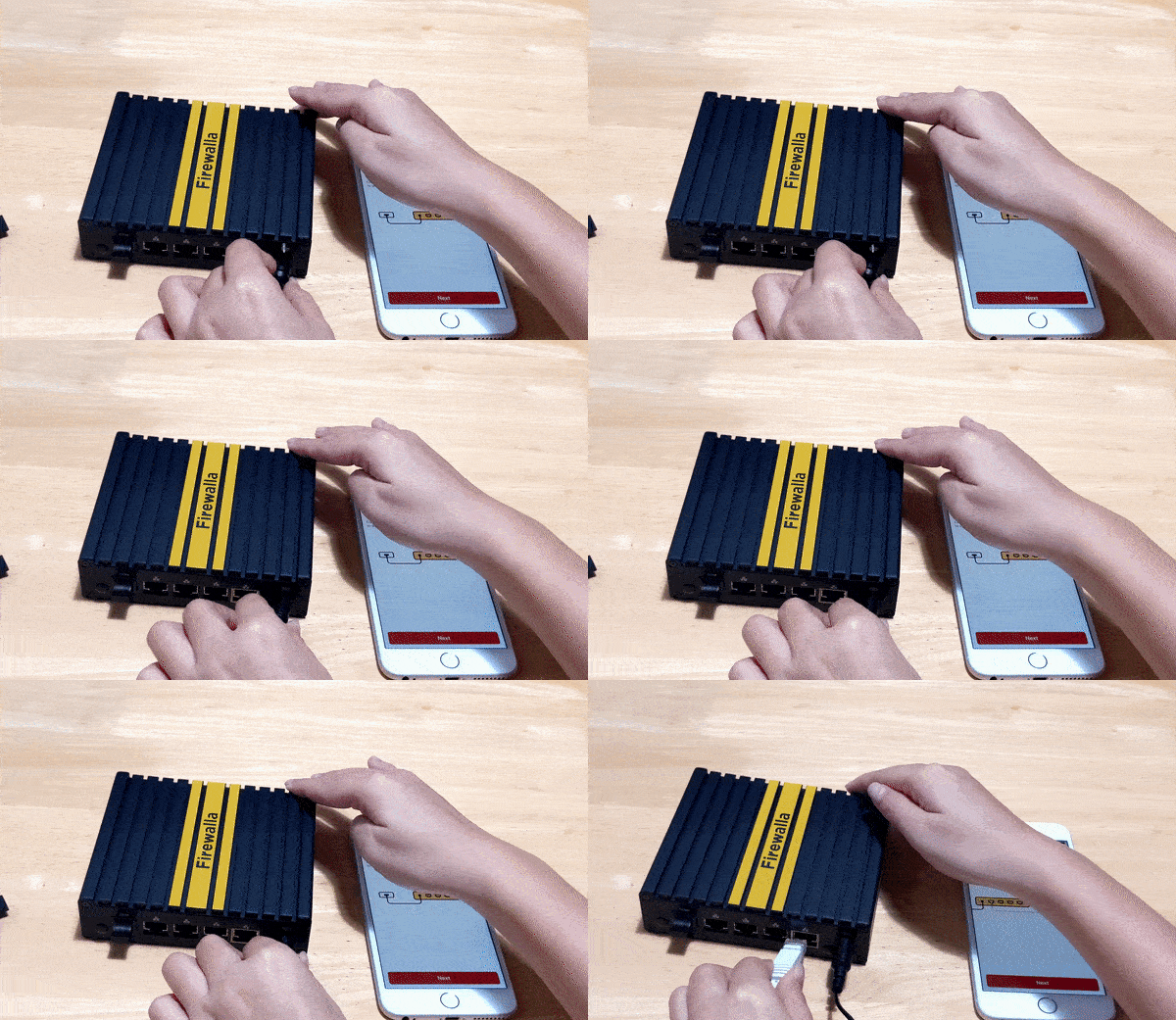
The app can be easily installed on your mobile device. All you need is your WiFi router and a power source, the app on your mobile device, and a barcode scanner. To get started, simply scan the barcode on the box and connect to your WiFi. You can manage and monitor your device from anywhere on the globe, thanks to this functionality. Both iPhone and Android versions are available.
Compatibility
100 Mbits is the limit for IPS functionality. Depending on your router, this gadget works well with most routers and not as well with others. For router compatibility, you can check out the website to make sure yours is on the list before getting the device. For configuration, depending on the router you may have to log in to the router to perform a handful of configurations. Overall, there should be many compatibility issues with Firewalla products. We’ve heard from users that they run into issues when using Firewalla with Google Mesh Wifi, but it took us maybe an extra 4-5 minutes of setup to overcome that small hurdle.
It’s hard to imagine, you get this much protection in a small device. Your Firewalla Red home and wireless internet of things devices all are protected by its unique intrusion prevention system (IDS and IPS) against threats, including viruses, malware, hacking, phishing, cyberattacks, unwanted data theft when using public WiFi, and a slew of other protections.
Filtering Of Content and Blocking Functionality
You don’t have to unplug the power cord from the dusty old router anymore to get your kids to stop using your network. No more wondering what devices are accessing what content. You can check out what any device is doing on your network straight from your Smartphone. Want to block all access, or block off just gaming or social networks? Done with a click. As the primary account and keeper of the network, you can easily keep online activities on your network cyber-healthy and safe by enabling Family Protect, which screens out adult content and blocks malicious content. It’s a set it and forget it feature we love.
Ability to Activate Protection
With Firewalla Red, you can get a deep knowledge of your network and cloud-based behavior with an analytics engine that identifies and blocks problems as they arise. As a result of continuous monitoring, you will have complete visibility into all IoT devices within your network and will be able to monitor comprehensive network flows, bandwidth analysis, and internet troubleshooting. Nothing is bulletproof in the world of cyber security, but we can have safe online surfing and free from hacking the internet with Firewalla Red.
Alert Messages, Configured Successfully
Once Firewalla Red is linked, you will receive the first alert messages, which indicates each of the devices it discovers connected to the network. These notifications are configured by default. Some people get annoyed with over notifications of apps and devices. I am one of those people who hate getting unnecessary notifications. But if those notifications are purposeful and lead to value, that’s all that matters. You can customize in the app AND on your smartphone device just how frequent and aggressive you want those notifications.
Keeping your gadgets safe from cyber attacks and cyber threats
Advanced information for your network
Keeping confidential company information safe
Filtering content dynamically
Client-server VPN functionality is incorporated right into the operating system.
Services are free of charge every month. No monthly fees is fantastic!
30-day return policy and a one-year warranty
Cons
Unless you have a router that is compatible with it, do not purchase it. Be sure to check first! One you’ll want to look at is that some routers (although not officially supported) can still be used, but it requires a geek in the home. Using DHCP Mode. I did when I ran my Blue with my Synology Router and was able to get it to work. But again…you’ll need a geek in the home.
Creating a VPN server can be complicated for most people, but there is a vast Firewalla community to help if you are confused
100 Mbps speeds may seem slow for internet super users. If this is an issue for you, upgrade your expectations with Firewalla Purple.
Alerts can be a nuisance until you learn how to fine-tune them to your preference.
So…Should You Get Firewalla Red?
Despite having a few cons, Firewalla Red is a fantastic product that we highly recommend! You can secure your home networks with this stylish, comfortable, and practical solution. Many folks will breathe a sigh of relief knowing they can have a simple home network security option like Firewalla Red. The Firewalla app allows you to share data, hide your IP address, and secure your network, all from the convenience of your mobile device (making it very accessible). Custom settings give you more control over the security of your home wireless networks while also providing you with greater transparency into the choices you’ve made.
You’re addicted to your phone and we have the science to prove it! Not really…but sort of. We all know we're a little too reliant on our phones. We've become accustomed to using them for everything, from checking the time to ordering takeout. Many of us don’t think we’re addicted to our phones, but that’s not what the science says. Some of you right now are probably thinking, ‘I’m not addicted, I can stop anytime I want to!’ But can you really, though?. In fact, did you know that science says you're even more addicted to your phone than you realize? We recently read a study and the science says it might be worse than you think…
What Does Science Say About Our Phone Addictions?
We recently stumbled across a study commissioned by HMD Global about smartphones and our emotional responses to not having them. What we read was really shocking. On the surface level after reading the findings, I thought, ‘No way this is true”, but when I truly asked myself if I could go one day without my phone, I can kind of understand why some might have a response like those mentioned in a study of smartphone users. Here are some of the shocking highlights that I just found fascinating from this study of 2,000 smartphone users:
3 in 10 claims they never leave their house without their phone (I have to believe it’s more)
Most people are completely dependent on their smartphones for help
13% admit they can’t make it to work without a phone giving them directions! This one makes me laugh
Nearly 30% admit they are completely reliant on their phones for directions. Again, I think this is higher.
More than half believe running out of battery is a “nightmare scenario”.
One in eight people admits that a dying battery gives them anxiety.
Before you read on, revisit those highlights
Tips To Save Your Smartphone Battery Life
We all know how frustrating it is when our smartphone battery dies at the most inopportune time. And as this science suggests, it is causing anxiety in individuals. We don’t want that. Perhaps you are spending too much time on your phone and that’s the chief reason why the battery is dying. But…we still feel an obligation to help you so you don’t feel anxiety because of technology. To help you avoid that situation, here are some tips on how to save your battery life. There are really simple tips that won’t take a ton of time or know-how to accomplish.
Turn Off Location Services When You Don't Need Them
In all seriousness, why is it important that Candy Crush knows my location? In most Apple and Android phones, finding your location settings and disabling them by each app is really easy.
Dim Your Screen Brightness As Low As Possible
This is one most people don’t like to do, but it can save you quite a bit of time on your battery. Most people at first don’t like the dimmed screen but give it a try for a few hours and you won’t even know the difference. If you do notice a difference, then increase the brightness just a little bit. You’ll be surprised at how used to the dimmed brightness you’ll become accustomed to after a while.
Feel The Vibrations! Not Really…Turn Them Off
Despite what Mark Mark says about good vibrations, they’re not good for your battery life. Unless you absolutely have to have them, I’d highly suggest saving a ton of battery life by turning them off. Disable vibrations and sounds when you don't need them. Ever since I invested in a smartwatch I rarely have any sounds, vibrations, or notifications set on my phone. It all comes through my smartwatch. Even if you don’t have a smartwatch, disable the vibrations and opt-in for a less intrusive ringtone for calls and texts.
Uninstall Apps You’re Not Using
Depending on what app it is, you can save some much-needed battery life by uninstalling apps you don’t need, especially if those apps are tracking your location. What happens when you uninstall these pesky apps you don’t use? It results not only in improved battery life, but you’ll get better performance from your phone because you’ll have fewer processes being executed.
Update Your Phone's Software When New Versions Are Released
One of the most important features smartphone makers are astutely aware of is battery life. There has been numerous consumer research and market research performed exhaustively on this topic of battery life and it is a high priority for users and phone manufacturers. They are always trying to tackle the battery life conundrum through hardware and software. Your smartphone’s software is one area they constantly are trying to improve, not only for user experience but for battery life as well. Updating your software is great for security purposes, but it’s also great for your battery life.
Invest In A Good Pair Of Headphones
I am shocked by how many people make phone calls, watch movies, listen to music, and a list of other things and use their smartphone's internal speakers. It’s estimated that you lose about twice the power when using your phone’s speakers as opposed to headphones. You’ll drain your phone’s battery faster using those speakers.
This is a real issue. And it’s tough to balance between the feelings of “Am I addicted?” versus “I use my phone a lot for business and functioning in life.” So it’s not necessarily how much we check our phones and use them all day as much as how we feel towards the technology and our devices. For example, I just checked my usage stats on my smartphone and last week I averaged 94 pickups a day! But I’m a busy guy and the phone is a major part of my work life. On the flip side, if my teen is picking up his phone 100+ times a day, then that’s a different situation.
If you're constantly checking your phone, even when you're not expecting a call or text, then you might be addicted to your device. Another telltale sign is if you find yourself using your phone more often than you'd like to admit. If you can't go a few hours without looking at your screen, then it's time to take a break and reassess your relationship with your phone. Here are some really important questions to ask yourself. Take a moment to read each one and spend a moment of two really analyzing your emotions as it relates to each question. I’d highly recommend asking the same questions with your family and talking about everyone’s responses:
Can you go more than a few hours without checking your phone?
Do you feel anxious or antsy if you're not using your phone for more than a half-hour?
Do you spend more time on your phone than you intended to?
Are you constantly interrupted by notifications from your phone?
Do phone notifications and time spent cause problems in your personal or professional life?
There are a few ways to cut back on your phone usage. One is to set specific times for when you'll allow yourself to use it. For example, only allowing yourself to check social media during certain times of the day or week. Another way is to delete apps that you find yourself using too much. So to recap on the signs of phone addiction (in our “You might be a red-neck” voice):
You might be addicted to your phone if…you can’t go a few hours without checking it.
You might be addicted to your phone if…you feel anxious when you’re not around it.
You might be addicted to your phone if…you spend more time on your phone than you do talking to people.
You might be addicted to your phone if…it’s more important to check your notifications than it is to live your life!
You might be addicted to your phone if…your phone is a cause for relationship issues in your professional and personal life
How To Build Healthy Habits With Technology
It can be tough to break bad habits and build good ones, but it's not impossible. Stay positive! Stay determined and diligent. Here are a few tips to help you get started:
Practice Technology Mindfulness
Seriously, this works. I’ve talked with a handful of psychologists who says just the act of being aware of what we are doing can help. Be mindful of your technology usage. Pay attention to when and how often you're using your devices, and try to make conscious decisions about whether or not you really need to use them.
Create Limitations And Stick To Them
Set limits for yourself. Decide how much time you're going to spend on your devices each day (or week), and stick to it. There are a lot of apps and Apple’s screen time has this functionality built-in where you can track how much time spent on an app and set limitations.
Create Healthy Alternatives
If you find yourself mindlessly scrolling through social media or watching videos, try substituting those activities with something healthier, like reading, walking, or talking with friends and family members.
Develop Healthy Tech Habits Can Be Hard, But...
Developing healthy habits with technology can be tricky. Sart by taking a look at some simple tips to help us save battery life on our devices (to lessen our anxiety) and be more mindful of our screen time. Once we have those down, we can begin to think about how we want to use technology in our lives. For example, maybe you decide that you want to keep your phone out of the bedroom so you can focus on getting a good night’s sleep or take breaks from social media every hour instead of checking it compulsively throughout the day. Maybe only use apps to help you stay focused for the next week or so. For some, you might need to put on more extreme measures like personal app tracking and management. There are plenty of great apps that block websites or limit your social media use during certain times of the day. Whatever changes you make, just remember that it takes time and practice to form new habits – Rome wasn’t built in a day! And even more important, don’t let technology and your phones get in the way of human interaction. Connect with people in person whenever possible!
Every day, we hear about cyber attacks and the damage they can do. Whether it's a business or someone's personal information that has been compromised, these attacks are becoming more and more common. And as our lives move more and more online, the need for good cybersecurity becomes even more important. One way to help protect your home or business network is by using a firewall. A firewall is a piece of software or hardware that helps to prevent unauthorized access to your computer or network. There are many different types of firewalls available, but one you may want to consider is Firewalla Gold.
Firewalla Gold is a firewall designed for home and small business users. It provides protection against malware, ransomware, and other online threats. In this Firewalla Gold review, we dive deep enough to find out if this firewall hardware is the best device for monitoring your business or home network.
Firewalla Gold Explained
Firewalla Gold is a cybersecurity device that combines a router and a smart firewall in one compact design. How does it compare to other Firewalla devices? Comparing Gold to Firewalla Red and Blue, the Gold is packed with features and benefits (and we’ll get into all of those below). It can support over 3 Gigabit of throughput on top of the existing feature sets (versus 1 Gigabit of throughput you get with Firewalla Purple). Firewalla Gold introduces many exciting new functionalities. What kind of amazing functionalities? Router mode, network segmentation, and enhancement and rules. Firewalla Gold is a fully functional router. The new Firewalla Purple has some of these features as well.
With four Ethernet ports with Gold, you can segment the network with physical LANS and VLANs to isolate traffic in different segments and apply different policies. For example, you can create a guest network as a VLAN and block devices in the guest network from accessing other parts of your network. You can also use a device group when you want to manage multiple devices with the same policy that you can set up and customize. For example, on your kids’ devices with one tap, you can control internet access for all devices in the group. Simple. As a parent, this is one beefy piece of hardware that can do a ton to help you monitor and manage your home network. There are many other design features we love, but here are some of our quick thoughts on the Firewalla Gold.
Our Quick Thoughts On Firewalla Gold
Pros: We love how Firewalla claims “Firewalla Gold [is] the world’s most affordable multi-gigabit smart firewall.” And after doing some research, this is primarily true. Firewalla Gold does a LOT. If you want privacy protection? You got it. Looking for optimal cyber security? Dunzo. Parental controls? Bingo. We counted over 20 useful and effective features and benefits of Firewalla Gold. It’s just layer after layer of enhanced and effective security for your home or business network.
Cons: This device does a TON! The amount of features and benefits along with all the other bells and whistles, and amounts of data you can find is incredible. So how is that a bad thing? Well…it can be a bit overwhelming. Although we didn’t find installing and using Firewalla Gold to be terribly difficult, we understand how many entry-level users could experience a learning curve with this piece of somewhat complex hardware. But diving into the tutorials and help support on their website will help reconcile any issues you face. Spending a modest 15-20 minutes to learn and understand how to install Gold will pay dividends. During the review, we really didn’t find anything of negative value about Firewalla Gold.
Verdict: Firewalla Gold is the perfect solution for any family that wants complete control of their home network. Whether you are looking to block pesky ads or protect against hackers, this device offers it all with ease and precision! Takes a little bit of time for setup, but the benefits are definitely there.
As if its innovative features weren't enough reason alone why every household serious about network security should consider getting one today...it also comes at an affordable price point (within the context of what it can do) which will fit even those tight budgets out there.
Firewalla Gold is a great solution for monitoring your home network security and even your business. It's a powerful firewall and intrusion detection system that will protect your data and keep you and your business and family safe online. This is a perfect device especially if you run a business from home. A few of my favorite features of this product are that it acts as a firewall, has a 3 Gigabit deep packet inspection hardware (compared to Purple’s 1 Gigabit), and has content and policy-based routing. Other features worth mentioning are:
VPN Client (for secure browsing and streaming, encrypts your data)
Bridge Mode which can bridge two networks seamlessly together
Simple plug and play features for setup (they claim 5 minutes…for most, it might take a little longer though)
Robust network segmentation
Enhanced and effective parental controls
Built-in ad blocker
Geo-blocking
Multiple WLAN Connections. You can hook up to 4 separate WLAN connections. For example, while I’m already using 2 connections, I can also use one for my fiber connection and another for my Starlink Satellite. I can load balance them, failover them, or load balance them with a priority level for each port. Firewalla Gold’s multiple WLAN connections feature is pretty sweet.
Has 32GB of storage
Firewalla Gold Is relatively small
A VPN encryption speed of 120 Mbits
This is a very robust piece of hardware and many will be overwhelmed with the amount of data you can get from Firewalla Gold. The trick is sifting out what is important to you as the user. And those priorities are probably going to be different from parent to a business person. You might understand some of what was mentioned above. But there may be some of you who won't exactly know what all of this is. And that’s okay. Just understand that it’s awesome tech. But features smeatures. How do all of these high-tech, enhanced features benefit you?
Bear with us because some of these benefits just won’t speak to you. Some of them we get geeked about and some are ones most people (parents…we’re talking to you) can relate to. Here are some of the benefits of the Firewalla Gold that you should be stoked about:
Incredible protection. Firewalla Gold will keep your devices and data safe from cyber attacks
Firewalla’s VPN client alone is worth the cost of the device. No monthly contracts. After a few years, on this benefit alone it can pay for itself.
Firewalla Gold will monitor and control internet usage of every device connected to your network. Want to restrict internet access on one device and not the other? Easy. Don’t want little Jonny playing online games between 5-7? Simple. Want to receive alerts and notifications about certain online activity on your network? Not a problem. Block adult content. Easy. Block porn. No sweat. Want application-based monitoring? Firewalla does it all.
The Firewalla app and its integration with the piece of hardware is flawless and easy to operate. If you do have issues, there are ample amounts of tutorials online to help.
Geo-Blocking is another awesome benefit because we can block any network traffic from China, Turkey, Russian, Taiwan, Romania, and any of those countries that have a high concentration of incredible hackers. This benefit alone can stop hackers from attacking your business and personal data.
Firewalla Gold is going to block ads, which let’s be honest…can be very annoying at times.
Building a well-oiled and well-protected network is a breeze. Block domains and domains with wildcards. Block IP addresses. Port-based blocking abilities. Notifications when any device is online or offline. Regulate network traffic so you can prioritize traffic and reduce delays. Get impeccable and useful data insights into your network usage.
It’s understandable why there would be a little bit of overwhelm when looking at all the amazing things Firewalla Gold can do. It has a lot of power to do some incredible things. Theoretically, it is built for the advanced user. BUT…Firewalla Gold is the piece of hardware that will make you feel secure knowing your home and business networks are protected.
How Do I Install Firewalla Gold (H2)
Firewalla makes it easy to get started with their products by providing a step-by step guide on how you can easily install them. First of all, download the free Firewalla app from either Apple Store or Google Play store and follow instructions for connecting devices including plugging in the power code provided along with cords that connect everything together nicely.
Firewalla Gold Help/Support (H2)
The company's support services are phenomenal. They offer a variety of ways to get help, including an extensive community and router compatibility checker tool that can pinpoint any issues you're having with your device in just seconds!
All in all, their support services include a help center, a community (and I have found a lot of useful information there), router compatibility look-up, install guides, user manuals, app download helps, troubleshooting guides, and your basic contact help support tickets.
Firewalla Warranties
We're happy to report that Firewalla is a brand we can trust. The warranty for their products stands behind its promise of quality and longevity, as well! All Firewalla hardware (Gold included) is backed by a limited one-year manufacturer’s warranty. In the scope of hardware devices, a one-year warranty is pretty good. This doesn’t mean you can be rough with the device. It is a Limited Warranty under normal use and service. They also have a decent return policy as well (30 days), but if you don’t buy directly from Firewalla (like Amazon, Indiegogo, or another reseller) you will have to follow those store policies on returns and refunds.
If you’re in the market for a new network security solution or are just curious about Firewalla Gold (or any of their other products like Firewalla Purple), we highly recommend giving this one a try. It’s an investment that could very well pay off in the long run thanks to its combination of features, benefits, vast online community, and customer service. Plus, if you do happen to have any issues with your device, Firewalla’s support is top-notch and they offer a decent hardware warranty that will make you feel at ease. They literally take the risk out of delivering you optimal security for your home or business. Grab a Firewalla Gold today!
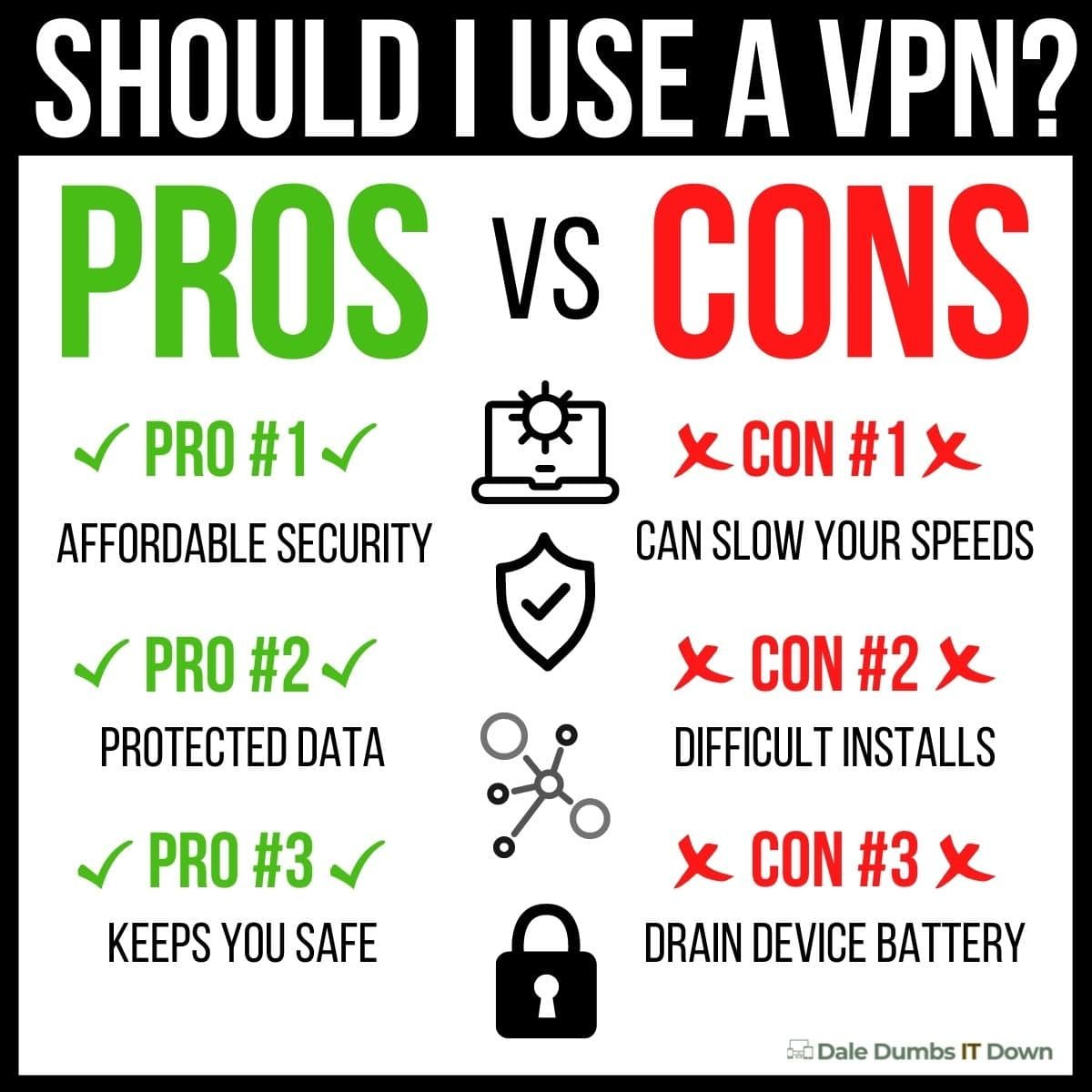
There is a lot of talk out there about VPNs. Should you get one? What are the benefits? I’ve heard they slow down your connections? I’ve heard they are the best protection you can get. Trust me, I’ve heard them all. There’s a lot of noise. Some of it is good noise. And some of it not. We want to set the record straight and talk about the pros and cons of using a VPN.
A VPN, or virtual private network, is a service that creates a secure, encrypted connection between your computer and the VPN provider's servers. This can be useful for many purposes, from safeguarding your internet traffic from prying eyes to accessing region-locked content. However, not all VPNs are created equal, and it's important to understand the pros and cons of using one before deciding whether or not to invest in one. In this blog post, we'll take a look at the pros and cons of using a VPN so that you can make an informed decision about whether or not it's right for you.
What Are The Cons Of Using A VPN?
Before we hit on the good things about VPNs, we want to briefly dive into some of the cons. Some of the negative banter you’ll most likely hear are half-truths. And they're partially true because VPNs are a dime a dozen. There are so many of them out there. There are free ones, paid ones, good ones, and bad ones. Basing a single experience on a single VPN service just doesn’t do the idea of getting a VPN justice. But generally speaking, let’s discuss some of the cons you might experience when dealing with VPNs.
This is true, BUT…it depends on the type of VPN you get. Most of the paid versions (and some of the free) can handle 1 Gbps speed or higher. Most people that experience a slowed connection probably have opted in for a free version.
They’re Difficult To Setup
This was definitely true in the infant stages of VPNs because most people using them were the techy-type and knew their way around this kind of technology. Of course, someone who is an average user of computers and the internet would struggle with new technology. But as more VPNs hit the market, we’re beginning to see companies get really good at customer experience, so the setup and configuration aren’t nearly as bad as it was only a handful of years ago.
VPNs Can Drain Your Battery
This applies mostly to your smartphone devices (and tablets for that matter). A big reason why this is the case is that apps that run continuously on your phone in the background naturally will have the most impact on your device’s battery. Just going off what my iPhone says, my VPN uses about 15-20% of my battery on average. It’s about the 3rd highest app in battery usage as well. And that’s been pretty consistent. But again…apps like Facebook, YouTube, NBA2k Mobile, and even your messaging apps will drain your battery, soooo.
VPN Connections Can Just Poof
This will happen from time to time and I’ve experienced it with a couple of free versions. This is why a kill switch option is a really nice feature to pay attention to. Hotspot Shield has a kill switch and is free. Most of the paid versions have this added benefit as well. Without getting into the complexities of kill switches, the idea behind the kill switch is really simple. Basically, if the VPN connection drops, you can activate a “Kill Switch”, which blocks your device’s access to the internet. It’s nice because this can prevent you from having that device send data outside your secure VPN. It’s a nice feature that most VPNs should have in case the VPN server drops. At any given moment, your secure connection to a VPN server can be interrupted, which in effect can reveal information that was private. Information like your IP address, your location, and some other personal data. You’re going to want a VPN that has an “Always On” option in their settings for a kill switch.
They Give People A False Sense Of Super Security
They are not full-proof protection from cyberattacks, personal data protection, and viruses on the web. Quite honestly, I don’t think I’ve ever come across something that is completely bulletproof from the dangers on the web. But the notion is such that some believe they get a VPN and they’re completely protected from anything nefarious on the web. That’s just not true.
There are seriously so many awesome benefits you get out of using a VPN. Benefits range from increased security, encrypted personal data, hacker protection, escaping data caps on your internet, and so many more. But we wanted to highlight some of the best Pros as to why you should get a VPN.
VPNs Are Affordable Security
This is one of the major perks of using a VPN. Compared to other security measures, VPNs can be significantly more affordable than other security measures. There are a handful of free VPNs out there that make security virtually free. Hotspot Shield and ProtonVPN are a couple of free VPNs you should check out. Even the paid versions are relatively cheap. ExpressVPN’s paid service right now is under $7 a month and Norton VPN is $40 for the whole year with up to 5 devices for protection.
A VPN Protects Your Data
This is such an incredible benefit. VPNs will help protect the data that you send and receive on your devices. Again…it’s not bulletproof (nothing is), but with the encryptions VPN services offer, it definitely makes it harder for hackers. They don’t necessarily work the same way as fully comprehensive anti-virus software, but they will protect you if you have healthy digital hygiene (stay away from phishing websites, don’t download compromised files, etc).
Access Content From Virtually Anywhere
This will depend on how many servers your VPN service offers, but generally speaking if you opt-in for a paid VPN, you’ll be able to access blocked content from anywhere in the world. I remember one time on a long vacation to another country we literally had Netflix blocked the whole time. You could argue that we shouldn’t have been watching Netflix on vacation, but nonetheless…a VPN will allow you to access any streaming service from any country. Furthermore, it’s not just streaming services. You can bypass almost any geoblock. Geoblocking is tech that will restrict your access to the internet and websites based on your geolocation.
Should You Get A VPN?
If you’re someone that regularly uses the internet, buys anything online, or does any kind of banking online, VPNs are a great way to increase your security and privacy. They work by creating an encrypted tunnel between your device and the VPN server, so that no one can see your traffic or track your activities. They’re not perfect protection, but they’re pretty good.
Firewalla Purple is a device that can help you monitor your home network and keep your kids safe while connected online. I usually don't all-in on products with so much fervor, but Firewalla Purple is the best device for monitoring your home network. Period.
Our Quick Thoughts On Firewalla Purple
Pros: A very effective piece of hardware for monitoring your home network. You get incredible support and protection from cyber-attacks. We love that this device is small and you can take it with you on the go. Up to 1 Gbps speed so you won’t notice a lag on your network. Blocks ads. Has safe search. Geo-IP filtering. It is easy to use and easy to install.
Cons: Although we didn’t find installing and using Firewalla Purple to be too complex, we can understand how some entry-level users could experience a little bit of learning fatigue with this piece of hardware. But that’s normal. Most people would avoid this by spending 15-20 minutes to learn and understand how to install Purple properly and leverage all the cool features it has to offer. During the review, we couldn’t find anything of negative value about Firewalla Purple.
Verdict: If you want to get serious about monitoring and protecting your home network, Firewalla Purple should be on your radar (should be in your cart). This clever and innovative device gives you all the visibility, control, and protection that a premium hardware firewall device should.
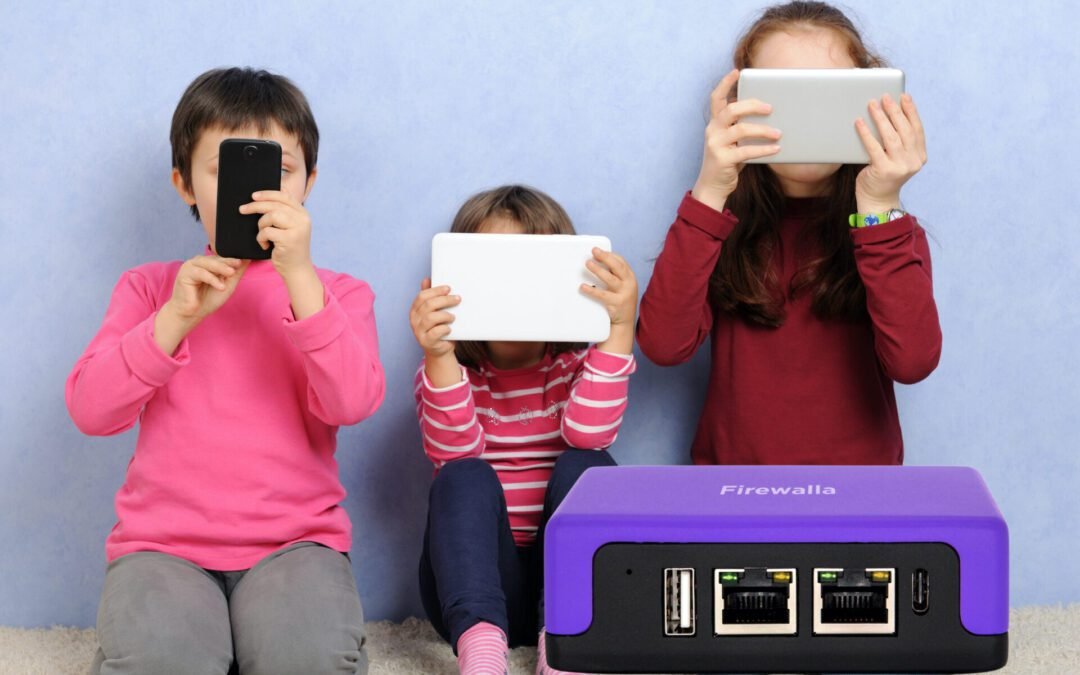
Have you ever been worried about your kids' safety online? Let's be real, if you're like me, it's always on the mind. Here's the problem: As a parent, you want to keep your kids safe while they're online. But it's not always easy to know what they're up to, or if they're being cyber-bullied, or if they're being good digital citizens, and all that nasty stuff they're exposed to. You're also probably a little concerned about what's coming and out of your home through the internet and their devices. What are you supposed to do? Let's talk about Firewalla Purple.
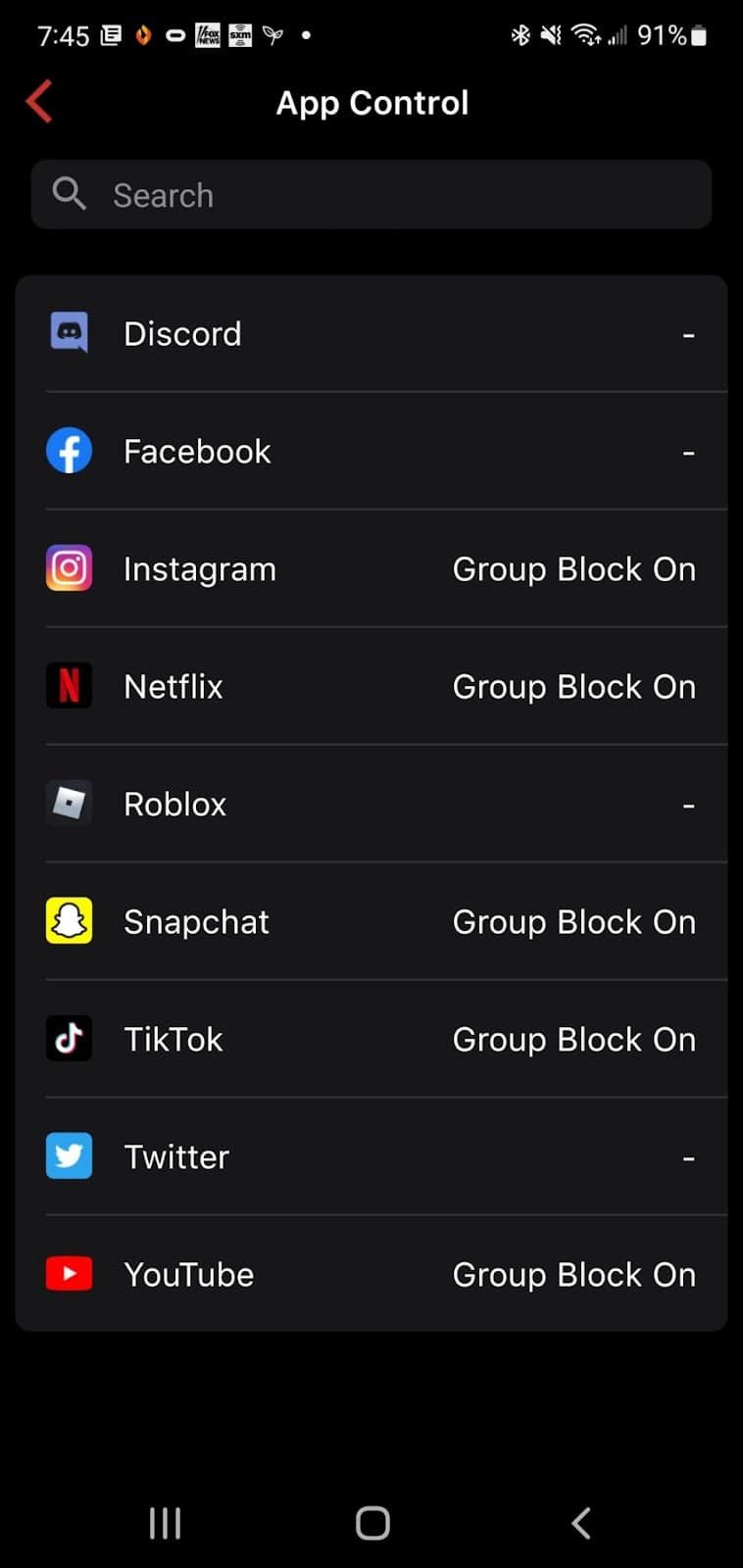
It can help you keep your kids safe while they're online by giving you a real-time view of all the devices on your network. You can see what websites they're visiting, and even block access to certain ones. You can even block specific social media services or block them all, and on top of that you can block them per device, group of devices or all devices.
With Firewalla Purple, you'll have peace of mind knowing that your kids are safe online. You'll be able to see what they're doing and protect them from any harmful content. Plus, it's easy to set up and use, so there's no need to worry about complicated instructions. It's the best device for monitoring your home network, and we wanted to offer a comprehensive review of this really sweet product every home should have.
Firewalla Purple Is The Solution For Monitoring Your Home Network
If you're like most people, you probably don't think too much about your home network security. You might have a firewall installed on your computer, and maybe you've even got a router with some basic security features enabled. Perhaps you have an app to help you as well. But beyond that, you probably don't give it much thought.
That's a mistake. Your home network is vulnerable to attacks from hackers, cyber thieves, and other criminals. Get used to it. These nefarious individuals are a normal occurrence in the digital world and they're never going away. If your data is compromised, the consequences can be disastrous. Identity theft, financial theft, and a list of other problems will greet you in life. And it ain't fun.
Trying to protect your kiddo’s? You can either block porn sites or if by chance they find a new adult site, Firewalla analyzes the site and sends you an alarm right away that tells you “Johnny is watching porn”. In this regard, Firewalla Purple is a proactive monitor for your home network and your family.
Firewalla Purple Features We Love…
Firewalla Purple is the solution for monitoring your home network security. It's a powerful firewall and intrusion detection system that will protect your data and keep you and your family safe online. A few of my favorite features of this new Firewalla launch are that it acts as a firewall, has 1 Gigabit deep packet inspection hardware (that's a lot!), and has content and policy-based routing. Other features worth mentioning is:
Built-in VPN server and VPN Client (for secure browsing and streaming, encrypts your data)
Router and Transparent Bridge Mode (which syncs seamlessly with your existing hardware)
Has 16GB of onboard storage
Is small and compact (easy to travel with) - 9x6x3cm
Some of you won't exactly know what all of this is, but for the geeks out there...you're probably nodding a big "heck yeah". What do these features mean? How do they benefit you (because that's what you really care about)?
Many of you won't know all of that technobabble geek-talk and that's okay. Gigabit deep packet inspection? I hear you! What you care about is how those features are going to benefit you! Here are some of the benefits of the Firewalla Purple that you should be excited about:
Firewalla Purple will keep your devices and data safe from cyberattacks
Firewalla Purple will monitor and control internet usage of every device connected to your network
This cool little hardware device is going to block ads, enhance your ability to be an effective parent in the digital world, and give you the most important and advanced insights into your network. You can geek out on those insights (if you're like me) or make them as simple to understand. Purple does it all. Oh...and NO MONTHLY FEES!
Did we mention that Firewalla Purple has built-in Wi-Fi so you can have all of this protection on the go! Staying in a hotel for a week with the family? Maybe staying at Nana's for the holidays? Perhaps in another country on a work trip? You still get all of these awesome features, benefits, and protection.
Firewalla Purple is the piece of hardware that will make you feel secure knowing your home network is protected. And that's what matters most to me.
How Do I Install Firewalla Purple
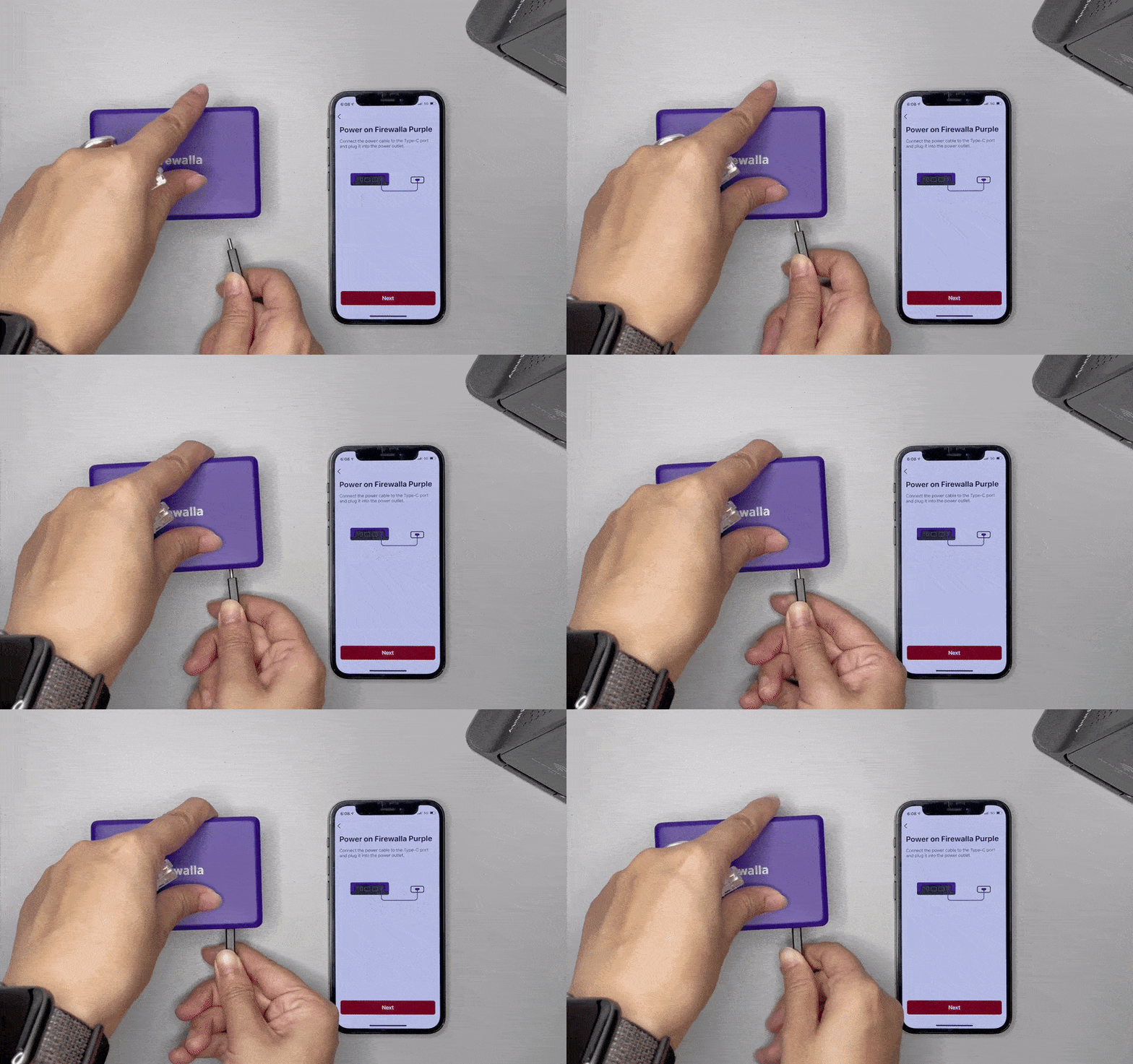
Firewalla has come a long way in making the setup and installation of its products easy. First, you’ll want to download the Firewalla app (it’s supported by Apple and Android), plug in the device to its power source (power code provided ~ sad we have to worry about power supply cords being provided with products nowadays), plug in your connections ethernet cord, and follow the step-by-step setup instructions on the app.
Firewalla Purple Help/Support
For a company that got their start leveraging crowd-funding for their products, their level of Help and Support is phenomenal. I was impressed by the development and innovation of their products, but the way their support has evolved and improved over the years is nothing short of impressive.
Their support services includes a help center, a community (and I have a lot of useful information there), router compatibility look up, install guides, user manuals, app download helps, troubleshooting guides, and your basic contact help support tickets.
Firewalla Warranties
We love brands that stand behind their products. That is a hallmark trait that is important to us. Firewalla’s warranty fulfills on that promise. All Firewalla hardware (Purple included) is backed by a limited one year manufacturer’s warranty. In the scope of hardware devices, a one year warranty is pretty good. Now, this doesn’t mean you can beat the crap out of the device. It is a Limited Warranty under normal use and service. They also have a decent return policy as well (30 days), but if you don’t buy directly from Firewalla (like Amazon, Indiegogo, or another reseller) you will have to follow those store policies on returns and refunds.
If you're a parent with kids who have devices, you need to be monitoring your home network security. If you're not, time to get serious about it. And Firewalla Purple is a great place to start. Firewalla Purple is the solution for monitoring your home network security and it's packed with features that will protect your data and keep your family safe online. With 16GB of onboard storage, this little hardware device is small and compact, and easy to travel with. It also has built-in Wi-Fi so you can have all of this protection on the go! Keep yourself and your family safe online and grab a Firewalla Purple. If you want to…
Keep your devices and data safe from cyberattacks
Monitor and control internet usage of every device connected to your network
Block ads and enhance your ability to be an effective parent in the digital world
Get real-time insights into your network that you can geek-out on or make simple to understand
...Firewalla Purple is going to be your best friend.
As a parent with kids who have devices, you're always worried about their safety online. You want to monitor their internet usage and keep them safe from cyberattacks, but it's hard to do that when you don't know how to use the technology yourself. You feel like you're behind the curve and your kids are always one step ahead of you. At least that's how I feel! I know you feel the same way. They know more about how to use the internet and stay safe than you do. They're pre-wired for this technology. But we're pre-wired in our ability to know that we need to help protect them. Firewalla Purple helps us with those noble intentions. Firewalla Purple is the solution for monitoring your home network security and it's packed with features that will protect your data and keep your family safe online.